EasyManua.ls Logo

Marantz SR7000 - Remote Control Unit RC7000 SR Features; Programmable Learning and Preset Codes; Luminous Buttons and Display; Jog Dial, Macro, and Naming Capabilities

Marantz SR7000
40 pages
Print Icon
To Next Page IconTo Next Page
To Previous Page IconTo Previous Page
Loading...
REMOTE
RC7000SR
MAM
FEATURES
&
PROGRAMMABLE
LEARNING
FUNCTION
Can
easily
be
programmed
to
learn
the
codes
for
almost
any
other
infrared-based
remote,
allowing
the
remote
control
functions
for
many
different
components
to
be
consolidated
conveniently
in
a
single
unit.
»
PRESET
CODES
Function
buttons
already
contain
preset
codes
(using
the
RC-^C-6
remote
control
language)
for
other
remote-controllable
Marahtz
audio-visual
component,
LUMINOUS
BUTTONS
The
remote
controller
uses
luminous
buttons
which
store
light
allowing
it
to
be
used
even
in
the
dark,
«
LARGE.
EASY-TO-READ
DISPLAY
Large
LCD
(liquid
crystal
display)
displays
all
operating
messages
and
other
information
at
a
glance.
«
JOG
DIAL
The
function
selected
by
Jog
Dial
(displayed
on
the
LCD)
can
be
operated
directly
by
the
enter
button.
MACRO
CAPABILITY
Macro
function
allows
the
remote
controller
to
be
programmed
to
execute
complex
strings
of
multiple
commands
using
a
single
keystroke,
NAME
ASSIGNMENT
Allows
one
to
change
the
(displayed
via
the
LCD)
name
for
a
command.
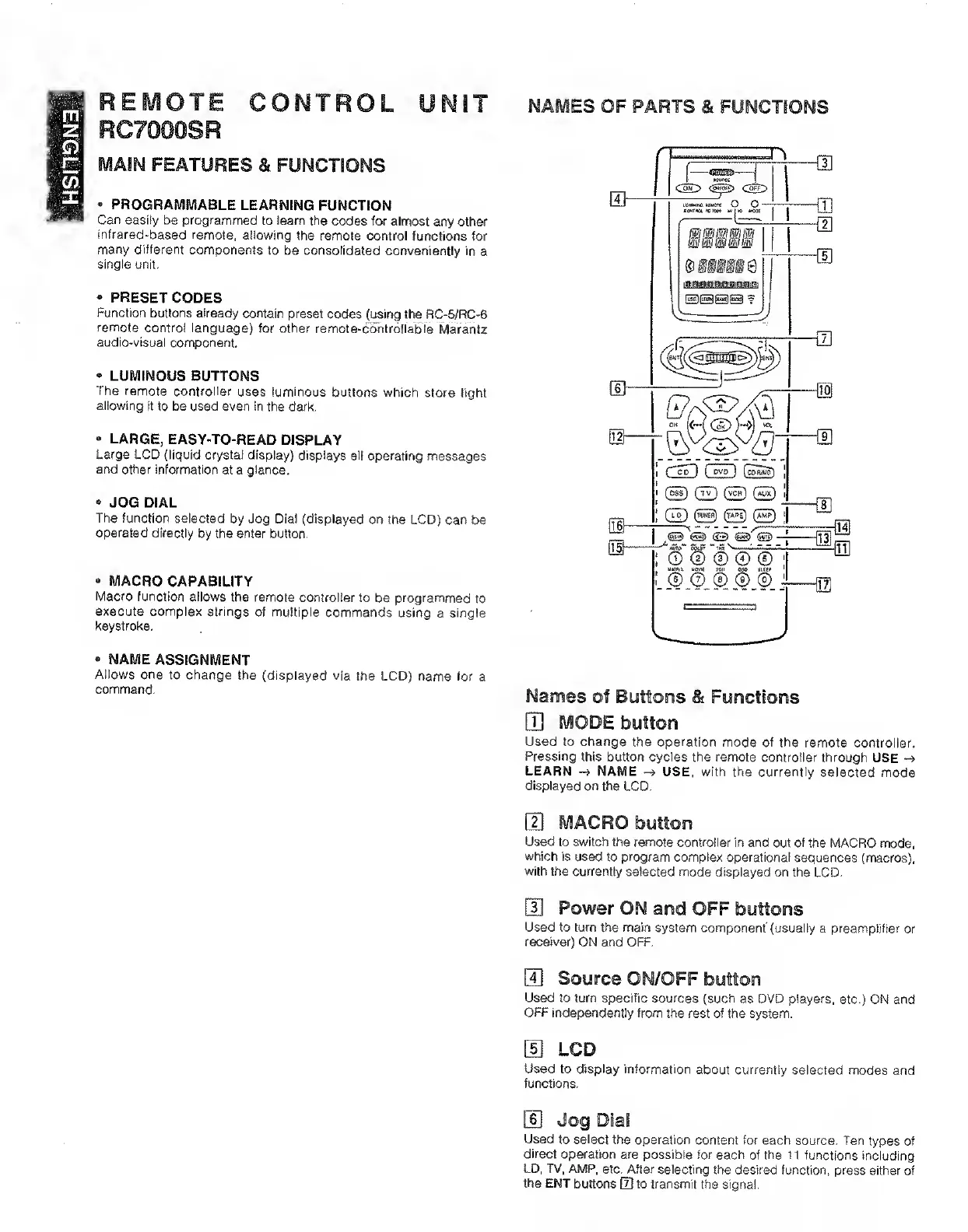
NAMES
OF
PARTS
&
FUNCTIONS
Names
of
Buttons
&
Functions
[H
mode
button
Used
to
change
the
operation
mode
of
the
remote
controller,
Pressing
this
button
cycles
the
remote
controller
through
USE
LEARN
NAME
USE,
with
the
currently
selected
mode
displayed
on
the
LCD.
Used
to
switch
the
remote
controller
in
and
out
of
the
MACRO
mode,
which
is
used
to
program
complex
operational
sequences
(macros),
with
the
currently
selected
mode
displayed
on
the
LCD.
Used
to
turn
the
main
system
component'(usually
a
preamplifier
or
receiver)
ON
and
OFF,
S
Source
ON/OFF
button
Used
to
turn
specific
sources
(such
as
DVD
players,
etc.)
ON
and
OFF
independently
from
the
rest
of
the
system.
LCD
Used
to
display
information
about
currently
selected
modes
and
functions.
Used
to
select
the
operation
content
for
each
source.
Ten
types
of
direct
operation
are
possible
for
each
of
the
11
functions
including
LD,
TV.
AMP,
etc.
After
selecting
the
desired
function,
press
either
of
the
ENT
buttons
[D
to
transmit
the
signal.

Other manuals for Marantz SR7000

Related product manuals