EasyManua.ls Logo

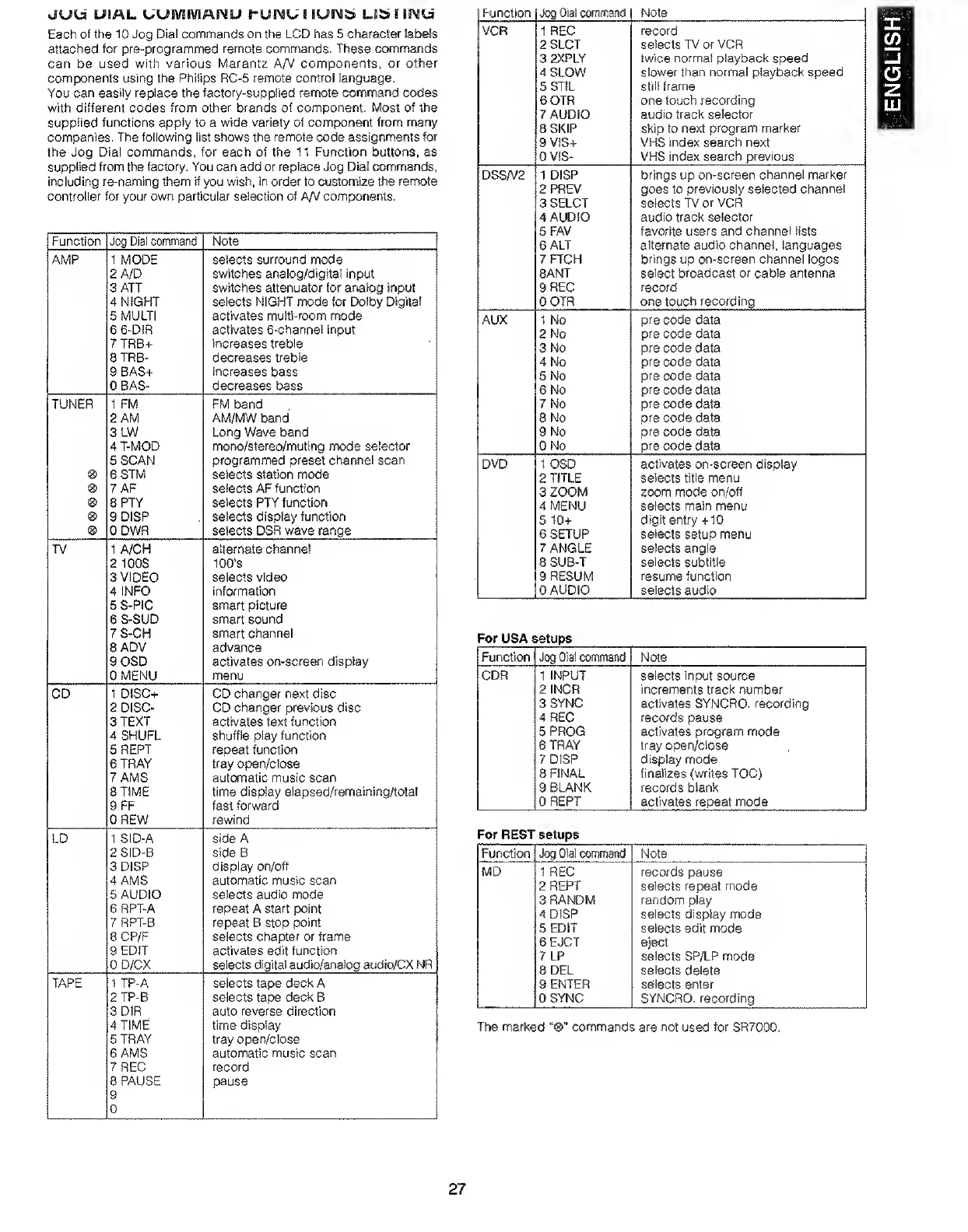
Marantz SR7000 - Jog Dial Command Functions Listing; AMP, VCR, DSS;V2, AUX, DVD Commands; CDR, TV, CD, LD Commands; TAPE, MD Commands

Marantz SR7000
40 pages
Print Icon
To Next Page IconTo Next Page
To Previous Page IconTo Previous Page
Loading...
JUia
UiAL
UUMIVIAIMU
t*UNU
I
lUEM^
Li^
IINU
Each
of
the
10
Jog
Dial
commands
on
the
LCD
has
5
character
labels
attached
for
pre-programmed
remote
commands.
These
commands
can
be
used
with
various
Marantz
A/V
components,
or
other
components
using
the
Philips
RC-5
remote
control
language.
You
can
easily
replace
the
factory-supplied
remote
command
codes
with
different
codes
from
other
brands
of
component.
Most
of
the
supplied
functions
apply
to
a
wide
variety
of
component
from
many
companies.
The
following
list
shows
the
remote
code
assignments
for
the
Jog
Dial
commands,
for
each
of
the
11
Function
buttons,
as
supplied
from
the
factory.
You
can
add
or
replace
Jog
Dial
commands,
including
re-naming
them
if
you
wish,
in
order
to
customize
the
rerwte
controller
for
your
own
particular
selection
of
AA/
com(X>nents.
Function
Jog
Dial
command
Note
AMP
1
MODE
selects
surround
mode
2
A/D
switches
analog/digitai
input
3
ATT
switches
attenuator
for
analog
input
4
NIGHT
selects
NIGHT
mode
for
Dolby
Digital
5
MULTI
activates
multi-room
mode
6
6-DIR
activates
S-channel
input
7TRB+
increases
treble
8TRB-
decreases
treble
9
BAS+
increases
bass
DBAS-
decreases
bass
TUNER
1
FM
FM
band
2
AM
AM/MW
band
3
LW
Long
Wave
band
4
T-MOD
mono/stereo/muting
mode
selector
5
SCAN
programmed
preset
channel
scan
6
STM
selects
station
mode
7
AF
selects
AF
function
8PTY
selects
PTY
function
9
DISP
selects
display
function
ODWR
selects
DSR
wave
range
TV
1
A/CH
alternate
channel
2
100S
100’s
3
VIDEO
selects
video
4
INFO
information
5
S-PiC
smart
picture
6
S-SUD
smart
sound
7S-CH
smart
channel
8
ADV
advance
9
OSD
activates
on-screen
display
OMENU
menu
CD
1
DISC+
CD
changer
next
disc
2
DISC-
CD
changer
previous
disc
3
TEXT
activates
text
function
4
SHUFL
shuffle
play
function
5REPT
repeat
function
6
TRAY
tray
open/ciose
7
AMS
automatic
music
scan
8
TIME
time
display
elapsed/remainingAotal
9FF
fast
forward
0
REW
rewind
LD
1
SID-A
side
A
2SID-B
side
B
3
DISP
display
on/off
4
AMS
automatic
music
scan
5
AUDIO
selects
audio
mode
6
RPT-A
repeat
A
start
point
7
RPT-B
repeat
B
stop
point
8
CP/F
selects
chapter
or
frame
9
EDIT
activates
edit
function
OD/CX
selects
digital
audio/analog
audio/CX
NR
TAPE
1
TP-A
selects
tape
deck
A
2TP-B
selects
tape
deck
B
3
DIR
auto
reverse
direction
4
TIME
time
display
STRAY
tray
open/close
6
AMS
automatic
music
scan
7
REC
record
8
PAUSE
9
0
pause
Function
Jog
Dial
command
Note
VCR
1
REC
record
2SLCT
selects
TV
or
VCR
3
2XPLY
twice
normal
playback
speed
4
SLOW
slower
than
normal
playback
speed
SSTIL
still
frame
6
0TR
one
touch
recording
7
AUDIO
audio
track
selector
8
SKIP
skip
to
next
program
marker
9V1S+
VHS
index
search
next
OVIS-
VHS
index
search
previous
DSSA/2
1
DISP
brings
up
on-screen
channel
marker
2PREV
goes
to
previously
selected
channel
3
SELCT
selects
TV
or
VCR
4
AUDIO
audio
track
selector
5FAV
favorite
users
and
channel
lists
6
ALT
alternate
audio
channel,
languages
7FTCH
brings
up
on-screen
channel
logos
SANT
select
broadcast
or
cable
antenna
9
REC
record
OOTR
one
touch
recording
AUX
1
No
pre
code
data
2
No
pre
code
data
3
No
pre
code
data
4
No
pre
code
data
5
No
pre
code
data
6
No
pre
code
data
7
No
pre
code
data
8
No
pre
code
data
9
No
pre
code
data
ONo
pre
code
data
DVD
1
OSD
activates
on-screen
display
2
TITLE
selects
title
menu
3
ZOOM
zoom
mode
on/off
4
MENU
selects
main
menu
6
10+
digit
entry
+10
6
SETUP
selects
setup
menu
7
ANGLE
selects
angle
8
SUB-T
selects
subtitle
9
RESUM
resume
function
0
AUDIO
selects
audio
For
USA
setups
Function
Jog
Dial
command
Note
CDR
1
INPUT
2
INCR
3
SYNC
4
REC
5
PROG
6
TRAY
7DiSP
8
FINAL
9
BLANK
OREPT
selects
input
source
increments
track
number
activates
SYNCRO.
recording
records
pause
activates
program
mode
tray
open/close
display
mode
finalizes
(writes
TOC)
records
blank
activates
repeat
mode
For
REST
setups
Fur^ction
Jog
Dial
cwnmand
Note
MD
1
REC
2
REPT
3
RANDM
4
DISP
5
EDIT
6EJCT
7
LP
8
DEL
9
ENTER
OSYNC
records
pause
selects
repeat
mode
random
play
selects
display
mode
selects
edit
mode
eject
selects
SP/LP
mode
selects
delete
selects
enter
SYNCRO.
recording
TTie
marked
“®"
commands
are
not
used
for
SR7000.
27
ENGLISH

Other manuals for Marantz SR7000

Related product manuals