EasyManua.ls Logo

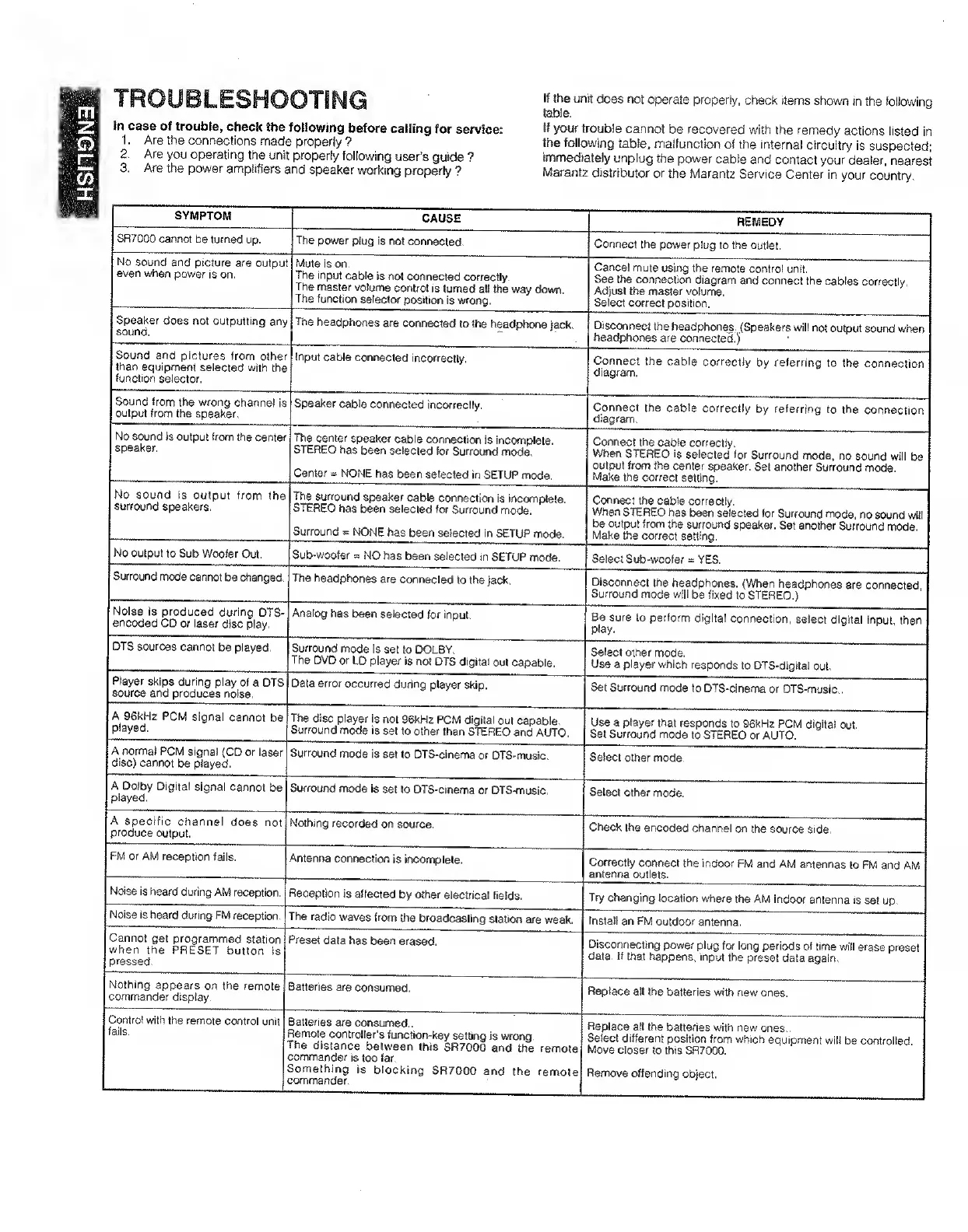
Marantz SR7000 - Troubleshooting Common Issues; Power and Sound Output Troubleshooting; Speaker and Signal Troubleshooting; Noise, Reception, and Remote Issues

Marantz SR7000
40 pages
Print Icon
To Next Page IconTo Next Page
To Previous Page IconTo Previous Page
Loading...
ENGLISH
TROUBLESHOOT!
}n
case
of
trouble,
check
the
following
before
calling
for
service:
1,
Are
the
connections
made
properly
?
2,
Are
you
operating
the
unit
properly
following
user's
guide
?
3,
Are
the
power
amplifiers
and
speaker
working
properly
?
If
the
unit
does
not
operate
properly,
check
items
shown
in
the
following
t^ie.
If
your
trouble
cannot
be
recovered
with
the
remedy
actions
listed
in
the
following
table,
malfunction
of
the
internal
circuitry
is
suspected;
immediately
unplug
the
power
cable
and
contact
your
dealer,
nearest
Marantz
distributor
or
the
Marantz
Service
Center
in
your
country.
SYMPTOM
SR7000
cannot
be
turned
up.
No
sound
and
picture
are
output
even
when
power
is
on.
Speaker
does
not
outputting
any
sound.
Sound
and
pictures
from
other
than
equipment
selected
with
the
function
selector.
Sound
from
the
wrong
channel
is
output
from
the
speaker,
No
sound
is
output
from
the
center
speaker.
The
power
plug
is
not
connected.
Mute
is
on.
The
input
cable
is
not
connected
correctly.
The
master
volume
cwrtrol
is
turned
all
tiie
way
down.
The
function
selector
position
is
wrong.
The
headphones
are
connected
to
ttie
headphone
jack.
Input
cable
connected
incorrectly.
REMEDY
CcMinect
the
power
plug
to
the
outlet.
Cancel
mute
using
the
remote
control
unit.
See
the
connection
diagram
and
connect
the
cables
correctly.
Adjust
the
master
volume.
Select
correct
position.
Disconnect
the
headphones,
(Speakers
will
not
output
sound
when
headphones
are
connected,)
Connect
the
cable
correctly
by
referring
to
the
connection
diagram.
No
sound
is
output
from
the
surround
speakers.
No
output
to
Sub
Woofer
Out.
Surround
mode
cannot
be
changed,
Noise
is
produced
during
DTS-
encoded
CD
or
laser
disc
play.
DTS
sources
cannot
be
played.
Speaker
cable
connected
incwrectly.
The
center
speaker
cable
connection
is
incomplete.
STEREO
has
been
selected
for
Surround
mode.
Center
=
NONE
has
been
selected
in
SETUP
mode
The
surround
speaker
cable
connection
is
incomplete.
STEREO
has
been
selected
for
Surround
mode.
Surround
=
NONE
has
been
selected
in
SETUP
mode.
Sub-woofer»
NO
has
been
selected
in
SETUP
mode.
Select
Sub-woofer
=
YES.
The
headphones
are
connected
to
the
jack.
Connect
the
cable
correctly
by
referring
to
the
connection
diagram.
Connect
the
cable
correctly.
When
STEREO
is
selected
for
Surround
mode,
no
sound
will
be
output
from
the
center
speaker.
Set
another
Surround
mode.
Make
the
correct
setting.
Connect
the
cable
correctly.
When
STEREO
has
been
selected
for
Surround
mode,
no
sound
wiil
be
output
from
the
surround
speaker.
Set
another
Surround
mode.
Make
the
correct
setting.
Analog
has
been
selected
for
input.
Player
skips
during
play
of
a
DTS
source
and
produces
noise.
A
96kHz
PCM
signal
cannot
be
played.
A
norma)
PCM
signal
(CD
or
laser
disc)
cannot
be
played.
A
Dolby
Digital
signal
cannot
be
played.
A
specific
channel
does
not
produce
output.
FM
or
AM
reception
fails.
Noise
is
heard
during
AM
reception.
Noise
is
heard
during
FM
reception.
Cannot
get
programmed
station
when
the
PRESET
button
is
pressed.
Nothing
appears
on
the
remote
commander
display.
Control
with
the
remote
control
unit
fails.
Surround
mode
Is
set
to
DOLBY.
The
DVD
or
LD
player
is
not
DTS
digital
out
capable.
Data
error
occurred
during
player
skip.
The
disc
player
is
not
9^H2
PCM
digital
out
capable
Surround
mode
is
set
to
other
than
STEREO
and
AUTO,
Surround
mode
is
set
to
DTS-cinema
or
DTS-music.
Surround
mode
is
set
to
DTS-cinema
or
DTS-music,
Nothing
recorded
on
source.
Antenna
connecliwi
is
incomplete.
Reception
is
affected
by
other
electrical
fields.
The
radio
waves
frcwn
the
broadcasting
station
are
weak.
Preset
data
has
been
erased.
Batteries
are
consumed.
Batteries
are
consumed..
Remote
controller's
function-key
setting
is
wrong.
The
distance
between
this
SR7000
and
the
remote
commander
is
too
far.
Something
is
blocking
SR7000
and
the
remote
commander.
Disconnect
the
headphones.
(When
headphones
are
connected
Surround
mode
will
be
fixed
to
STEREO.)
Be
sure
to
perform
digital
connection,
select
digital
input,
then
play.
Select
other
mode.
Use
a
player
which
responds
to
DTS-dlgltal
out.
Set
Surround
mode
to
DTS-cinema
or
DTS-music,.
Use
a
player
that
responds
to
96kH2
PCM
digital
out.
Set
Surround
mode
to
STEREO
or
AUTO.
Select
other
mode.
Select
other
mode.
Check
the
encoded
channel
on
the
source
side,
Correctly
connect
the
indoor
FM
and
AM
antennas
to
FM
and
AM
antenna
outlets.
Try
changing
location
where
the
AM
indoor
antenna
is
set
up.
Install
an
FM
outdoor
antenna.
Disconnecting
power
plug
for
long
periods
of
time
will
erase
preset
data.
If
that
happens,
input
the
preset
data
again.
Replace
ali
the
batteries
with
new
ones.
Replace
all
the
batteries
with
new
ones..
Select
different
position
from
which
equipment
will
be
controlied.
Move
closer
to
this
SR7000,
Remove
offending
object.

Other manuals for Marantz SR7000

Related product manuals