10
ENGLISH
REAR PANEL
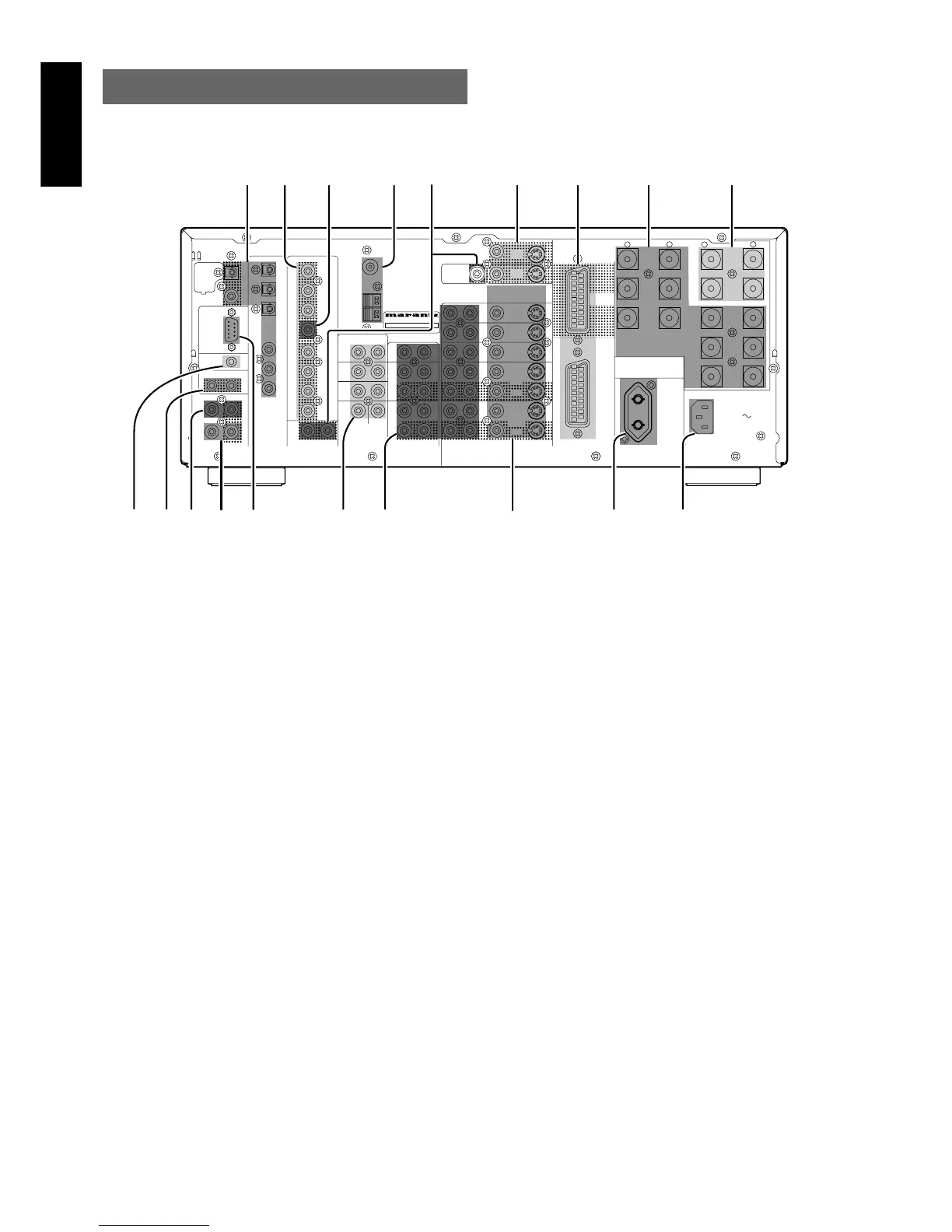
b Multiroom Outputs (Audio L&R, Video)
These are the audio and video output jacks for the remote zone (Multi Room).
Connect these jacks to the optional audio power amplifiers or video
display devices to view and listen to the source selected by the
mulitroom system in a remote room.
n MONITOR OUT
There are 2 monitor outputs and each one includes both composite
video and S-video configurations. When connecting two video
monitors or televisions, be aware that the OSD interface can be used
with both MONITOR OUT.
m SCART INPUT/OUTPUT
If your DVD player or other device has SCART connectors,
be sure to connect it to this SCART IN connector on the
SR8300. and connect TV’s SCART terminal to MONITOR
OUT(SCART) on the SR8300.
By sending the pure DVD SCART video signal directly, the DVD
signal forgoes the extra processing that normally would degrade the
image. The result is vastly increased image quality, with incredibly
lifelike colors and crisp detail.
, Speaker outputs terminals (for Main room)
Six terminals are provided for the front left, front right, front center,
surround left, surround right and surround back (LEFT) speakers.
. Speaker outputs terminals (for Multi room)
Two terminals are provided for the left and right speakers for
Multiroom(2
nd
zone)
Notes:
• Connect the these jacks to the matching + or – terminals on your
speakers. When making speaker connections, always make certain
to maintain correct polarity by connecting the red (+) terminals on
the SR8300 to the red terminals on the speaker and the black (–)
terminals on the SR8300 to the black terminals on the speakers.
z DIGITAL INPUT (Dig.1 - 6) / OUTPUT
(coaxial, optical)
These are the digital audio inputs and outputs. There are 3 digital
inputs with coaxial jacks, 3 with optical jacks.
The inputs accept digital audio signals from a compact disc, LD, DVD,
or other digital source component.
For digital output, there is 1 coaxial output and 1 optical output.
The digital outputs can be connected to MD recorders, CD recorders,
DAT decks, or other similar components.
x Preamp Outputs (L, R, SL, SR, SBL,
SBR, C)
Jacks for L(front left),R(front right), C(Center), SL(surround left),
SR(surround right),SBL(surround back left)and SR(surround back
right).
Use these jacks for connection to some external power amplifiers.
c Subwoofer Output
Connect this jack to the line level input of a powered subwoofer. If an
external subwoofer amplifier is used, connect this jack to the
subwoofer amplifier input. If you are using two subwoofers, either
powered or with a 2 channel subwoofer amplifier, connect a “Y”
connector to the subwoofer output jack and run one cable from it to
each subwoofer amplifier.
v FM antenna terminal (75 ohms)
Connect an external FM antenna with a coaxial cable, or a cable
network FM source.
AM antenna and ground terminals
Connect the supplied AM loop antenna. Use the terminals marked
“AM” and “GND”. The supplied AM loop antenna will provide good
AM reception in most areas. Position the loop antenna until you hear
the best
RC
MULTI
OUT
EXT. IR
OPT
COAX
DIGITAL-OUT
AC IN
OUTIN
SBR
DVD-R
VCR2/
SBL
1
ROOM
MULTI
ROOM
MULTI
RL
SW
LEFT
DC OUT 2
OUT
MULTI VIDEO
ANTENNA
BACK
SURR.
CENTER
C
SR
SL
R
L
OUT
MULTI
RS232C
DC OUT 1
RIGHT
LEFT
CENTER
BACK
SURR.
RIGHT
LEFT
FRONT
LEFT
–
+
SURR.
FRONT
SURR.
RIGHT
DIGITAL-IN
6
5
4
3
2
FRONT
SURR.
7.1CH-IN
R
AM
GND
OUT
OUT
S-VIDEOVIDEO
VCR1
AUDIO
IN
MONI.
1
L
/MD
CD-R
IN
OUT
CD
IN
DVD
L
TAPE
OUT
PRE OUT
IN
SUB.W
R
TV
MONI.
2
LR
DSS
–
+
RC-5
GND
MODEL NO.SR8300
100W
UNSWITCHED
AC OUTLETS
230V 50HZ
DVD IN
SCART/
OUT
MONITOR
6-8 OHMS
SPEAKER SYSTEMS
cvbxz n , .
⁄0⁄5 ⁄4 ⁄3 ⁄2 ⁄1⁄6
⁄7⁄8⁄9
m


 To Next Page