6
ENGLISH
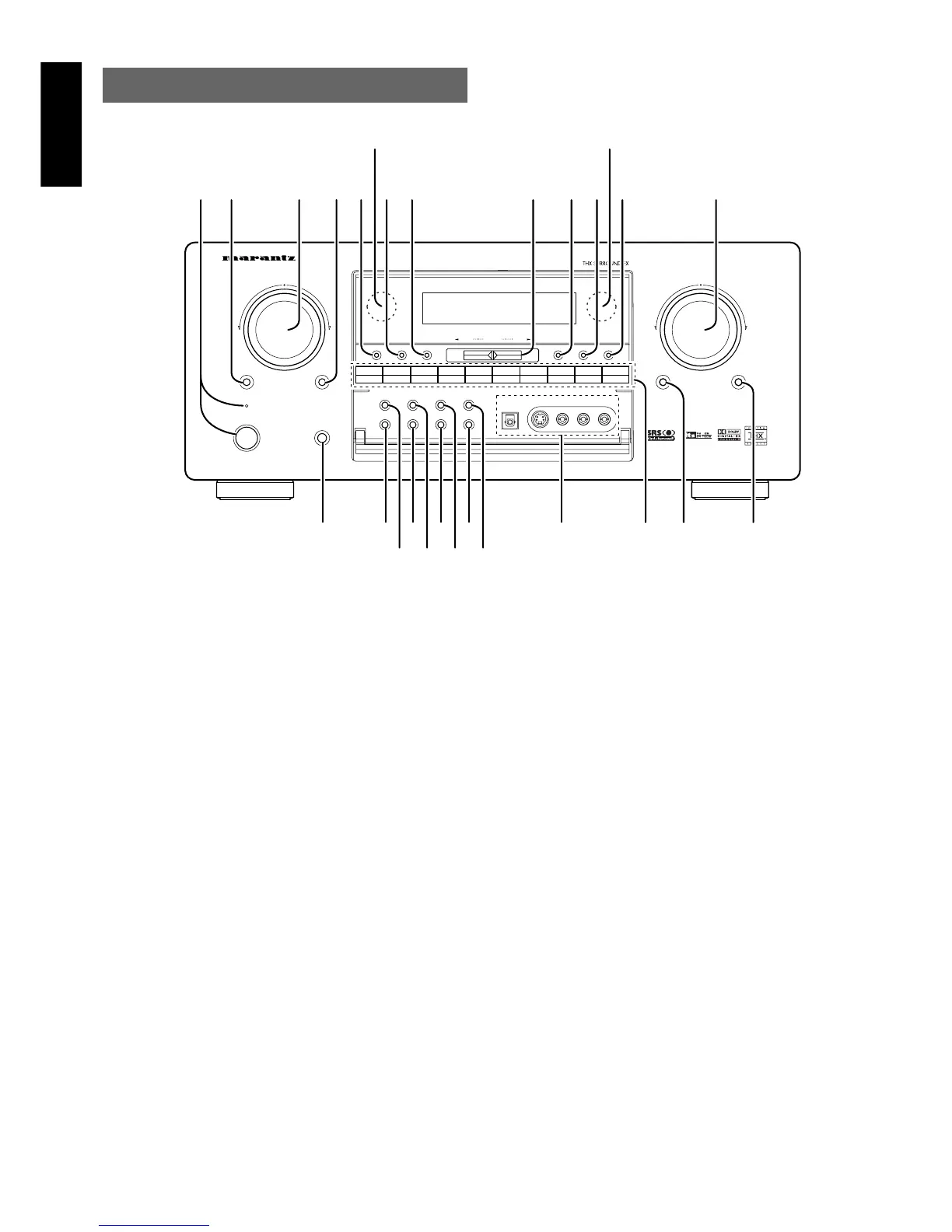
FRONT PANEL
u MEMO (memory) button
Press this button to enter the tuner preset memory numbers or station
names.
i TUNING UP / DOWN buttons
Press thses buttons to change the frequency or the preset number.
o F/P (FREQUENCY / PRESET) button
During reception of AM (MW/LW) or FM, you can change the function
of the UP/DOWN buttons for scanning frequencies or selecting preset
stations by pressing these buttons.
!0 T-MODE button
Press this button to select the auto stereo mode or mono mode when
the FM band is selected.
The “AUTO” indicator lights in the auto stereo mode.
!1 P.SCAN (preset scan) button
This button is used to scan preset stations automatically.
When pressed, the tuner starts scanning the all preset stations. Press
again to cancel the P-SCAN.
!2 VOLUME control knob
Adjusts the overall sound level. Turning the control clockwise
increases the sound level.
!3 ATT (Attenuate) button
If the selected analog audio input signal is greater than the capable
level of internal processing, PEAK indicator will light. If this happens,
you should press the ATT button. “ATT” is displayed when this
function is activated.
The signal-input level is reduced by about the half. Attenuation will not
work with the output signal of “REC OUT” (TAPE, CD-R/MD, VCR1
and VCR2 output). This function is memorized for each input function.
AV SURROUND RECEIVER SR8300
POWER ON/OFF
STANDBY
VOLUME
UPDOWN
PHONES
SELECT MUTE ATTENTER
SELECTOR
NIGHT
7.1CH-IN DSS TAPE CD-R TUNERCDDVD TV VCR 1 VCR2/DVD-R
MULTI-SPK
MULTI ROOM
AUX1S-DIRECT
AUX2A/D
SLEEP
T-MODE
TUNINGDOWN UP
P-SCANF/P
AUX1 INPUT
R
AUDIO
L
VIDEO
S-VIDEO
DIGITAL
MEMO
CLEARDISPLAY
R
@5 @4
@3
!6 !4!5 !3
@2 @0 !8
@1 !9
!2!1!0oiuytrewq
!7
@7@6
q POWER switch and STANDBY indicator
You can turn on and off the unit’s power using the front panel power
switch.
However, if you turn the unit off with the front panel switch, the unit
goes completely off rather than to the “standby mode” (Red LED
indicator light glows in the standby mode).
The unit cannot be turned on with the remote control when it is not in
the standby mode. When the red LED is on, the unit can be turned on
via the remote control or by pressing any input selector button on the
front panel.
w SELECT (MULTI FUNCTION MODE
SELECT) button
Press this button to change the mode for MULTI FUNCTION control
dial.
e SURROUND MODE Selector & MULTI
FUNCTION control dial
This dial changes surround mode sequentially or select contents of
OSD menu system.
r ENTER (MULTI FUNCTION ENTER)
button
Press this button to enter the setup by MULTI FUNCTION dial.
t DISPLAY mode button
When this button is pressed, the FL display mode is changed as
NORMAL → Auto Off → Off and the display off indicator(DISP) lights
up in condition of DISPLAY OFF.
y CLEAR button
Press this button to cancel the station-memory setting mode or preset
scan tuning.


 To Next Page