31
ENGLISH
SETUP
After all components are connected, initial setup must be performed.
ON SCREEN DISPLAY MENU SYSTEM
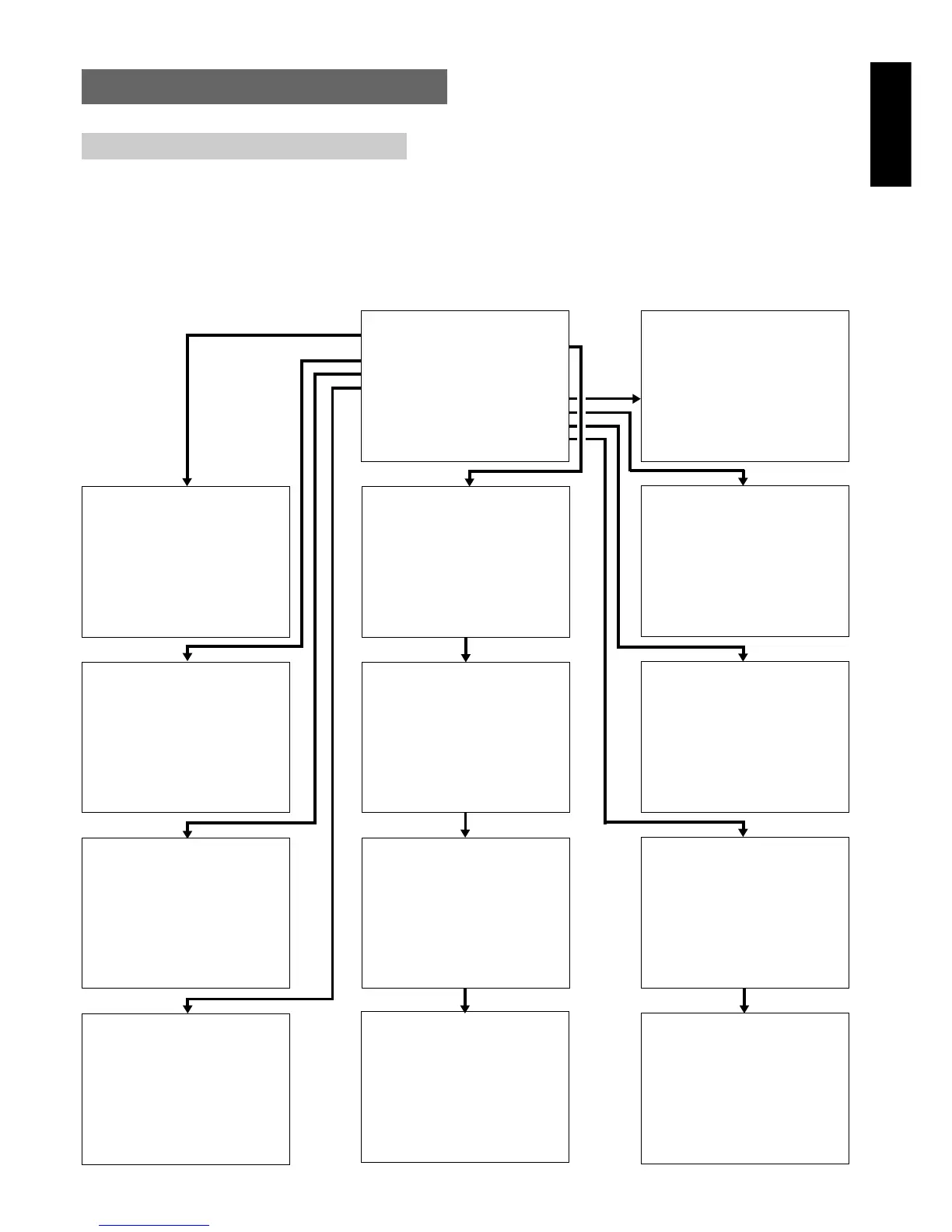
The SR8300 incorporates an on-screen menu system, which makes
various operations possible by using the cursor (Up, Down, Left,
Right) and OK buttons on the remote control unit.
Notes:
• To view the on-screen displays, make certain you have made a
connection from the Monitor Out jack (VIDEO, S-VIDEO or
SCART)on the rear panel to the composite,S-Video or
component input of your TV or projector. (see 26 page)
• In order to view the SR8300’s displays, the correct video source
must be selected on the video display.
1.
Select the AMP mode in remote commander.
2.
Press M (menu) button on the remote commander to display the
“MAIN SETUP MENU” of the OSD menu system. There are 8
items in the MAIN SETUP MENU.
3.
Select a desired sub-menu with Up or Down cursor button, and
press the OK button to entry.
The display will change to selected sub-menu.
You can lock the condition of setup to each sub-menu with Left or
Right cursor buttons.
Notes: If you desire to adjust any sub-menu, you need to set
UNLOCKED.
4.
If you desire to exit from this menu system, press Ex(exit) button
or move the cursor to EXIT and press the OK button.
MA I N SE TUP MENU
1 ) I NPUT SETUP : UNLOCKED
2 ) SPEAKER SETUP : UNLOCKED
3 ) PREFERENCE : UNLOCKED
4 ) SURROUND : UNLOCKED
5)PRO LOGIC II : UNLOCKED
6)CS II : UNLOCKED
7 )MULT I ROOM : UNLOCKED
8 ) 7 . 1 CH I N : UNLOCKED
9 ) DC - TR I G SETUP : UNLOCKED
EX I T
1INPUTSETUP
CD : D6 - AT TV : ANA
TAPE :ANA DSS :D3-AT
CD- R : D1 - AT DVD : D5 - AT
VCR1 : ANA
VCR2 : ANA
AUX1 :D -AT
MA I N EX I T
2-1 SPEAKERS SIZE
THX SPKR SYSTEM : YES
SUBWOOFER : YES
FRONT L /R : SMALL
CENTER : SMALL
SURROUND L / R : SMALL
SURR . BACK : 1CH
SURR . BACK S I ZE : SMALL
MA I N NEX T EX I T
2 - 2 SPEAKERS D I STANCE
FRONT L : 10 f t 3 .0 m
FRONT R : 10 f t 3. 0 m
CENTER : 10 f t 3 . 0 m
SURR . L : 1 0 f t 3 . 0 m
SURR . R : 10 f t 3 . 0 m
SUB W : 10 f t 3 . 0 m
SURR . BACK : 1 0 f t 3 . 0 m
MA I N RETURN NEXT EX I T
2 - 3 SPEAKERS LEVEL
TEST MODE : MANUAL
FRONT L : 0 dB
CENTER : 0 dB
FRONT R : 0 dB
SURR . R : 0 dB
SURR . BACK : 0 dB
SURR . L : 0 dB
SUB W : 0 dB
MA I N RETURN NEXT EX I T
3 PREFERENCE
TV - AUTO : D I SABLE
OSD I NFO : ENABLE
D IG I TAL OUT : SOURCE
SUBWOOFER OUT : THX
MA I N EX I T
4 SURROUND
SURR . MODE : AUTO
C I NEMA RE - EQ : OFF
LFE LEVEL : 0 dB
SURR L /R EFFECT :
∗∗
∗∗
∗
∗∗
∗∗
∗
∗∗
∗∗
∗ dB
SURR BACK EFFECT :
∗∗
∗∗
∗
∗∗
∗∗
∗
∗∗
∗∗
∗ dB
CENTER EFFECT :
∗∗
∗∗
∗
∗∗
∗∗
∗
∗∗
∗∗
∗ dB
SUB W EFFECT :
∗∗
∗∗
∗
∗∗
∗∗
∗
∗∗
∗∗
∗ dB
MA I N EX I T
5PLII -MUS I C PARAMETER
PARAMETER : DEFAULT
PANORAMA : OFF
DIMENSION : 4
CENTER WI DTH : 0
MA I N EX I T
2 - 4 BASS PEAK LEVEL
BASS PEAK TEST : START
VOLUME LEVEL : +18dB
--------------------
ENTER
MA I N RE T URN E X I T
7MULTI ROOM
MUL T I ROOM : OF F
MUL T I SPKR : OF F
V I DEO : DVD
AUD I O : DVD
VOLUME SETUP : VAR I ABLE
VOLUME LEVEL : - 90 dB
SLEEP T IMER : OFF
- ---MAIN-ROOM STATUS----
V I DEO: DVD AUD I O: DVD
MA I N EX I T
9-2 DC TRIGGER SETUP
DC TR I G- 2 : D I SABLE
CD : OFF TV : OFF
TAPE : OFF DSS : OFF
CD - R : OFF DVD : OFF
TUNER: OFF VCR1 : OFF
AUX1 : OFF VCR2 : OFF
AUX2 : OFF LD : OFF
MA I N RE T URN E X I T
9-1 DC TRIGGER SETUP
DC TR I G- 1 : D I SABLE
CD : OFF TV : OFF
TAPE : OFF DSS : OFF
CD - R : OFF DVD : OFF
TUNER: OFF VCR1 : OFF
AUX1 : OFF VCR2 : OFF
AUX2 : OFF LD : OFF
MAI N NEXT EX I T
8 7 . 1 CH I NPUT LEVEL
FRONT L : 0 dB
CENTER : 0 dB
FRONT R : 0 dB
SURR . R : 0 dB
SURR . B R : 0 dB
SURR . B L : 0 dB
SURR . L : 0 dB
SUB W : 0 dB
MA I N E X I T
6CSII PARAMETER
TRUBASS : 0
SRS D I ALOG : 0
MA I N E X I T


 To Next Page