15
ENGLISH
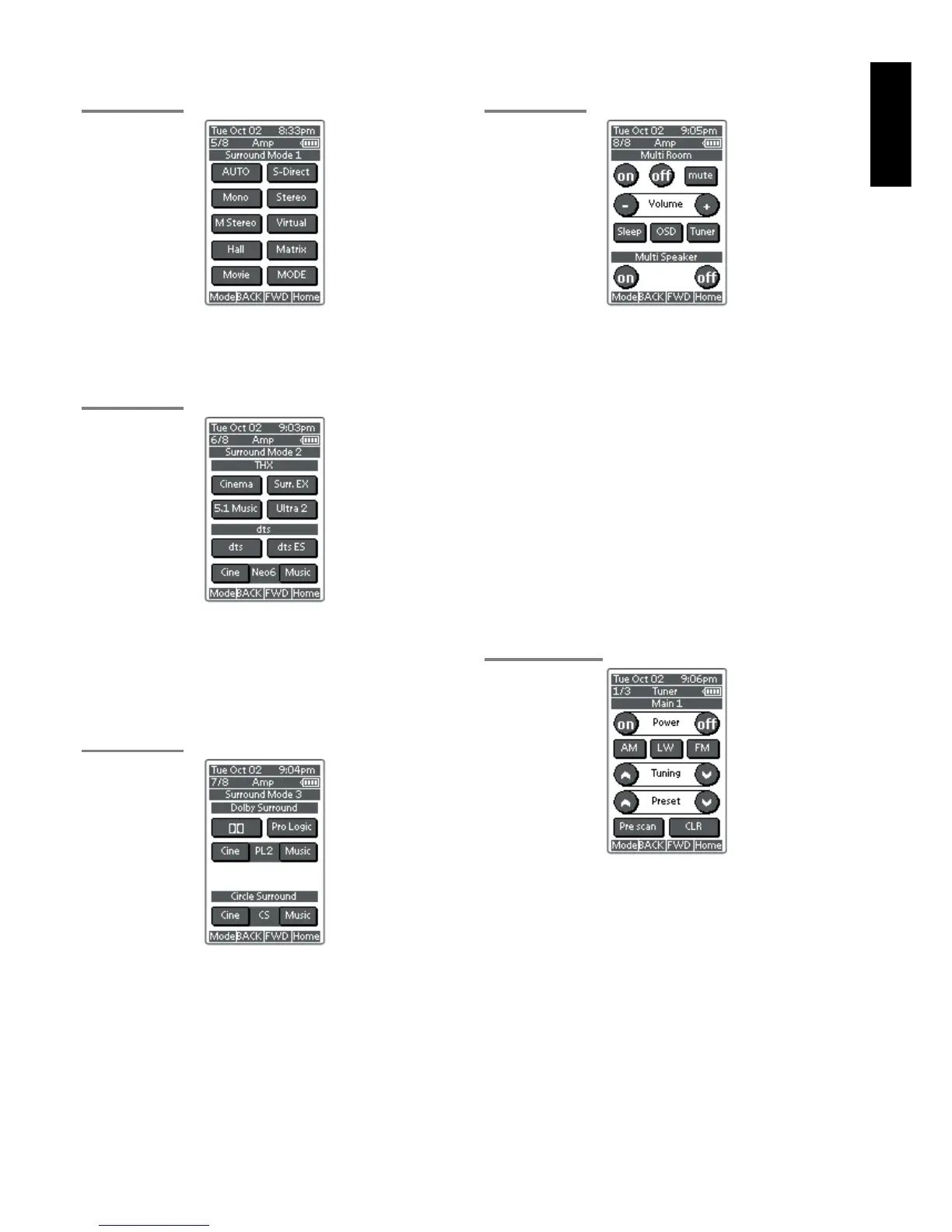
SURROUND MODE 1
AMP PAGE 5/8
AUTO, S-DIRECT, Mono, Stereo, M-Stereo(Multi channel stereo),
Virtual, hall, matrix, Movie.
These buttons are used to select surround mode.(see page 39, 40)
SURROUND MODE 2
AMP PAGE 6/8
THX
CINEMA, Surr.EX(THX Surround EX) and 5.1 Music
These buttons are used to select THX mode. (see page 39)
DTS
dts, dts-ES, Neo6-cinema and Neo6-music
These buttons are used to select DTS mode. (see page 39)
SURROUND MODE 3
AMP PAGE 7/8
DOLBY SURROUND
DD and PL(Pro Logic), PL2-movie, PL2-music
These buttons are used to select Dolby Surround mode. (see page 39)
Circle Surround
CSII-cinema and CSII-music
These buttons are used to select SRS Circle Surround mode. (see
page 40)
Note:
• Use MODE button (AMP page 5/8) to select CSII-Mono.
MULTI ROOM
AMP PAGE 8/8
On/Off
These buttons are used to switch the unit to multi room mode.
Volume + and –
These buttons are used to adjust the sound level to multiroom system.
Mute
This button is used to mute the sound to multi room system
temporarily.
Sleep
This button is used to set the sleep timer to multi room system.
Tuner
This button is to jump to TUNER's screen in this remote control unit.
OSD button
This button is used to turn on the On Screen Display for general
information.
Multi room speaker On and Off
These buttons are used to switch the unit to multi room speaker mode.
Note:
See page 50 to detail of Multi Room system.
TUNER
TUNER PAGE 1/3
Power On and Off buttons
These buttons are used to turn on or off SR8300
AM, LW, FM buttons
These buttons are used to switch between FM, AM, and LW mode of
the tuner.
Tuning (^ :up / v : down ) buttons
These buttons are used to change the frequency.
Preset (^ :up / v : down ) buttons
These buttons are used to change the preset station.
Preset Scan button
This button is used to start a scan automatically through the stations
preset into the receiver's memory.
CLR (Clear) button
This button is used to cancel certain memory or programming of tuner
operations.


 To Next Page