MT850 User’s Manual V1.3
19
Chapter 1 Interface
BT HID
Getting Connected
1. Press the scan button to power up the scanner.
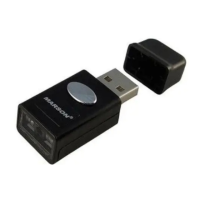
2. Scan “Disconnect”, the scanner will emit two beeps. Alternatively you may press and hold
function for 5 seconds until two beeps.
3. Scan “BT HID”, the scanner will emit two beeps.
4. Select “Wireless Scanner” from discovered device list.
5. If Bluetooth application prompts you to enter a pincode, please follow the steps in Pincode
Setup section.
6. The scanner will emit two beeps as indication that the Bluetooth connection has established
successfully.
7. While conneted with the scanner as physical keyboard, the touch keyboard on iOS/Android
device might disappear. To resolve this issue please do the following:
(1) For iOS device, simply press the function button once.
(2) For Android device, go to “Settings” > “Language & Input”, tap on “Default keyboard” and
turn off “Physical keyboard” or turn on “On-screen keyboard”.



 To Next Page