a) Disconnect any test leads from external devices.
b) Press the key to select thermocouple and RTD/Ω mode, if not already
selected. If thermocouple mode is displayed, press the key again to cycle to RTD/Ω
mode.
c) If output mode is displayed, select input mode by pressing the and
keys.
d) Press the key to select the desired RTD type, the custom curve, the SPRT, or
the desired ohms range. The set up and use of custom RTD coefficients is described
in section 4.5. The set up and use of SPRT coefficients is described in section 4.6.
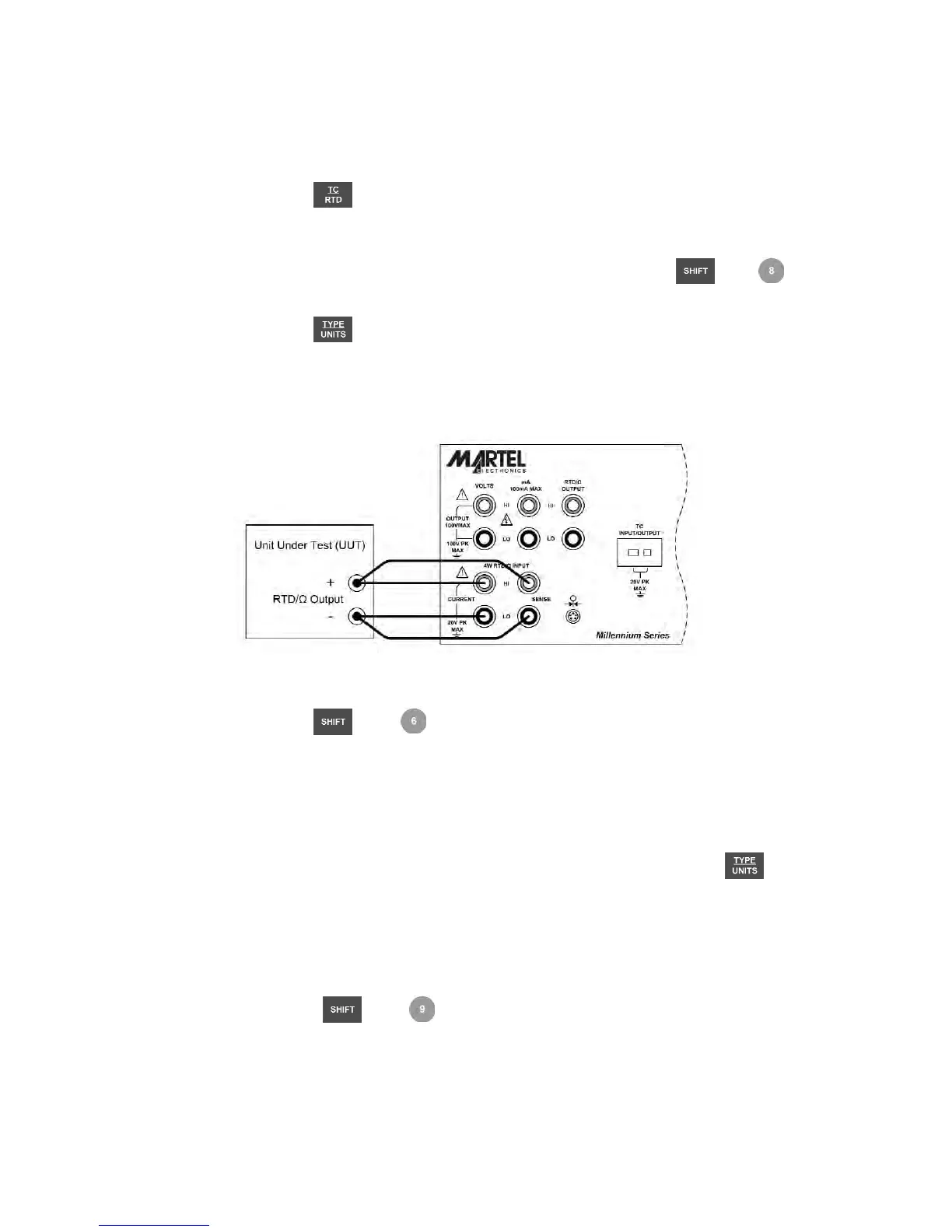
e) Connect the unit under test to the 4 wire RTD/Ω input terminals of the 3001 as shown
in figure 12.
Figure 12 - RTD/Ω Input Connection
f) Press the and keys to toggle the RTD display between °F and °C.
g) For best accuracy, it is advisable to zero the RTD resistance circuit(s) daily, or if the
3001 is being used outside of the ambient temperature range of 18 to 28 °C. The
maximum offset from unit calibration that can be zeroed out is ±0.1 ohm for the high
range and ±0.01 ohm for the low range.
To zero a RTD resistance circuit:
• Select the RTD measure function as described above, and press the key
until the low or high ohms range is selected.
• Short the RTD/Ω terminals with the test leads normally used for RTD/Ω
measurements.
• Allow at least 3 minutes for the test leads and terminals to stabilize to the same
temperature.
• Press the and keys to zero the ohms range.
17


 To Next Page