2.3 Primary Input/Output Display and Controls
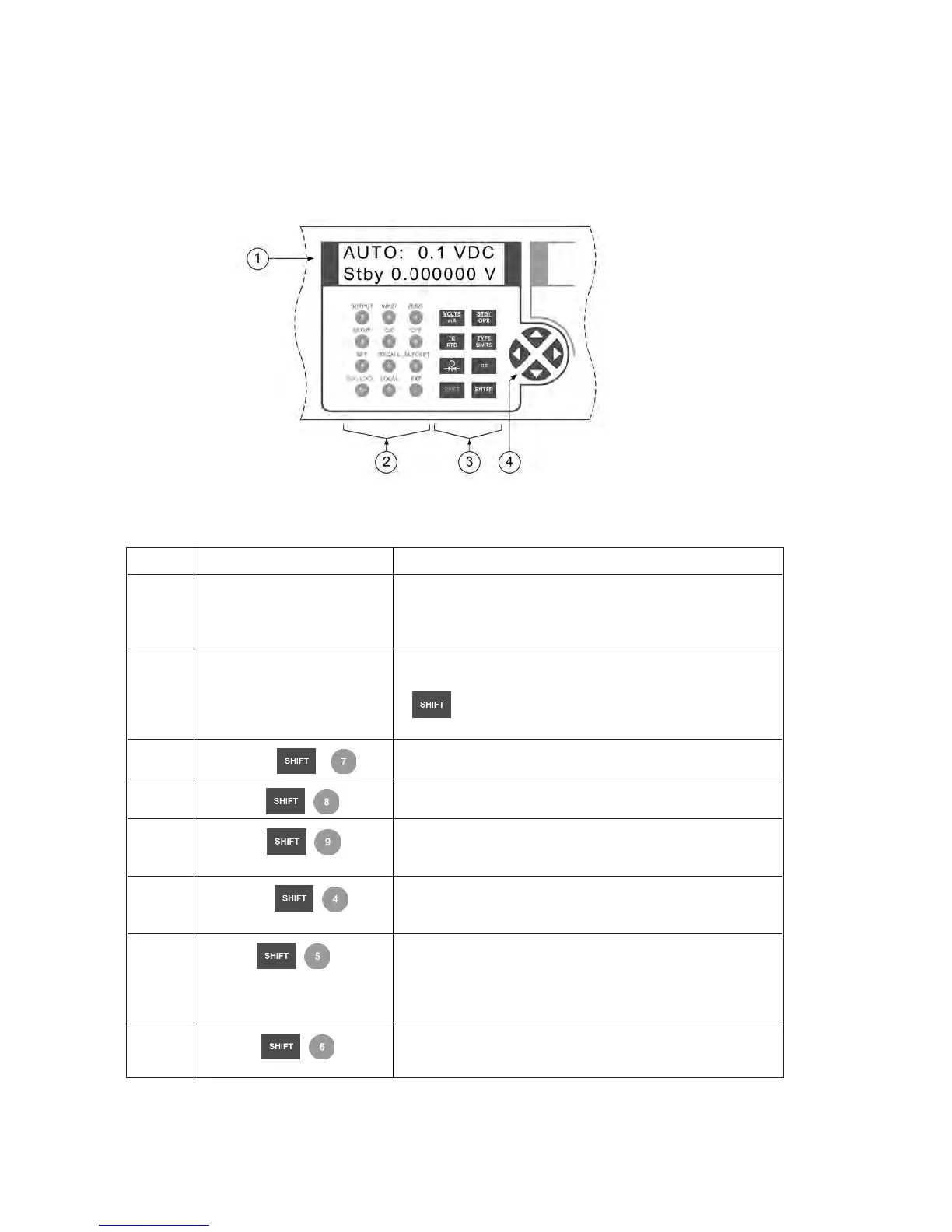
Figure 3 describes the primary input/output display and controls in detail.
Figure 3 - Primary Input/Output Display and Controls
Item Name Description
1 Display A 2 line, 16 character, display providing all visual user
feedback for the primary output and input operations.See
section 2.6 for layout details, and section 2.7 for possible
error messages.
2 Numeric and secondary Output value data entry keys.Secondary function selection
function keys per the text printed above the numeric key. Press the
key followed by the numeric key to select the func-
tion.
OUTPUT Change RTD/Ohms or Thermocouple to output mode.
INPUT Change RTD/Ohms or Thermocouple to input mode.
ZERO Zero the input for Pressure, Thermocouple millivolts, or
RTD ohms
SETUP Adjust the LCD Contrast, LCD Backlight, and Remote
Interface Configuration as described in section 8.
CJC Select internal or external cold junction compensation for
Thermocouple temperature measurements. When external
compensation is selected, XCJC is displayed at the start of
the second line.
°C/°F Select Centigrade or Fahrenheit units for RTD and
Thermocouple temperature measurements.
6


 To Next Page