Caution
To avoid possible damage to the calibrator or to the equipment under test:
• Use the proper terminals, function, and range for your measurement or sourcing
application.
• To avoid mechanically damaging the pressure module, never apply more than 10 ft-lb
of torque between the pressure module fittings, or between the fittings and the body of
the module.
• To avoid damaging the pressure module from overpressure, never apply pressure
above the rated maximum printed on the module.
• To avoid damaging the pressure module from corrosion, use it only with specified
materials. Refer to the pressure module documentation for material compatibility.
Make sure to remove all test connections before powering up the 3001. Failure to do so
could lead to damage of the 3001 or the unit under test.
2. Calibrator Description
2.1 Front Panel Overview
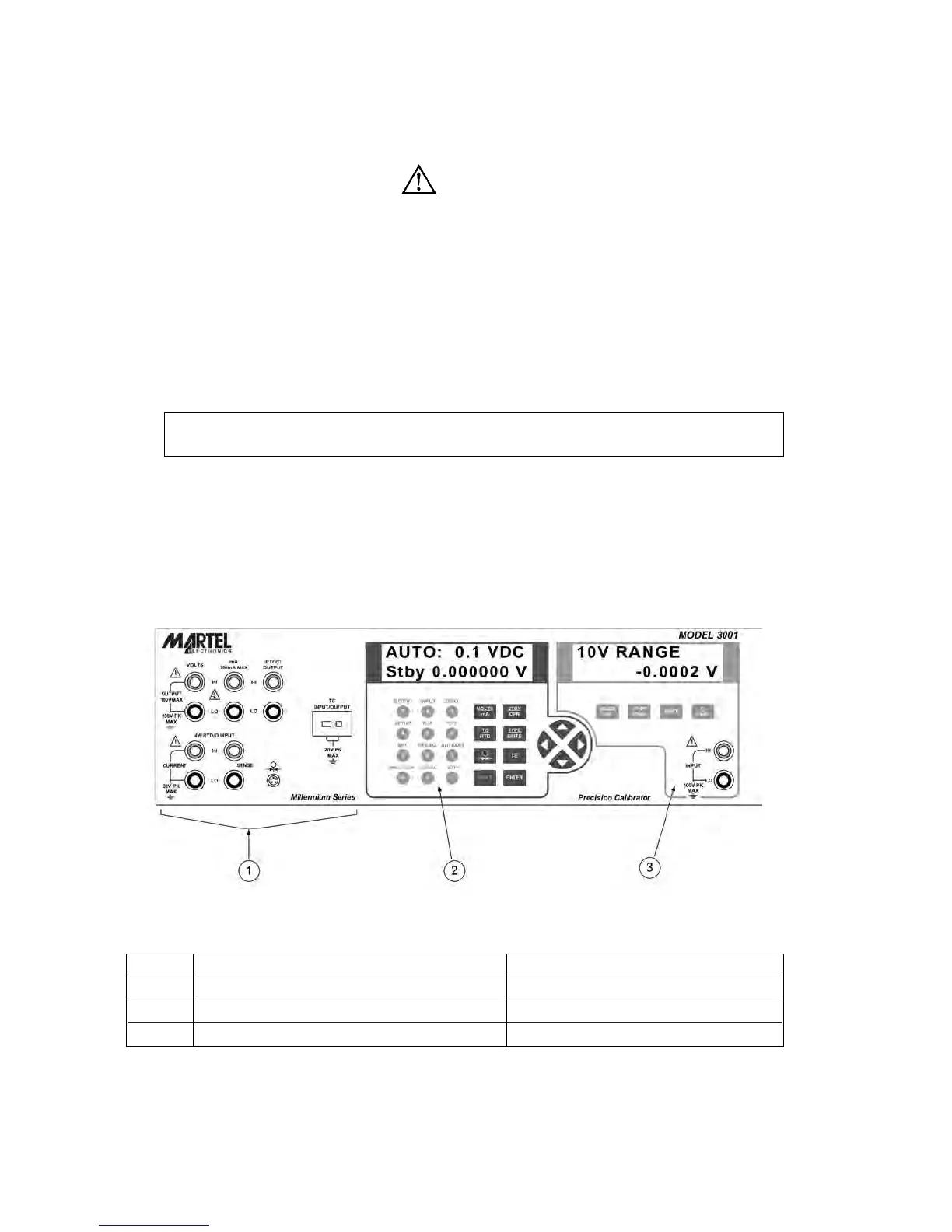
Figure 1 shows the overall layout of the front panel. Each of the three major divisions is
described in detail in the following sections.
Figure 1 - Front Panel
Item Name Description
1 Primary input/output terminals See section 2.2 for details
2 Primary input/output display and controls See section 2.3 for details
3 Isolated input display, controls, and terminals See section 2.4 for details
4


 To Next Page