1. Disconnect any test leads from external devices.
2. Select pressure input on the primary display as described in section 4.9.
3. Select current input on the isolated display as described in section 5.2. Select the
isolated loop power option. If a HART communicator is to be used for set up of the
transmitter, select the HART option.
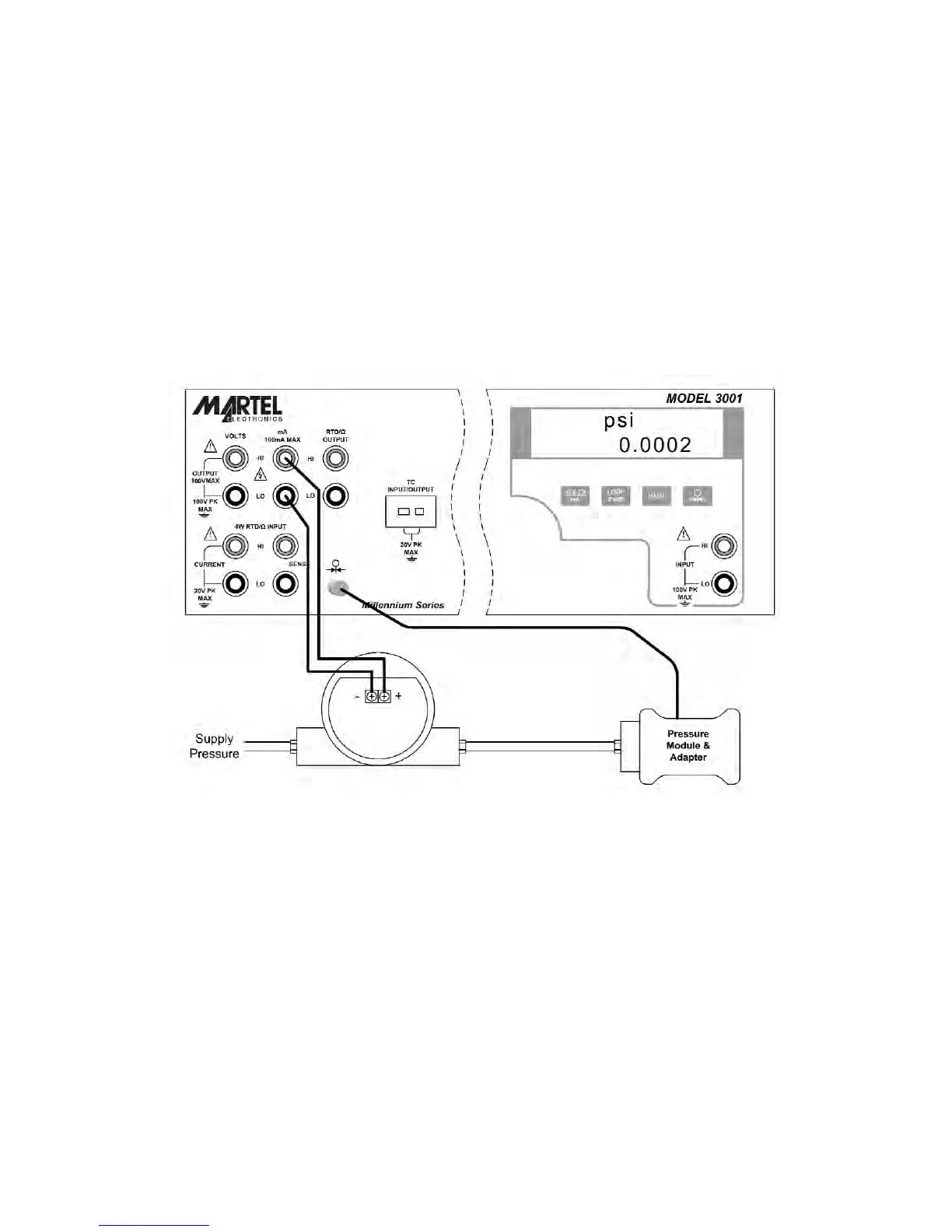
4. Connect the transmitter as shown in figure 20.
5. Test and calibrate the transmitter per the manufacturer's instructions.
7.2 I/P Transmitter
Figure 21 - I/P Transmitter Application
1. Disconnect any test leads from external devices.
2. Select current output on the primary display as described in section 4.2.
3. Select pressure input on the isolated display as described in section 5.3
4. Connect the transmitter as shown in figure 21.
5. Test and calibrate the transmitter per the manufacturer's instructions.
29


 To Next Page