9.2 Setting up the RS-232 Port for Remote Control
The 3001 is fully programmable over a standard RS-232 link with a PC. The RS-232
cable length for the port should not exceed 15 meters (50 feet), although longer cable
lengths are permitted if the load capacitance measured at a connection point (including
signal terminator) does not exceed 2500 pF.
The serial communications parameters in the 3001 are fixed at the following values:
• 9600 baud
• 8 data bits
• 1 stop bit
• no parity
• Xon/Xoff
• EOL (end-of-line) character CR (Carriage Return)
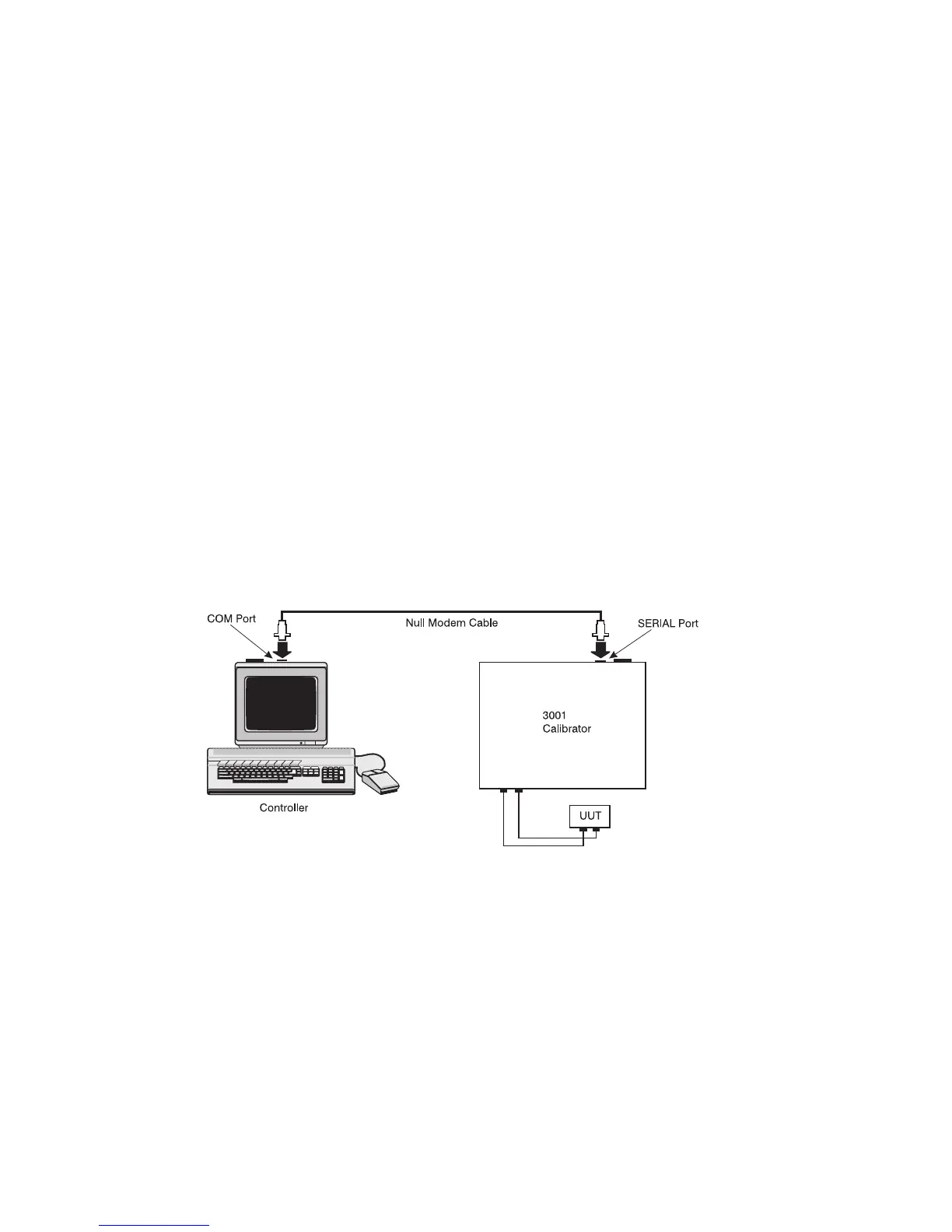
A typical RS-232 connection is shown in Figure 31. Note the use of a null modem cable
for the connection. See section 2.5 for the location of the RS-232 port on the rear panel
of the 3001.
9.2.1 Using the 3001 on Computers with USB Ports
The 3001 can be used with a computer having only USB ports with the use of a USB to
serial converter. Martel can provide the following equipment to support this connection:
• 80313, Cable, USB to serial adapter
• 80157, Cable, Null modem, RS-232
Please check with the factory or your local distributor for pricing and availability.
Figure 31 - RS-232 Remote Connection
9.3 Setting up the IEEE-488 Port for Remote Control
The 3001 is fully programmable for use on a standard IEEE-488 interface bus. The IEEE-
488 interface is also designed in compliance with supplemental standard IEEE-488.2,
which describes additional IEEE-488 features. Devices connected to the IEEE-488 bus
are designated as talkers, listeners, talker/listeners, or controllers. Under remote control
of an instrument, the 3001 operates as a talker/listener.
A PC equipped with an IEEE-488 interface controls the 3001. Compatible software for
IEEE-488 operation, MET/CAL, may be purchased from Fluke.
38


 To Next Page