EasyManua.ls Logo

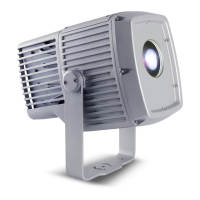
Martin Exterior Projection 500 - User Manual

Martin Exterior Projection 500
60 pages
Print Icon
To Next Page IconTo Next Page
Loading...
Exterior Projection 500
User Manual

Other manuals for Martin Exterior Projection 500

Questions and Answers

  • S
    Samuel RiveraAug 18, 2025
    What to do if I see 'Err Fan' on my Martin DJ Equipment?
    • T
      Tina ParkerAug 18, 2025
      If you see 'Err Fan', it indicates that the fan is not running or there is no connection. You should check the fan and its connections to resolve this issue.
  • M
    Mark WalterAug 20, 2025
    What to do if I see 'Err Focus' on my Martin DJ Equipment?
    • Y
      Yvonne GarciaAug 21, 2025
      If you see 'Err Focus', it means the focus lens hall sensor has a read error. Check the hall sensor, motor, connection, and magnet.
  • R
    Robert ValdezAug 23, 2025
    What to do if I see 'Err Color wheel' on my Martin DJ Equipment?
    • S
      Samantha DawsonAug 23, 2025
      If you see 'Err Color wheel', it indicates a color wheel hall sensor read error. You should check the hall sensor, motor, connection, and if the magnet is missing.
  • A
    Amanda MclaughlinAug 26, 2025
    What to do if I see 'Err Gobo Wheel' on my Martin DJ Equipment?
    • J
      jessicagarciaAug 26, 2025
      If you see 'Err Gobo Wheel', it signals a gobo wheel rotation hall sensor read error. Check the hall sensor, gobo wheel motor, connection, and for a missing magnet.
  • L
    Larry KentAug 28, 2025
    What to do if I see 'Err Prism Wheel' on my Martin DJ Equipment?
    • N
      Nathan HolmesAug 28, 2025
      If you see 'Err Prism Wheel', it indicates a prism wheel hall sensor read error. Check the hall sensor, prism wheel motor, connection, and for a missing magnet.
  • H
    Holly SolisAug 30, 2025
    What to do if I see 'Err Animation' on my Martin DJ Equipment?
    • V
      Valerie HessAug 30, 2025
      If you see 'Err Animation', it means there's an animation hall sensor read error. You should check the hall sensor, motor, connection, and if the magnet is missing.
  • A
    Andrew VasquezSep 2, 2025
    What to do if I see 'Err Prism/Frost' on my Martin DJ Equipment?
    • B
      benjamin19Sep 2, 2025
      If you see 'Err Prism/Frost', it means there is a prism and frost wheel hall sensor read error. Check the hall sensor, motor, connection, and for a missing magnet.
  • M
    Molly GrahamSep 5, 2025
    What to do if I see 'Err Gobo ind/rot' on my Martin DJ Equipment?
    • J
      jonesvictoriaSep 5, 2025
      If you see 'Err Gobo ind/rot', it indicates a gobo index rotation hall sensor read error. Check the hall sensor, gobo index rotation motor, connection, and for a missing magnet.
  • A
    Adam AdamsSep 7, 2025
    What to do if I see 'Err Prism rot' on my Martin DJ Equipment?
    • J
      Johnny BurchSep 7, 2025
      If you see 'Err Prism rot', it means there is a prism rotation hall sensor read error. Check the hall sensor, motor, connection, and for a missing magnet.
  • R
    Rita JonesSep 10, 2025
    Why does my Martin DJ Equipment show 'Err Prism ind/rot'?
    • M
      Michael CookSep 10, 2025
      The 'Err Prism ind/rot' error indicates a prism rotation hall sensor read error. To resolve this, check the hall sensor, prism wheel motor, connection, and ensure the magnet is present.

Summary

Safety Information

Protection from Electric Shock

Details safety precautions regarding electrical hazards and grounding.

Protection from Burns and Fire

Outlines precautions to prevent burns and fire hazards from the fixture's operation.

Protection from Eye Injury

Provides warnings and guidelines to prevent eye damage from the light output.

Protection from Injury

Details safety measures for secure mounting and handling to prevent physical injury.

Physical Installation

Mounting the Fixture

Provides instructions on how to securely mount the fixture for optimal performance.

Anchoring to a Surface or Structure

Details how to securely anchor the fixture's mounting yoke to a surface.

Adjusting Aiming (Pan and Tilt)

Guides users on how to adjust the fixture's pan and tilt for precise beam aiming.

AC Power

Connecting to Power

Details the process and requirements for connecting the fixture to AC power.

Control Data Link

Connecting the Data Link

Provides guidelines for connecting the DMX data link, emphasizing moisture protection.

Fixture Setup

Using the Control Menus

Explains how to access and navigate the fixture's control panel menus and settings.

Setting a DMX Address

Guides on setting the fixture's DMX start address for control.

Programming a Standalone Show

Explains how to program and run standalone shows without a DMX controller.

Manual Control Mode

Details how to enter manual control mode for testing and direct operation.

Fixture Configuration (Including Master;Slave Operation)

Covers settings for customizing fixture behavior, including master/slave synchronization.

Setting Up Master;Slave Operation

Provides step-by-step instructions for configuring master/slave synchronization.

Setup via RDM

Explains how to use RDM for remote configuration and data retrieval.

Effects

Gobos

Describes the rotating gobo wheel with six interchangeable glass gobos.

Maintenance

Cleaning

Provides guidelines for cleaning the fixture's housing and optical components.

Removing and Reinstalling the Top Cover

Provides detailed instructions for safely removing and reattaching the fixture's top cover.

Updating Firmware

DMX Protocol

Control Menus

DMX Address

Menu option to set the fixture's DMX address.

Troubleshooting

Specifications

Dynamic Effects

Lists the fixture's dynamic lighting effects and features.

Control and Programming

Specifies control systems, DMX channels, and protocol compliance.

Photometric Data

Provides output and intensity data for different beam angle models.

Electrical

Specifies electrical power supply, current, and surge protection details.

Photobiological Safety Warning

Highlights the risk group classification and potential optical radiation hazards.

Martin Exterior Projection 500 Specifications

General IconGeneral
Warranty2 years
Color Temperature6500K
ControlDMX, RDM
Input Voltage100-240V AC, 50/60Hz
Color ReproductionFull RGB spectrum
Operating Temperature-20°C to 45°C

Related product manuals