User Manual 15
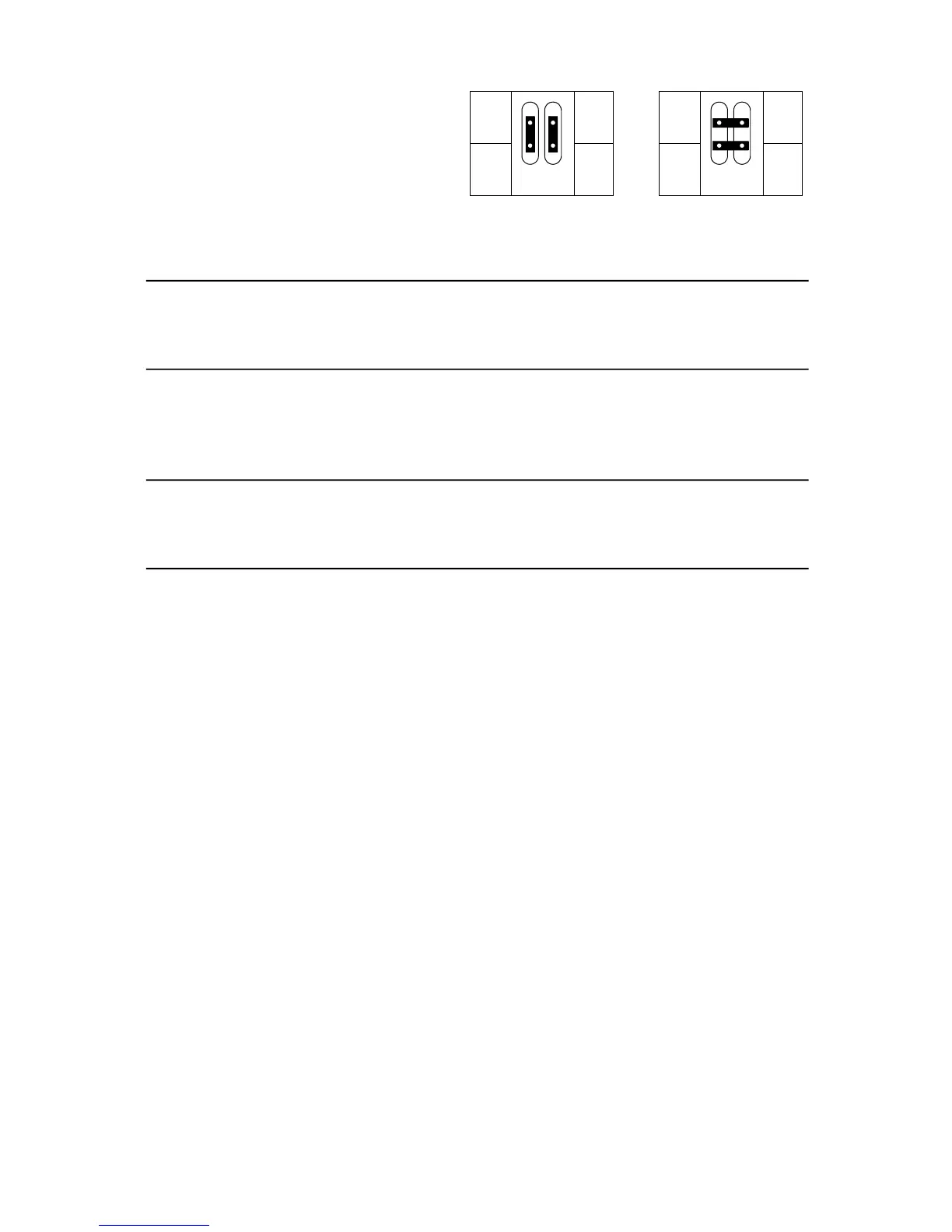
Changing the XLR pin-out
1. Remove the printed circuit board as described
above.
2. Position the jumpers for the desired XLR pin-out as
shown.
3. Replace the printed circuit board.
Martin pin-out DMX pin-out
Changing lenses
W A R N I N G
Attach the safety wire to the front head section.
18° and 65° field angle options are available for the MAC 600/E. (See “Accessories” on page 26.) The lens is mounted on a snap-lock
“lens hood” or front section that attaches easily to the head. Simply release the snap locks and unhook the safety wire to remove the
standard lens front. Hook the safety wire to the same location on the optional front and snap the locks closed.
I M P O R T A N T
The long front (18° option) does not fit in some flight cases.
The 18° front is longer than the standard front; the MAC 600/E fitted with this option fits only in flight cases produced after September,
1997. These can be identified by the outside measurements: 894 mm (35.2") from bottom to top, including wheels. Older flight cases
measure 860 mm (34") from bottom to top, including wheels, on the outside.
Verify that the flight case is of the newer type before shipping MAC 600/Es fitted with the 18° long front.
Cleaning the optical path
Cleaning and servicing components in the head is best left to qualified Martin technicians.
To access the optical components, remove the head cover. Remember to attach the internal safety cable when reassembling the head.
Be very careful if you decide to clean the optical components. The colored surface on the dichroic filters is achieved by means of
special multi-layer coatings and even small scratches in these might be visible. Residues left from cleaning fluids can bake onto and
ruin the component.
Wash dirty lenses and filters with isopropyl alcohol. Rinse with distilled water: mixing the water with a small amount of wetting
agent such as Kodak Photoflo will help prevent streaking and spotting. Dry with a clean, soft and lint-free cloth or blow dry with
compressed air. A generous amount of regular window glass cleaner may also be used, but no residues may remain.
Cleaning the fans
To ensure proper cooling of the fixture it is important that the fans are free of dust. Clean the fans with a vacuum or damp cloth if they
are dirty.
Replacing the lamp
The risk of lamp explosion increases with lamp hours as the quartz envelope gradually weakens. It is recommended that lamp usage
not exceed 125 percent of the lamp’s rated average life.
The procedure for installing the lamp is described on page 5. After installing the lamp, reset the RLAH and RLST counters under the
TIME menu as described page 13.














 To Next Page