Martin VDO Atomic Dot user guide 27
Maintenance
Read Safety information on page 6 before maintaining the fixture. Always
c
omply with the safety instructions.
Refer any service operation not described in this user manual to a qualified
service technician.
Excessive dust, smoke fluid, and particle buildup degrades performance, causes
overheating and will damage the fixture. Damage caused by inadequate
cleaning or maintenance is not covered by the product warranty.
Disconnect mains power before cleaning or servicing the fixture.
Fixtures must be serviced in an area where there is no risk of anyone being
injured by failing parts, tools or other materials.
Installing optical accessories
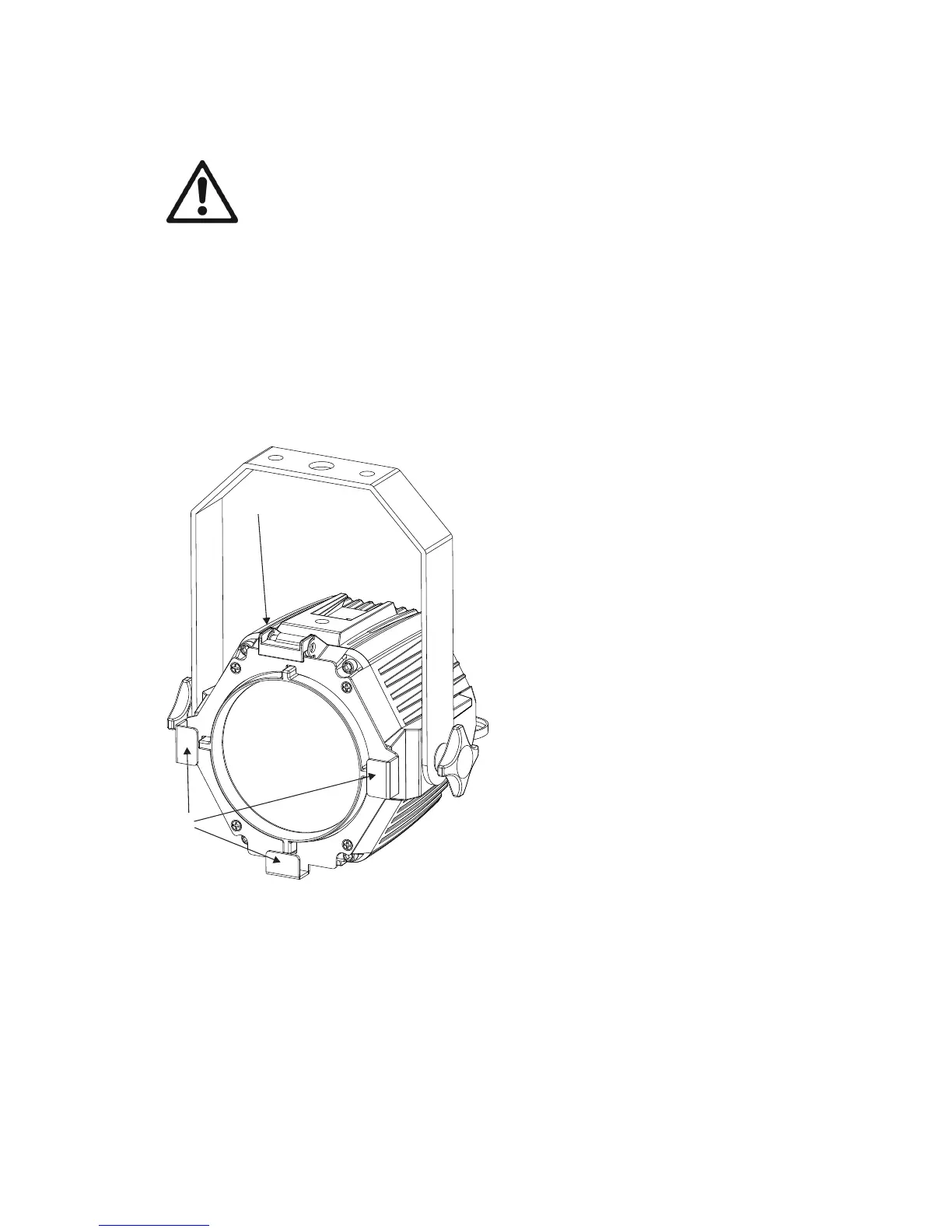
Installing one of the optical accessories available from Martin® for the VDO Atomic Dot takes a
few seconds. No tools are required.
1
2
To install an optical accessory:
1. Slide and lift up the hinged retaining clip (1) on the top of the VDO Atomic Dot and hold it back.
2. Slide the optical accessory into the PAR30-sized holders (2) on the front of the fixture,
ensuring that the accessory is correctly located on all sides.
3. Gently release the retaining clip and ensure it locks the accessory in position.
When using the Martin VDO Atomic Dot Diffuser, make sure that you insert them with the matt side
towards the fixture.












 To Next Page