22 Martin VDO Atomic Dot user guide
Using P3
The Ma
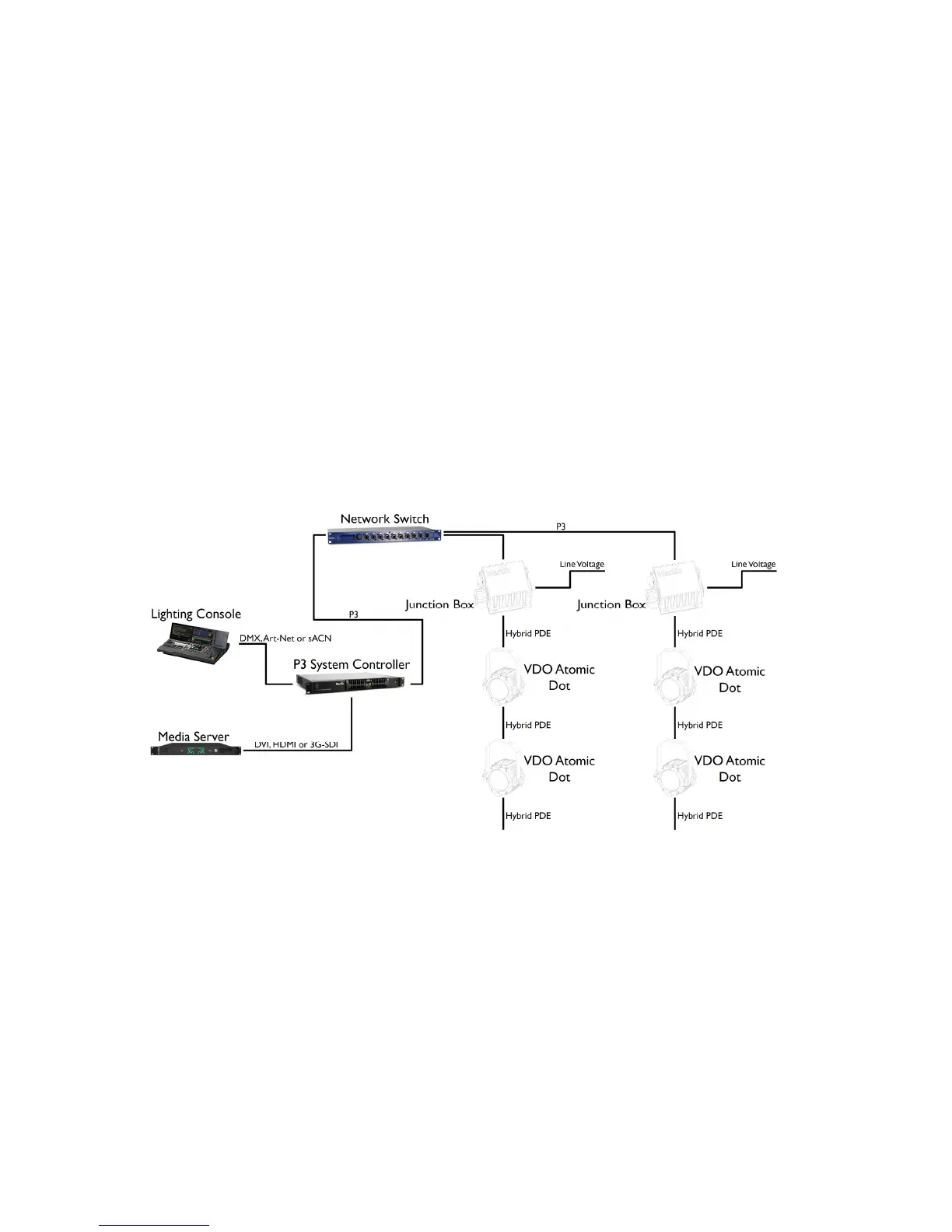
rtin P3 System Controller combines control information from the lighting console with video
information from a media server. This is distributed to the fixtures using a network switch. Each
Junction Box must have its own Ethernet connection from the network switch.
x Please ensure that network switch can operate at 100Mbit Ethernet link speed towards
junction boxes, as the VDO Atomic Dot can only operate at that link speed.
x Please ensure that network switch can operate at 1Gbit Ethernet link speed towards the
P3 System Controller, as it can only operate at that link speed.
x The combined length of Ethernet cable (between network switch and junction box) and
hybrid PDE cables must not exceed 90 m. The total length of all cables between network
switch and last fixture on the daisy-chain can be maximum 90 m.
x A shielded Ethernet cable must be used between the Network Switch and the Junction
Box.
x Other P3-compatible fixtures such as the MAC Allure Profile and P3 PowerPort 1500 can
be connected to the same network switch to operate all together from the same P3
System Controller.
PDE connections between fixtures
The VDO Atomic Dot fixtures are linked to each other and the Junction Box using a PDE
connection which carries both power and data.
x To make the connection, align the pins of the connectors and push together. The
connector will lock automatically.
x To remove the connection, twist the locking ring counter-clockwise to unlock and then pull
apart.













 To Next Page