37
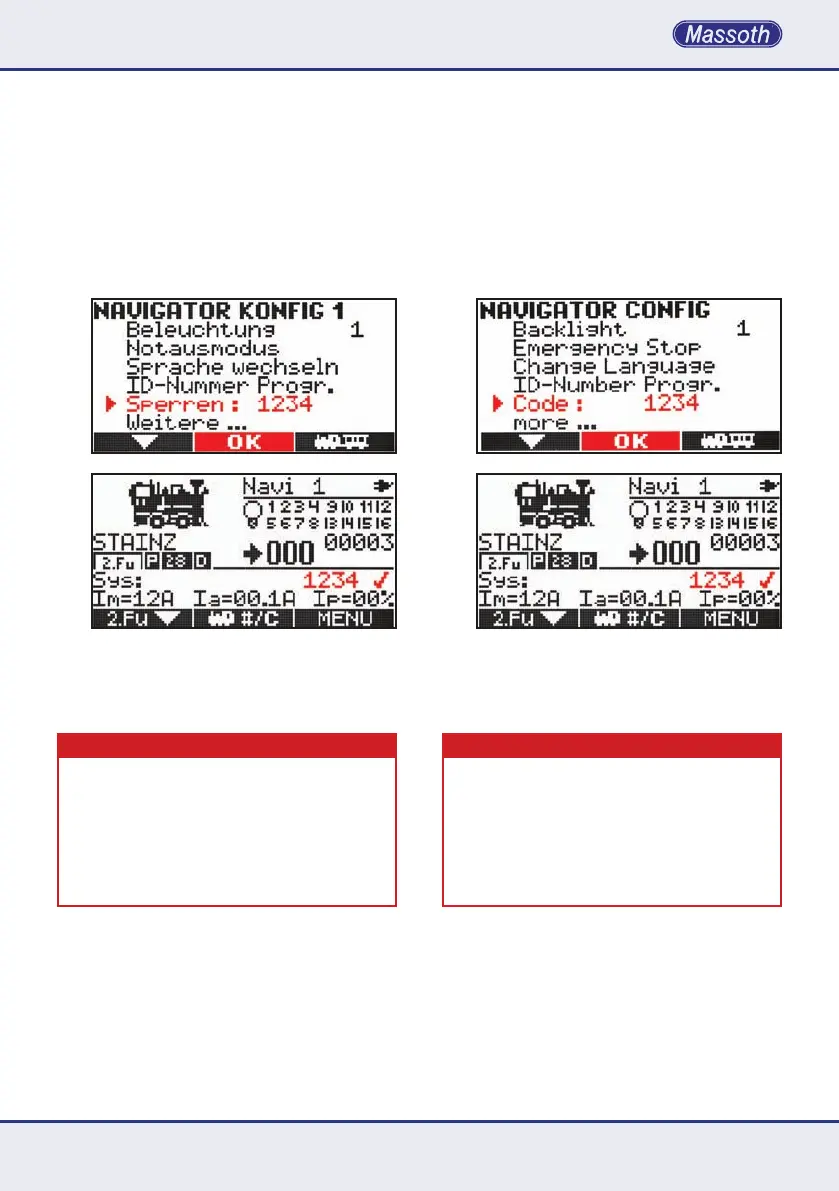
8.5 Sperrfunktion / Kindersicherung
DieseFunktionermöglichteineKindersiche-
rung. Nach Eingabe eines 4-stelligen Zah-
lencodes und bestätigen mit M2 stehen nur
nochfolgendeFunktionenzurVerfügung:
•Drehregler
•Taste M1(zurDeaktivierungderSperrfunktion)
•Tasten 1-9 für alle Funktionen
•F-Taste
DeaktivierenSiedieseFunktionwiedermitder
Taste M1 und der Eingabe Ihres 4-stelligen
Zahlencodes und Taste M1.
WICHTIGER HINWEIS
Sollten Sie einmal Ihren Zahlencode nicht mehr wissen, so
kontaktieren Sie uns per Mail unter hotline@massoth.de,
mitderAngabederSeriennummerIhresNavigators.Diese
können Sie an 2 Stellen sehen. Beim Einschalten Ihres Na-
vigatorsdieF-Taste gedrückt halten. (Ab V1.40 muss der
NavigatorimKabelbetriebsein!)DortsehenSielinksdie
Seriennummer. Oder schauen Sie im Batteriefach auf den
Aufkleber. Wir senden Ihnen dann einen Freischaltcode zu.
8.5 Locking function / Childlock
This function offers a childlock function. After
entering a 4-digit numerical code the childlock
isactivatedwithM2. The following functions are
availablewiththeactivatedchildlockfeature:
•dial knob
•key M1(todeactivatethechildlock)
•Keys 1-9 for all functions
•F-key
ThechildlockfeatureisdeactivatedwithM1
and entering the 4-digit code followed by M1.
IMPORTANT NOTE
Ifyoudonotrememberthecodepleasecontactusvia
email at hotline@massoth.de with the serial number of the
lockedNavigator.Theserialnumbercanbefoundattwo
differentlocations.WhenturningontheNavigatorplease
hold the F-key (cable operation required). The serial num-
ber is the left digit number. Besides that the serial number
is noted on the serial label inside the battery compartment.
Wewillthenbeabletoprovideanewunlockingcode.


 To Next Page