39
Make the External Connections
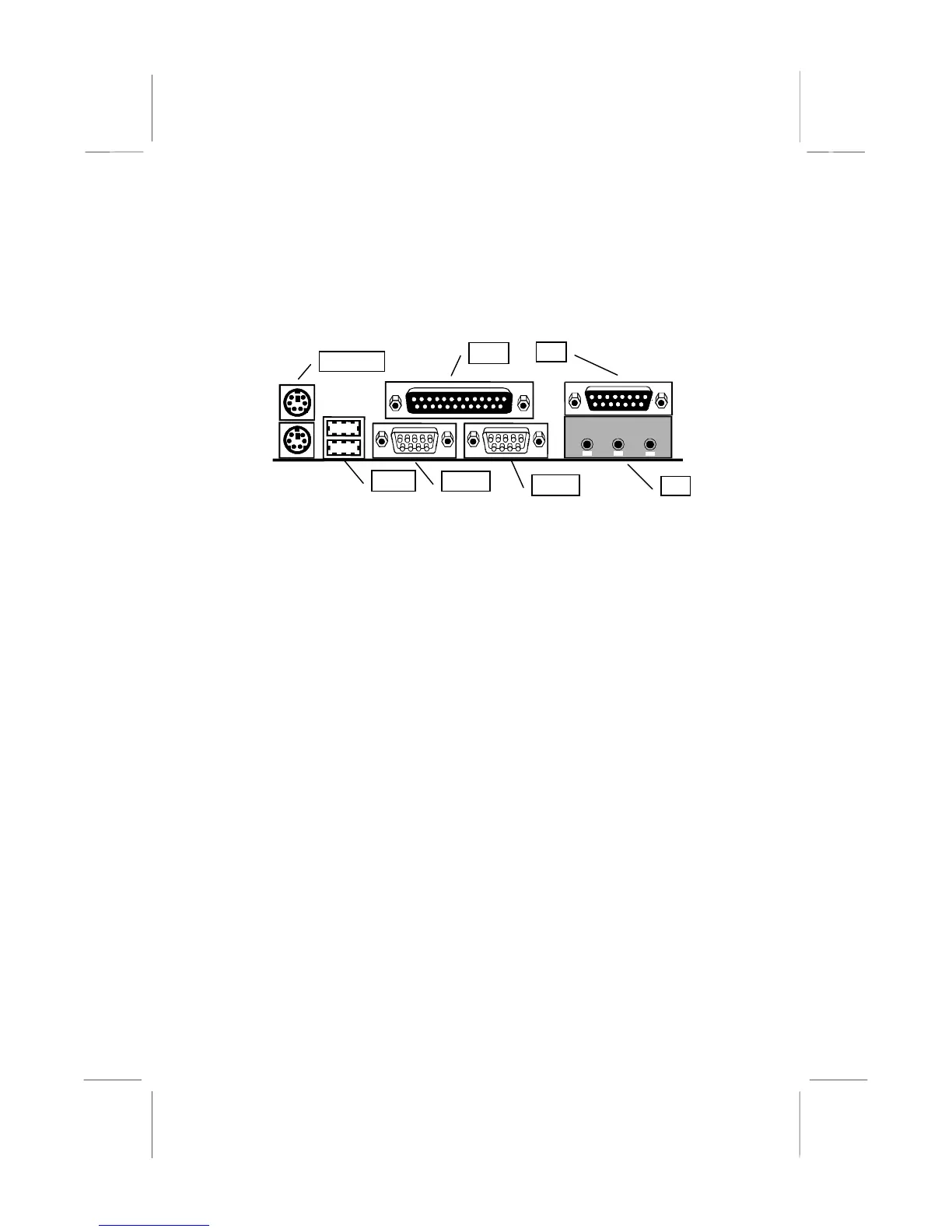
After you have installed the mainboard, make the connections to the
external ports.
KBMPS2
USB1
COM1
COM2
LPT1
JS1
JS1
1. KBMPS2 is a stack of two PS/2 mini-DIN ports. The upper port can
be used by a PS/2 mouse or pointing device. The lower port can be
used by a PS/2 keyboard.
2. LPT1 is a parallel port that can be used by printers or other parallel
communications devices. The system identifies the parallel port as
LPT1.
3. The upper 15-pin port JS1 is a game/MIDI port. You can use this
port to connect a joystick or a MIDI device to your system
4. The lower part of JS1 is three audio jacks. The left side jack is for a
stereo line out signal. The middle jack is for a stereo line in signal.
The right side jack is for a microphone.
5. COM2 is a serial port that can be used by serial devices such as a
mouse, a fax/modem and so on. This serial port is identified by the
system as COM2/4.
6. COM1 is a serial port that can be used by serial devices such as a
mouse, a fax/modem and so on. This serial port is identified by the
system as COM1/3.
7. USB1 is a stack of two Universal Serial Bus ports. Use these ports to
connect to USB devices.















 To Next Page