11
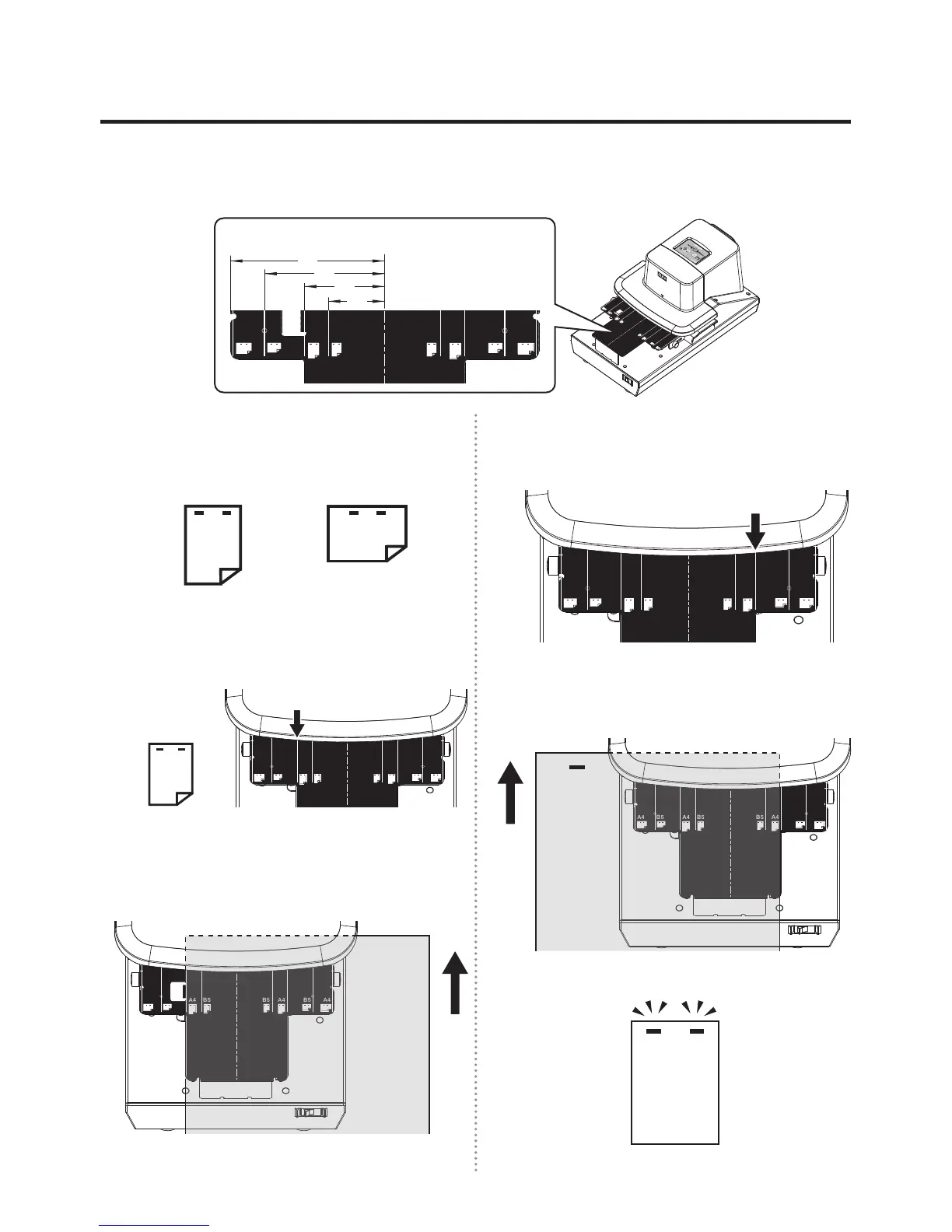
SHIFTING THE PAPER CROSSWISE TO STAPLE AT TWO POSITIONS
SHIFTING THE PAPER CROSSWISE TO STAPLE AT TWO POSITIONS
By working along the line of the paper table, the paper can be stapled at suitable positions at equal intervals (such
as avoiding a punched hole). (The B5-sized vertical paper cannot be automatically stapled. Staple it manually.)
1
Check the paper size (A4 or B5) and the
stapling position (vertical or horizontal).
HorizontalVertical
2
Staple twice. First, align the paper with a
corresponding line on one side.
A4 A4B5 B5A4 A4B5 B5
(Example)
For the A4-sized
vertical paper
3
Insert the paper gently into the main body.
Staple at the rst position. (In case of
manual stapling, press the START button.)
A4 A4B5 B5A4 A4B5 B5
4
Now, staple at the second position. Align the
paper with the other corresponding line.
A4 A4B5 B5A4 A4B5 B5
5
Insert the paper gently into the main body. (In
case of manual stapling, press the START button.)
A4 A4B5 B5A4 A4B5 B5
You are nished with stapling at two positions.
A4
A4B5
B5A4
A4B5
B5
A4 A4B5 B5A4 A4B5 B5
Paper table
Unit: mm
95
75
50
35


 To Next Page