8
STAPLING AUTOMATICALLY
STAPLING AUTOMATICALLY
Insert the paper and the machine staples it automatically.
1
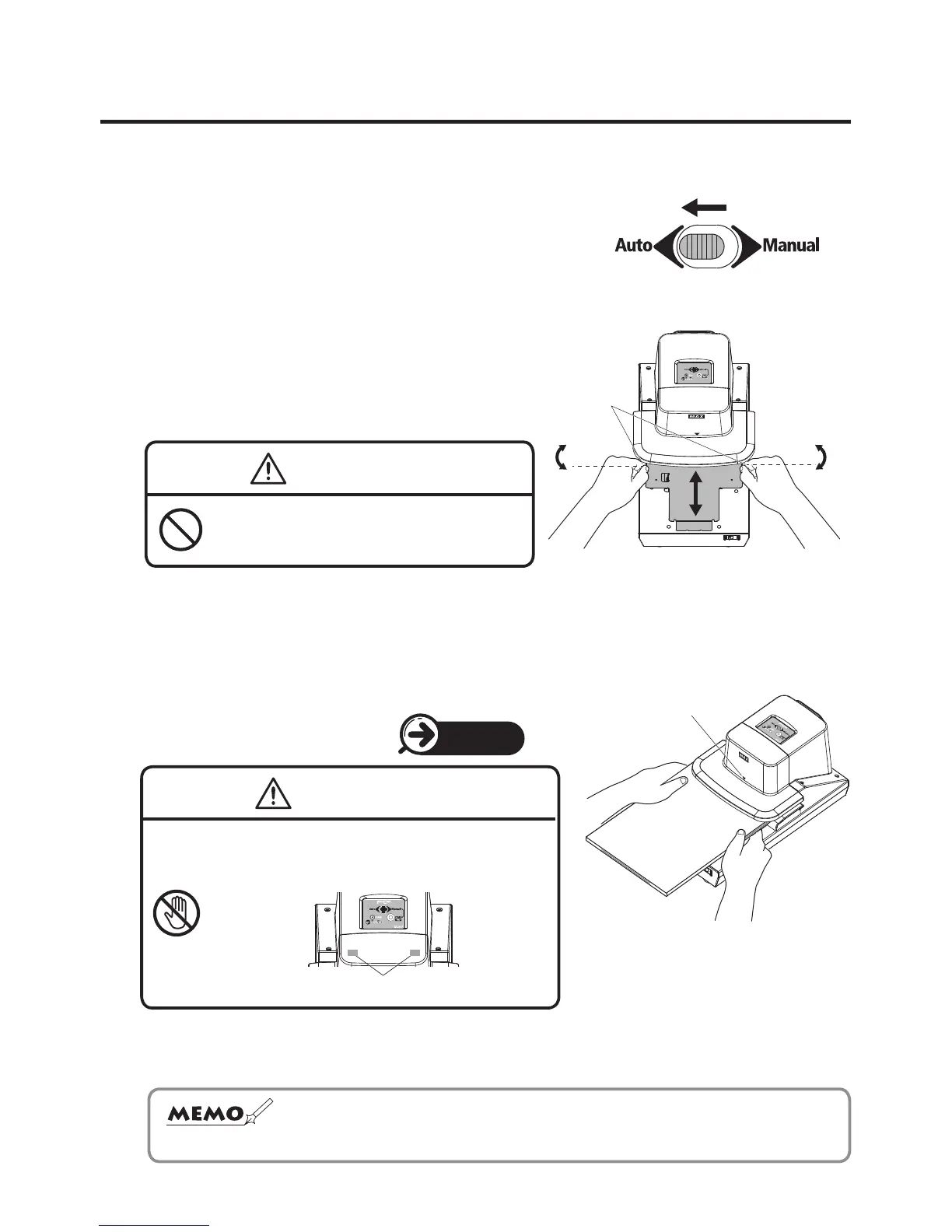
Slide the selector switch to the “Auto”, which is
located on top of the main body.
2
Stapling depth is adjustable within a range of
approx. 3 to 23 mm (1/8" to 7/8"). Loosen the
right and left knobs of the depth control slider to
move it as illustrated. Adjust it to your desired
depth and tighten the knobs.
CAUTION
Do not loosen the knobs more than
necessary.
It could damage the machine.
3
The mark ▼ on the front of the main body is the center of the stapling position. Move
the paper to the right and left to set your desired position. When this is done, use the
guideline of the paper table as required.
(See “Stapling at Two Positions”.)
4
Once the stapling position is decided, insert the paper gently into the main body. It will
be automatically stapled.
Depth control
slider
Loosen
Tighten Loosen
Tighten
Center of the stapling
position
PAGE 11
WARNING
Never touch the stapling position sensor (red).
The machine could be activated and cause
an injury.
☆
The machine is provided with two stapling position sensors on the right
and left. In case of automatic stapling, the machine is not activated
unless these two sensors recognize the paper simultaneously.


 To Next Page