12
REPLACING (LOADING) THE STAPLE REFILLS
REPLACING (LOADING) THE STAPLE REFILLS
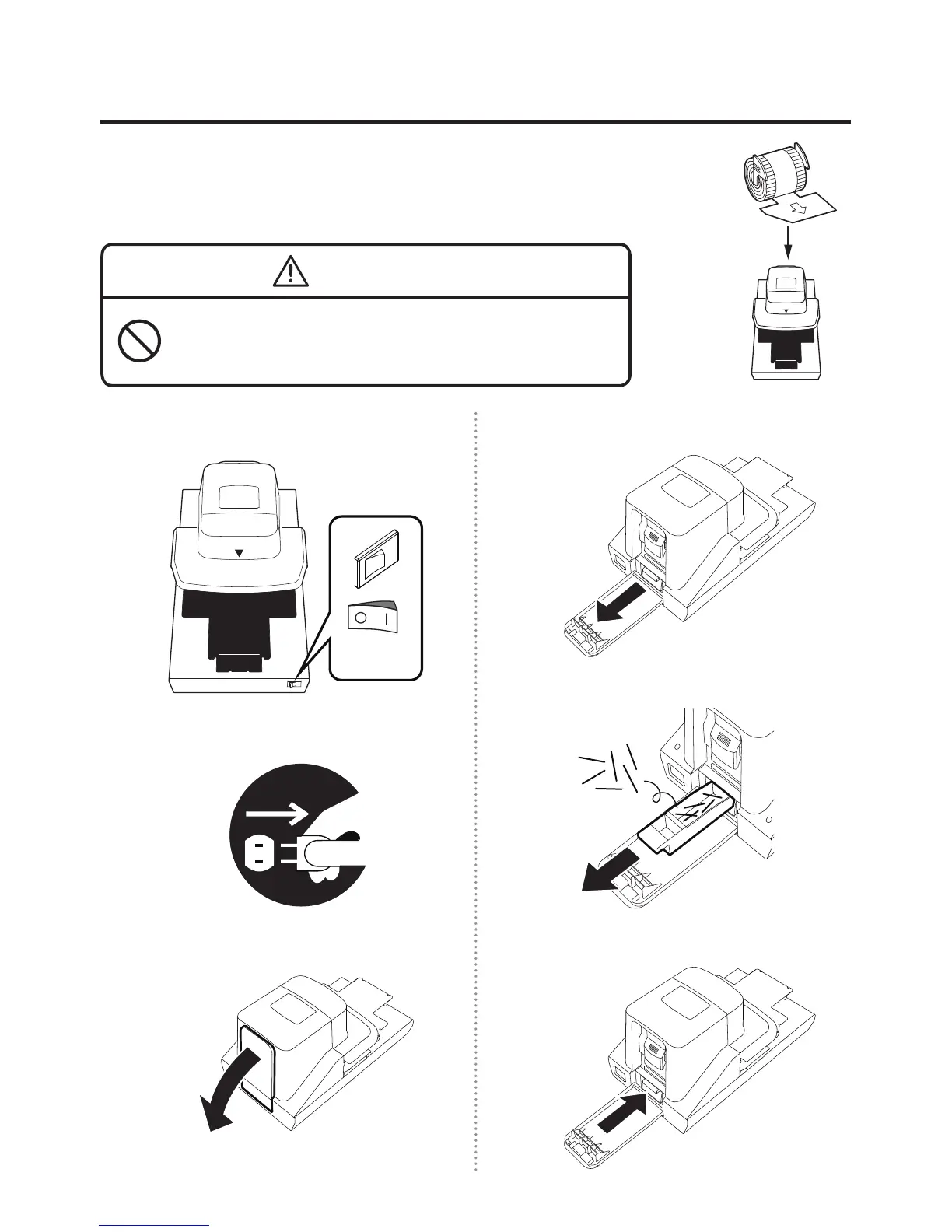
Once the machine runs out of the staples in the cartridge, the red LED
indication lamp is illuminated on the top of the machine “in order to
inform you to replace the staple rells”, disabling stapling operation even
if the paper is inserted. Replace the staple rells in the following manner.
WARNING
When replacing the staple rells, be sure to turn off the power
switch and disconnect the power plug from the plug socket.
It could cause an injury when the stapler is abruptly activated.
1
Turn off the power switch.
OFF!
2
Disconnect the power plug.
3
Open the rear cover on the back of the main body.
4
Pull out the staple trim tray.
5
Remove the staples from inside the staple trim tray.
6
Put back the staple trim tray.
Staple
rell


 To Next Page