- 18 -
EXPORTING TIME DATA TO THE MEMORY CARD
Operation
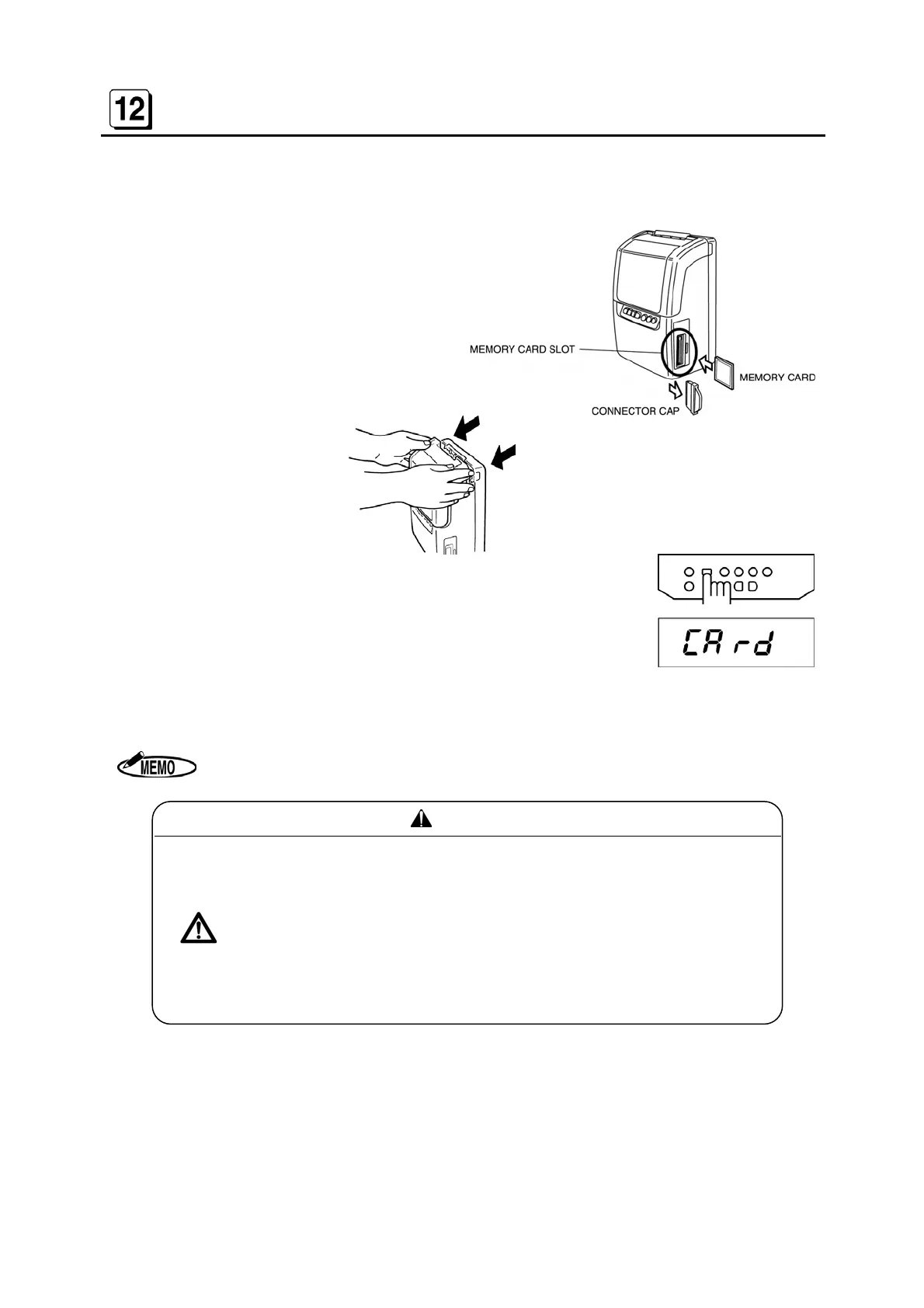
A Remove the Connector Cap and insert the
memory card (Compact flash card).
B Remove the front cover.
C Press the “MEMORY CARD” key for 3 seconds. The buzzer
beeps once and [CArd] is shown on the display.
D After about 60 seconds, the buzzer beeps twice, and the display shows time and date
automatically.
E Push the eject button to remove the memory card.
While [CArd] is displayed, the time recorder cannot be operated.
CAUTION
• Use the memory card only for ER-2200PC. Storing other data in
the memory card may cause damage to the data.
• Do not remove the memory card, while exporting time data to it. Re-
moval could cause damage to the data in the memory card.
• Format the memory card by Windows 98, Me, NT or 2000.
Do not format the memory card by Windows XP.
If you format the memory card by Windows 2000, be sure to choose
“FAT” the “File system”.


 To Next Page