- 10 -
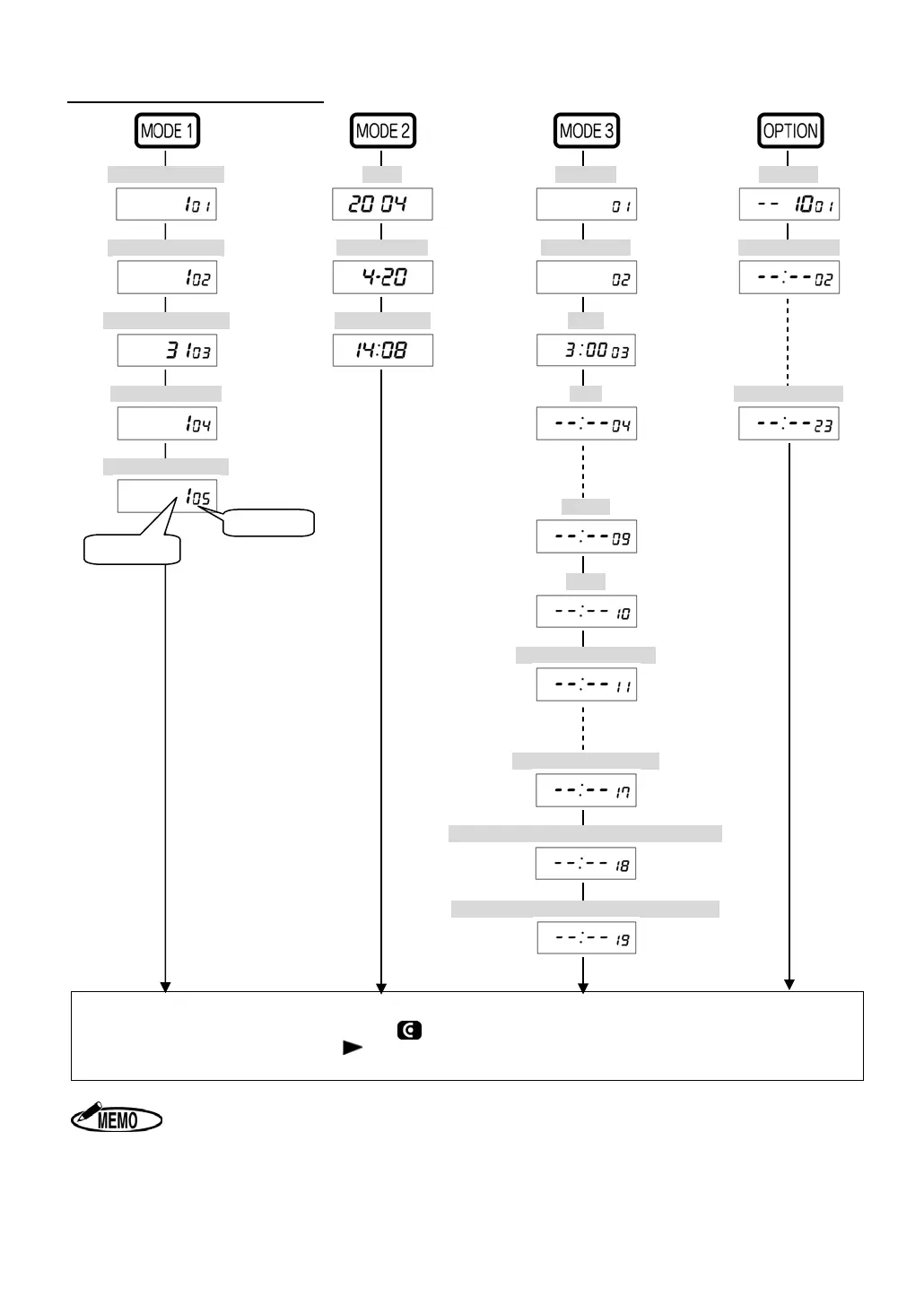
The Contents of Setting Item
[Machine Mode1] [Year] [Holiday] [Melody]
[Machine Mode2] [Month, Date] [Special Day] [Time Signal 1]
[Pay Closing Date] [Hour, Minute] [LST]
[60 or 100 scale] [IN1] [Time Signal 22]
[Daily Total Hours]
[OUT3]
[OST]
[IN1 for Special Day]
[OST for Special Day]
[Starting Date of Day Light Saving Time]
[Ending Date of Day Light Saving Time]
◆ After pressing “SET” key, all changed data in each mode are registered and the display re-
turns to the start of setting mode( symbol appears on the display.).
◆ Alternatively, you can press “
(FORWARD)” key in last setting item to register all changed
data, and then the display returns to the start of setting mode.
1. When selecting "3(Without Daily Total Hours function)" in Machine Mode 1
setting (CODE 01 in MODE 1) or using ER-2500E, Daily Total Hours setting
(CODE 05 in MODE1) is not displayed.
2. When setting no Special Day in Special Day setting (CODE 02 in MODE 3),
“CODE 11” to “CODE 17” are not displayed.
Code No.
Setting data


 To Next Page