- 23 -
WALL MOUNTING AND LAID-DOWN POSITION INSTALLA-
TION
CAUTION
If mounting on a wall, make sure the wall is strong enough to hold the mount
and recorder.
Mount ER-2500 by an attached wall mounting plate.
Do not use other materials.
Disconnect a power cord before installing on wall.
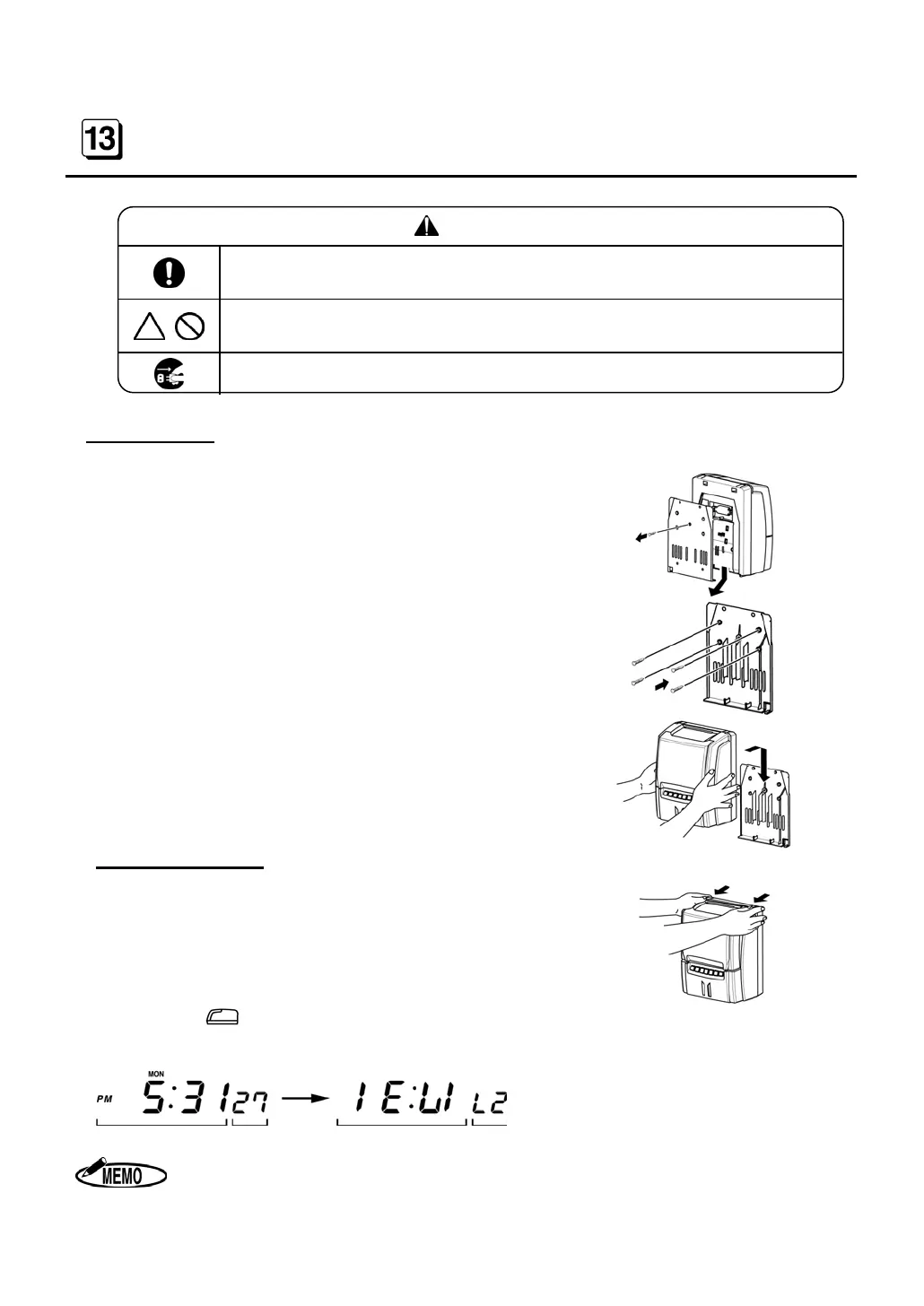
Wall Mounting
If hanging ER-2500 on a wall, use the following procedure.
1. Remove a screw and an attached wall mounting plate
as illustrated.
2. Fix the wall mounting plate to a wall with the included
4 screws (accessories).
3. Install ER-2500 into the wall mounting plate as illus-
trated.
Laid-Down Position
1. Remove a front cover.
2. Press the key for “Laid Down Position.”
3. The clock display will turn upside down.
The time on the display shows 24-hour format only.


 To Next Page