- 18 -
Example
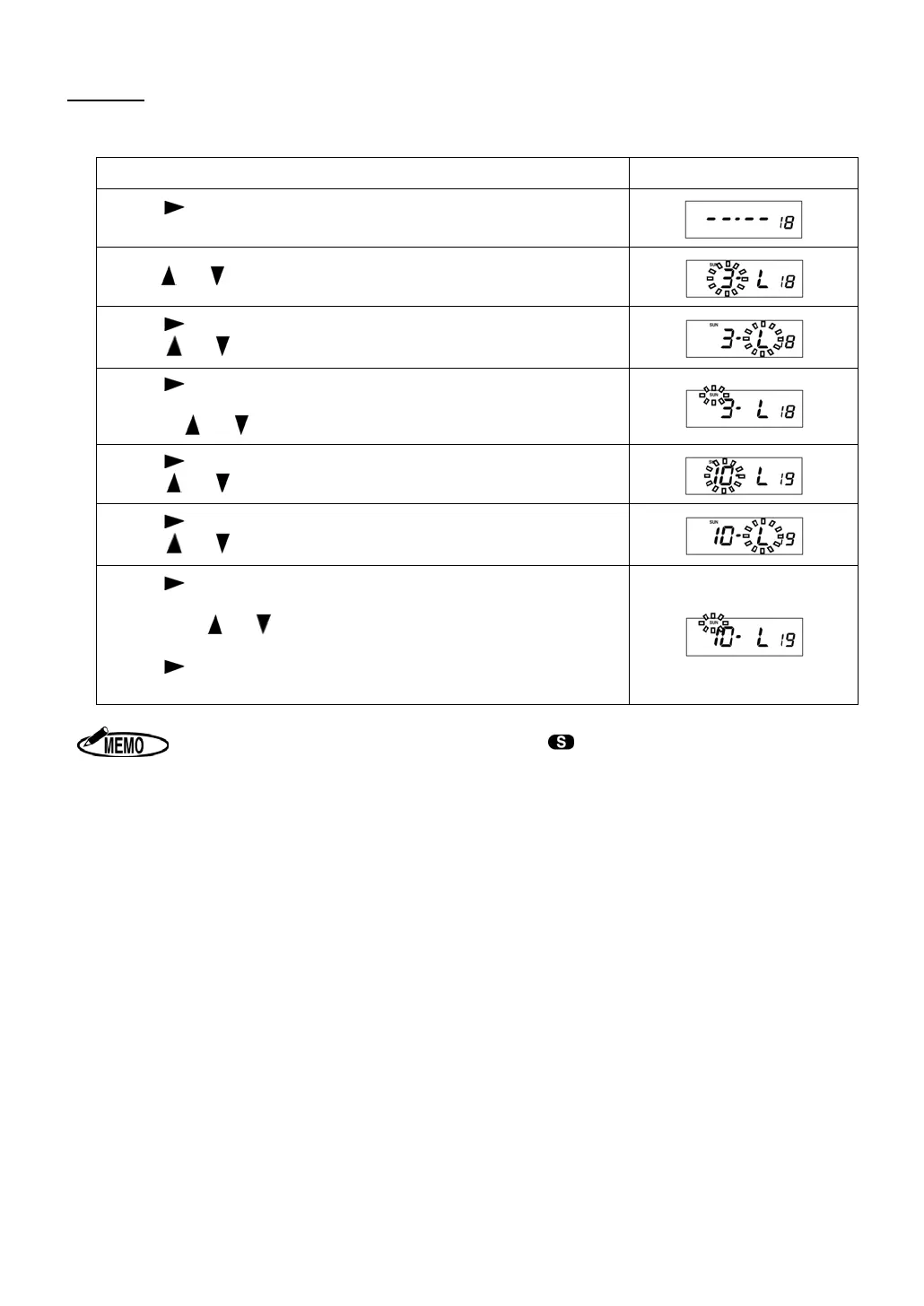
Starting Date of Daylight Saving Time : Sunday of the last week in March.
Ending Date of Daylight Saving Time : Sunday of the last week in October.
Procedure Display
Press to display CODE 18.
Starting Date of Daylight Saving Time is shown on the display.
Press or until the display shows “3” for March.
Press to move the cursor to set the week.
Press
or until the display shows “L” for the Last week.
Press to move the cursor to set .the day of the week.
Move the cursor to the position of “SUN” for the day of the week by
pressing
or .
Press to display CODE 19.
Press
or until the display shows “10” for October.
Press to move the cursor to set the week.
Press
or until the display shows “L” for the Last week.
Press to move the cursor to set .the day of the week.
Move the cursor to the position of “SUN” for the day of the week
by pressing
or .
Press
or “SET” key to register the changed data, and then the
display returns to the start of setting mode automatically.
1. During the period of Daylight Saving Time, symbol appears on the display.
2. Once set, Daylight Saving Time will be adjusted automatically from the following
year, in accordance with the setting data.


 To Next Page