- 20 -
TIME SIGANL (CODE 02 to 23)
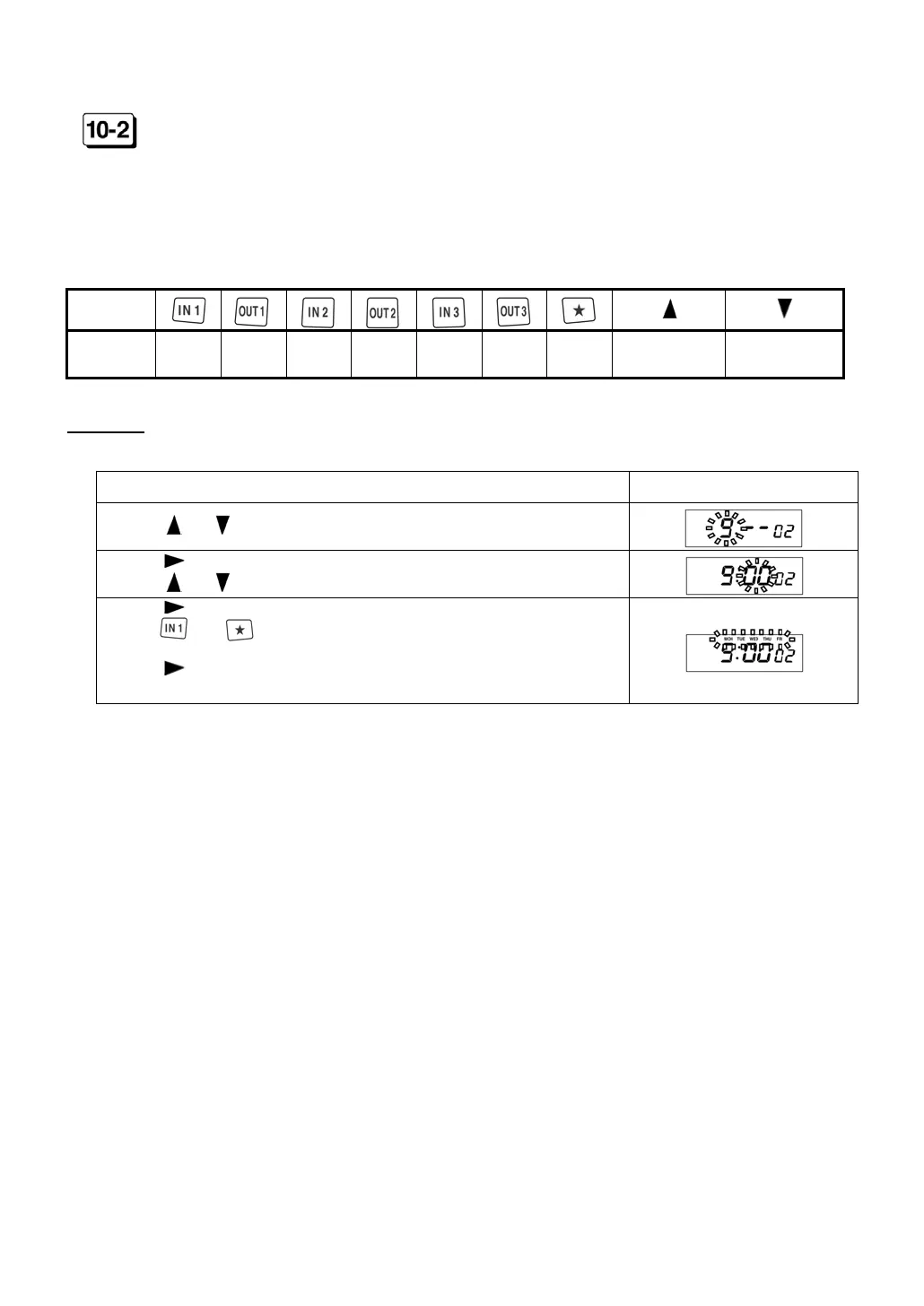
Set the time and the day of the week to sound “Time Signal.”
After setting the time, select the day of the week.
ER-2500 sounds “Time Signal” in the days of the week that is lit up.
ER-2500 can set “Time Signal” up to 22 times.
◆ Initial data: Time=- - : - - The day of the week=All days
Key
Day of
the week
SUN MON TUE WED THU FRI SAT
ALL days are
lit on.
ALL days are
lit off.
Example
Time=AM9:00, The day of the week=Mon, Tue, Wed, Thu, Fri
Procedure Display
Press or until the display shows “9.”
Press to move the cursor to set the minute.
Press
or until the display shows “00.”
Press to move the cursor to set the day of the week.
Press and key to light off “SUN” and “SAT.”
Press to display CODE 03 to set the next time and the day of
the week of Time Signal.


 To Next Page