FOR SERVICE TECHNICIAN’S USE ONLY
15
SERVICE MODE MENU TABLE
Button Press Function Behavior
Key 1 - Momentary press - Enter UI test
- Press and hold for 5 seconds. - Exits Service Diagnostics
Key 2 - Momentary press - Activates Automatic Test Mode
- Press and hold for 3 seconds. - Software Version Display
Key 3 - Momentary press - Displays Enter Fault Code Display Mode
- Press and hold for 5 seconds. - Clears the Error Codes
dz See “Activating Service Diagnostic Mode” to activate these buttons.
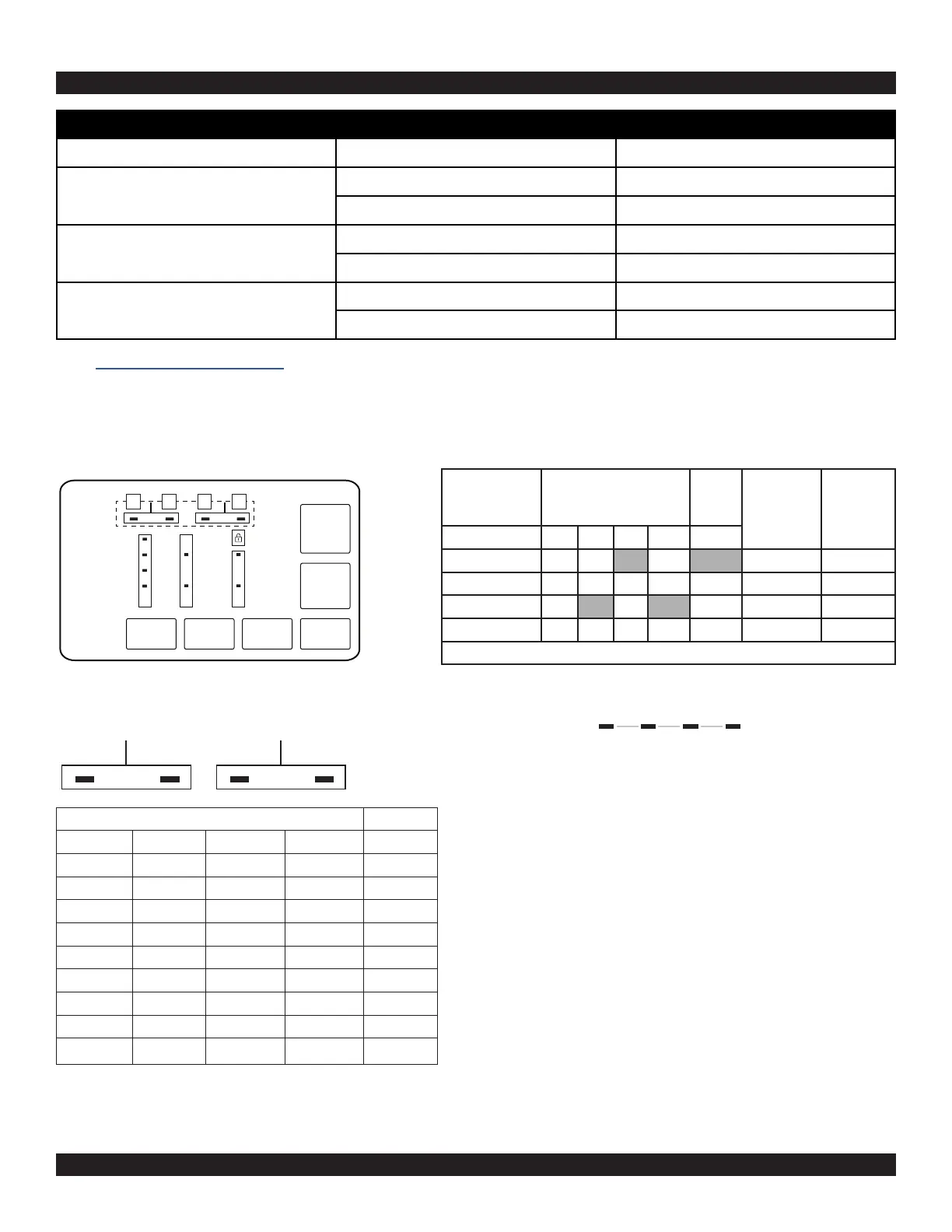
LED group 5
LED group 6
1 2 3 4 Value
0 0 0 0 0
0 0 0 1 1
0 0 1 0 2
0 0 1 1 3
0 1 0 0 4
0 1 0 1 5
0 1 1 0 6
0 1 1 1 7
1 0 0 0 8
1 0 0 1 9
Sense Soak Wash Done
Example: F3E2
1. Wash and Done are ON, Lid Lock LED is ON
2. All are OFF
3. Wash is ON, Lid Lock LED is OFF
4. All are OFF
5. Back to step 1
READING BINARY CODES
dz LED ON means 1 (has an associated value, see table)
dz LED OFF means 0 (has an associated value of zero)
Frame Number Status LEDs
Lid
Lock
LED
Fault/Error
Code
Frame
Timing
(Seconds)
8 4 2 1 5
1 1 F F2 0.5
2 0.5
3 1 1 E E5 0.5
4 1
Repeat
Key 6/
POWER
Key 5/
START
Key 4Key 3Key 2Key 1
Status
Indicator
8 4 2 1



 To Next Page