▼
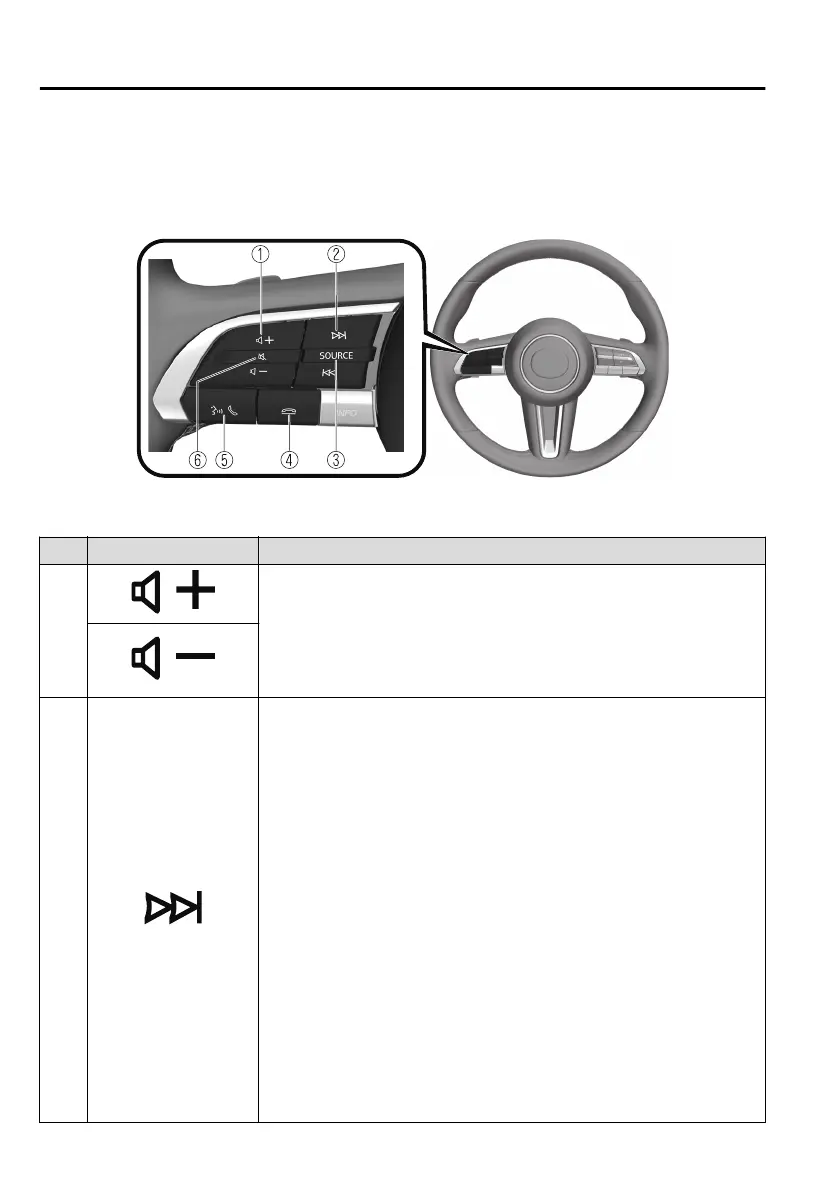
Audio Remote Control Switch Operation
The audio remote control switch is on the left side of the steering wheel. You can
operate basic audio functions, pick up/hang up the phone, or activate voice
control using the switch.
The shape of the switches may
dier
depending on the vehicle model.
No. Item Explanation
1
Volume adjustment button:
Press the (+) or (-) button to adjust the volume.
If you adjust the volume during a voice guidance, the volume of the
voice guidance changes.
If you adjust the volume while making a hands-free call, the conversa-
tion volume changes.
2
Seek Switch:
Selecting a radio station
(FM/AM radio)
You can call up radio stations registered to your favourites by pressing the seek
switch while listening to FM/AM radio. The radio stations change each time you
press the switch.
In addition, press and hold the seek switch until you hear a beep to start automatic
station selection. It stops when a radio broadcast is tuned in.
(DAB radio)
*
You can call up radio stations registered to your Favourites by pressing the seek
switch while listening to DAB radio. The radio station changes each time you
press the seek switch.
In addition, if you press and hold the seek switch until you hear a beep, the service
switches to the next or previous service. If there is no next or previous service in the
selected Ensemble, Ensemble switches.
Cuing
Music and video files can be cued by operating the button while audio or video is
playing.
Interior Features
Mazda Connect
5-22
*Some models.
Mazda3_8HS5-EE19I_Edition1_new 2019-7-1 10:56:36



 To Next Page