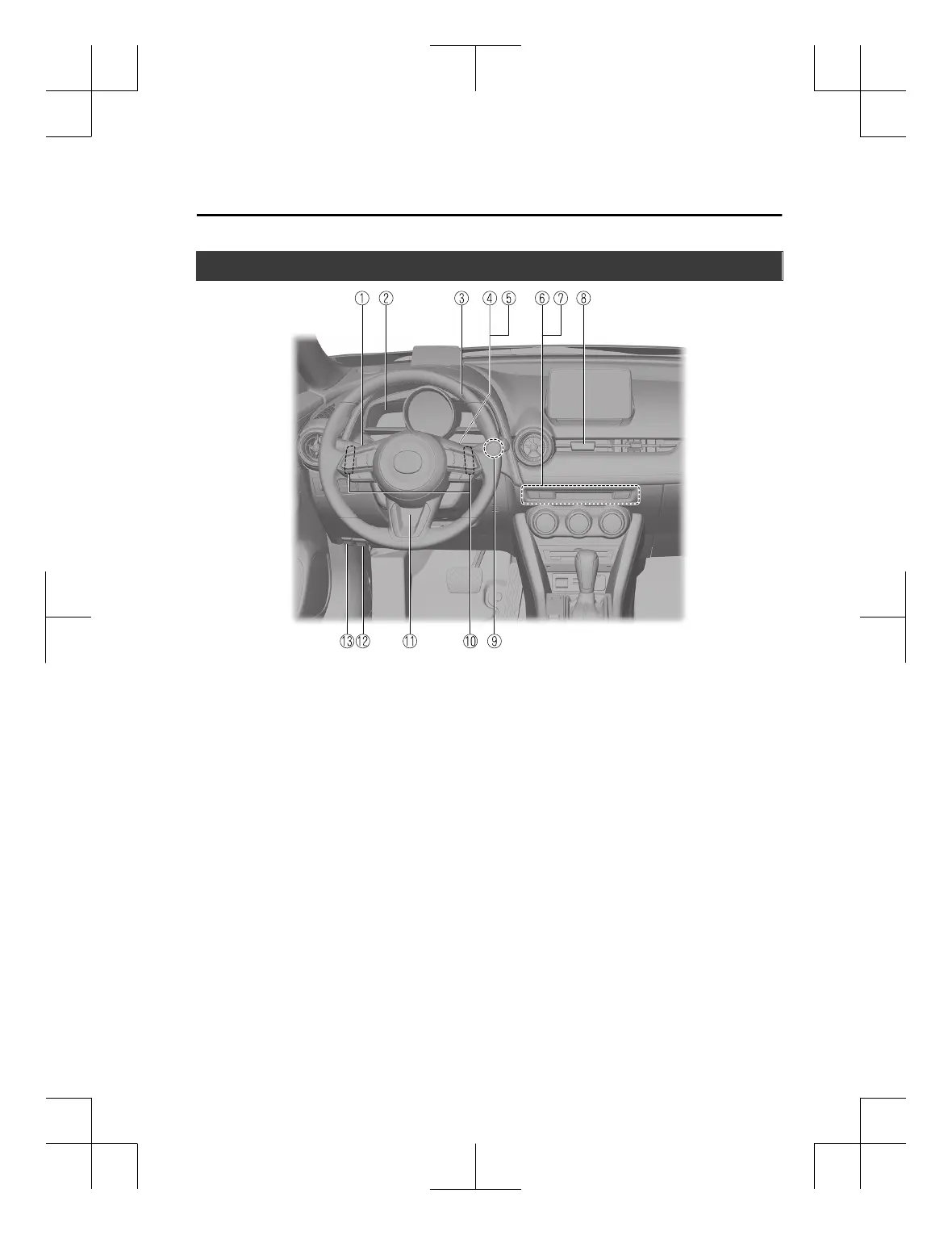
Interior Equipment (View B)
① Audio control switches..........................................................................................page 5-16
② Instrument cluster..................................................................................................page 4-21
③ Instrument panel illumination knob...................................................................... page 4-27
④ Mazda Radar Cruise Control (MRCC) switches.....................................page 4-144, 4-155
⑤ Cruise control switches.......................................................................................page 4-225
⑥ Seat warmer switches..............................................................................................page 2-6
⑦ Heated steering wheel switch................................................................................page 3-31
⑧ Hazard warning flasher switch..............................................................................page 4-76
⑨ Push button start......................................................................................................page 4-4
⑩ Steering shift switches...........................................................................................page 4-53
⑪ Lock release lever................................................................................................. page 3-31
⑫ Bonnet release handle........................................................................................... page 6-21
⑬ Remote fuel-filler flap release...............................................................................page 3-29
Pictorial Index
Interior Overview (Left-Hand Drive Model)
The equipment and installation position varies by vehicle
1-3
CX-3_8GT4-EE-18D_Edition8_old 2019-11-14 12:53:52



 To Next Page