number of hours includes both mowing,
searching and charging time.
Note: The daily operation capacity is approximate
and depends on the inbuilt standby period. Refer
to
Schedule and Standby on page 32
.
Product work ca-
pacity
Approximate daily opera-
tion capacity, m
2
/h, ft
2
/h
600 m
2
42 / 50
500 m
2
41 / 49
400 m
2
40 / 48
Example: A lawn of 500 m
2
/ 5400 ft
2
, cut with a
ROB S600 specified for 600 m
2
.
500 m
2
/ 42 ≈ 7 h.
5400 ft
2
/ 50 ≈ 7 h.
Days /
week
h / day Suggested schedule
setting
7 7 07:00 - 14:00 / 7:00
am - 2:00 pm
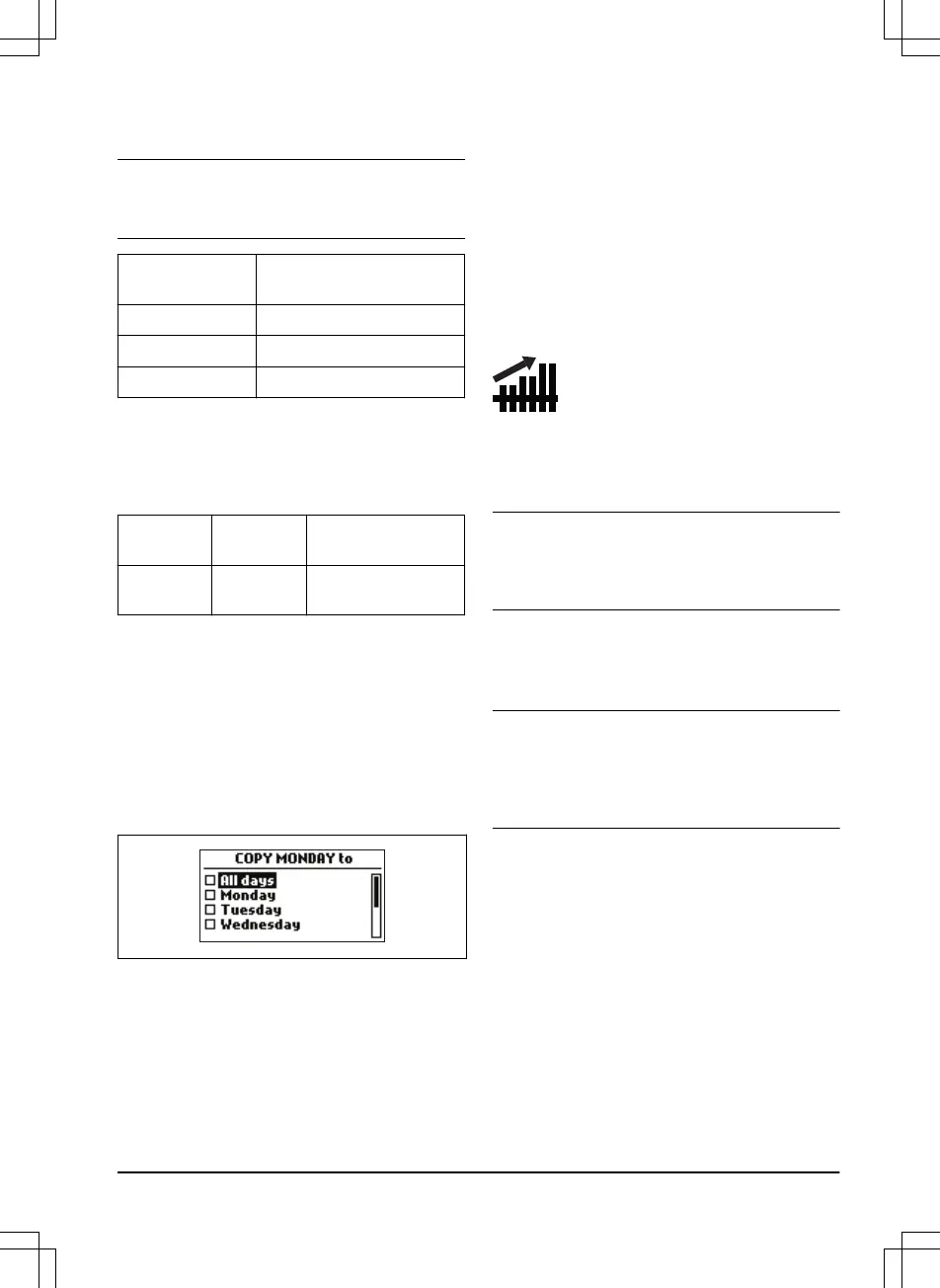
3.10.3.7 To copy the schedule setting
1. Do steps 1–3 in
To get access to the
schedule menu on page 23
.
2. Use the arrow buttons and the OK button to
move through the menu structure
Schedule
> Advanced > Overview > Copy
.
3. Use the arrow buttons and the OK button to
copy the schedule setting. You can copy the
schedule settings day to day or for the full
week.
3.10.3.8 To reset the schedule setting
You can remove all schedule settings and use
the factory setting.
1. Do steps 1–3 in
To get access to the
schedule menu on page 23
.
2. Use the
arrow buttons and the OK button to
move through the menu structure
Schedule
> Advanced > Overview > Reset
.
a) Push the arrow buttons to select
Current day
to only set the current day
to factory settings.
b) Push the arrow buttons to select
All
week
to reset all schedule settings to
factory settings.
3. Push the OK button.
3.10.4 Lawn sheild
The
Lawn sheild
automatically adjust the cutting
time to the growth of the grass. The product is
not permitted to operate more than the schedule
settings.
Note: When using
Lawn sheild
, it is
recommended to make as much operating time
as possible available for the
Lawn sheild
. Do not
restrict the schedule more than necessary.
The first operation of the day is set by the
schedule settings. The product always complete
1 mowing cycle, and then the
Lawn sheild
selects
if the product will continue to operate or not.
Note:
The
Lawn sheild
is reset if the product does
not operate for more than 50 hours, or if a
Reset
of all user settings
is done. The
Lawn sheild
is
not changed if a
Reset of schedule settings
is
done.
3.10.4.1 To set the Lawn shield
1. Do steps 1–3 in
To get access to the menu
on page 23
.
2. Use the arrow buttons and the OK button to
move through the menu structure
Settings >
Lawn shield > Use Lawn shield
.
3. Push the OK button to select the Lawn
shield.
4. Push the BACK button.
3.10.4.2 To set the Lawn shield frequency
Set how frequently the product must cut the
grass when the Lawn shield is in use. There are
1411 - 001 - 18.12.2019
Installation - 25






 To Next Page