[EN] 17
Maintenance
To ensure your dehumidier is always performing at its best, it’s important to regularly clean it.
• Always unplug your dehumidier from the mains before cleaning.
• Do not allow the dehumidier to get wet.
Cleaning the exterior
Clean the exterior with a soft, dry cloth. If the dehumidier is extremely dirty, use a slightly damp cloth.
Never spray the device with water.
Cleaning the dust lter
The dust lter is a life-long lter and therefore should not need to be replaced (other than for wear
and tear reasons). When used regularly, the lter may become clogged with dust and dirt particles.
The lter must be cleaned a minimum of every two weeks (not doing so could invalidate the unit’s
warranty). Please follow the steps below.
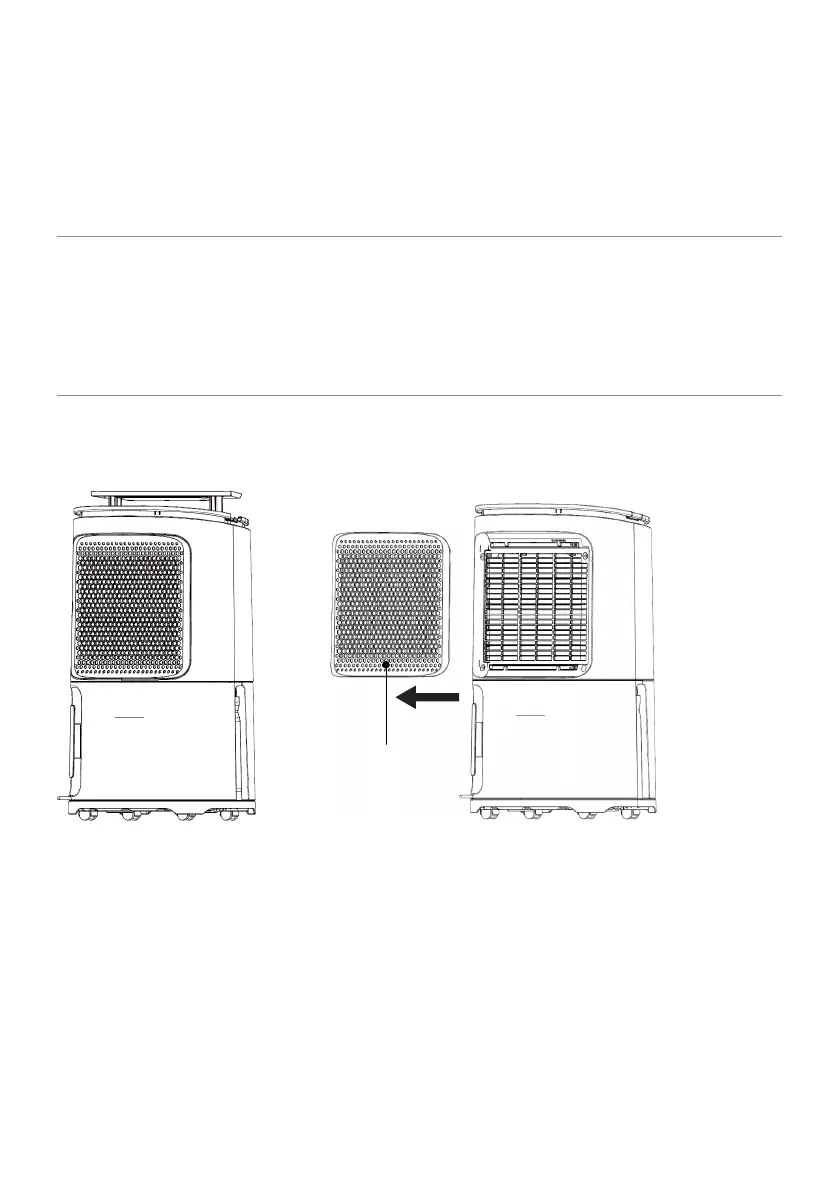
1. Remove the dust lter from the dehumidier by sliding the lter case to the left, away from the
dehumidier. The dust lter is built into the lter case and cannot be removed – you may have to
remove the H13 HEPA lter to access the dust lter.
2. Clean the dust lter with the end of a hoover or soapy water no hotter than 40°C. Rinse and dry
completely before inserting back into the dehumidier.
Filter case and dust
lter combined


 To Next Page