[EN] 11
Operation
When the dehumidier is rst plugged into the mains it will beep once, the power and timer button will
light up.
• All buttons on the control panel only require a short press: press the buttons rmly and quickly.
• When in use the louvre must be open - this can be done manually.
Control panel
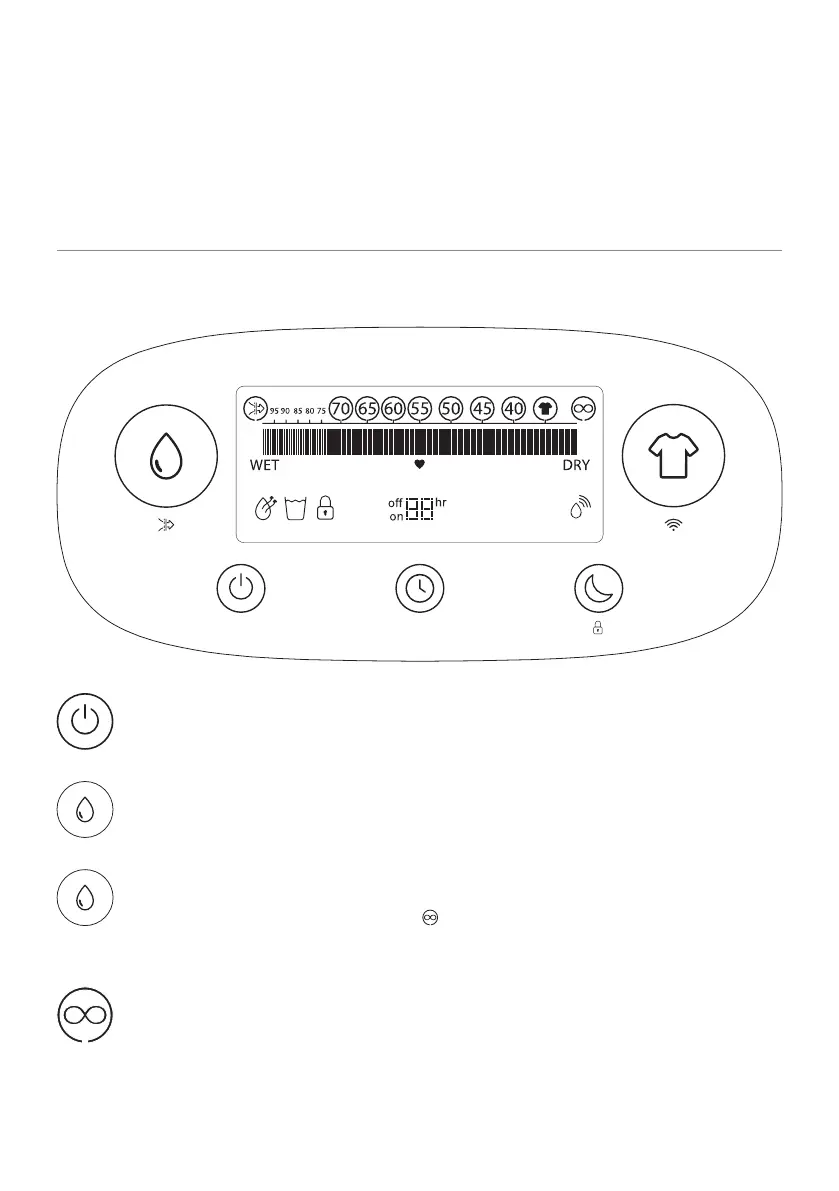
ON/OFF: Press the power button once to turn the dehumidier on. The display will turn on
and the dehumidier will start to run. To turn the dehumidier o press the power button
again.
Smart Humidity Mode: Press this button and the dehumidier will default to a target
humidity of 55%RH.
Variable Humidistat: To set your dehumidier to reach a target humidity other than 55%
continue to press the Smart Humidity Mode button and scroll through the options in the
following order: 70, 65, 60, 55, 50, 45, 40, . Once you have reached your desired target, it
will stay displayed with a circle around it.
Continuous: With this target the dehumidier will continue to run and only turn o when the
water tank is full, regardless of the humidity level.
Once the target humidity level has been reached (-3%) the dehumidier will stop. Every 30
minutes the fan will run and check the humidity level, the dehumidifying indicator will turn o.


 To Next Page