93075 Page 9
4069 RT April 2014
4069 RT Controls & Components
Controls & Components
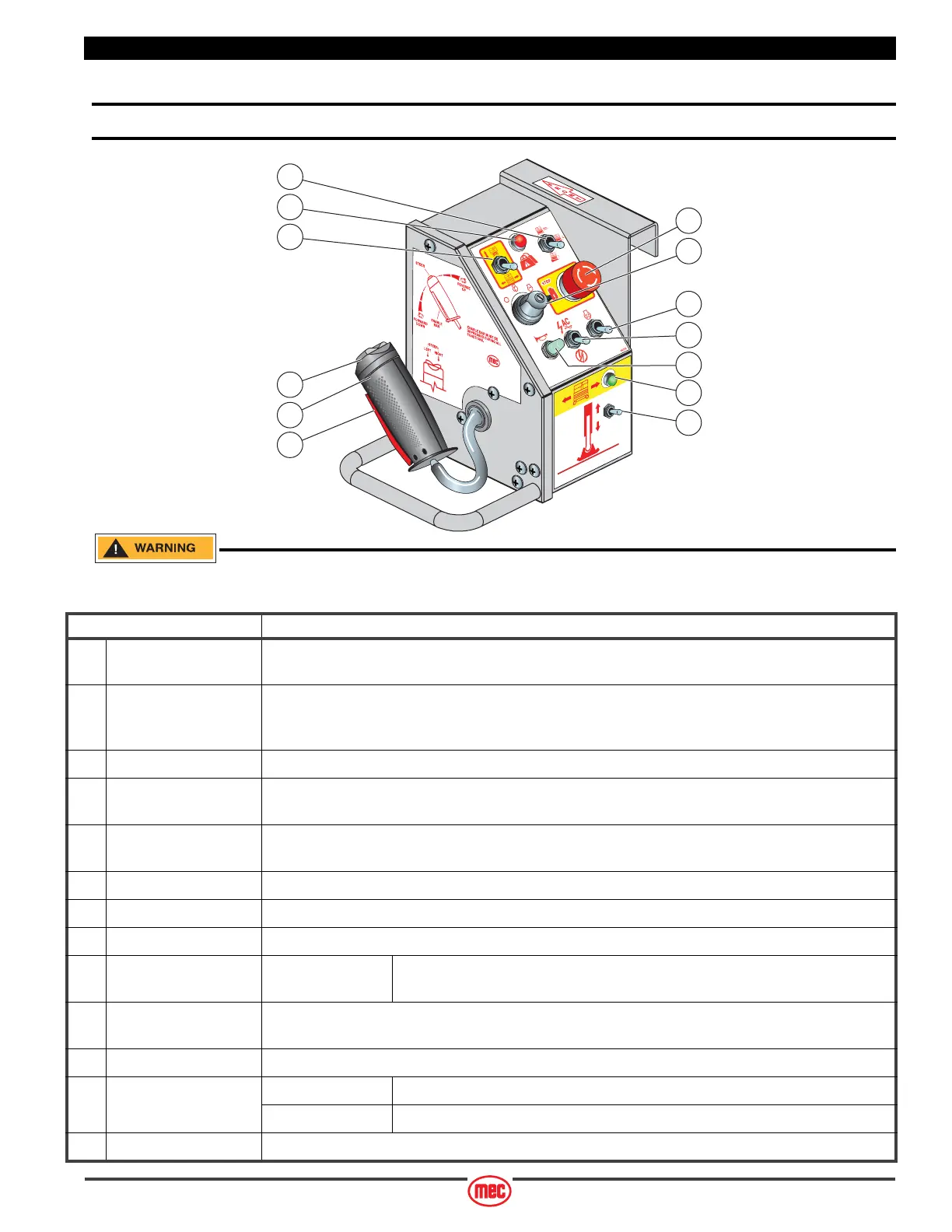
Platform Controls
ALWAYS be aware of the machine’s position and of your surroundings
before activating any control function.
ART_4410
1
2
3
4
5
7
6
8
9
10
11
12
13
CONTROL DESCRIPTION
1 Speed/Torque
Selector Switch
Move this switch to the up position for high speed drive. Move to the middle position for
mid-speed/mid-torque drive. Push this switch to the down position for high torque drive.
2Overload Indicator
Light
Platform overloaded when light is ON.
An audible alarm will sound and all machine functions will stop.
Remove weight from the platform to restore function and continue.
3 Lift/Drive Switch Move this switch UP to enable the Lift function. Move this switch DOWN to enable the Drive function.
4 Emergency Stop Switch Press the EMERGENCY STOP switch at any time to stop all machine functions.
Turn switch clockwise to reset.
5 Start Switch Turn to far right to start engine. Switch will return to RUN position for normal operation.
Turn to OFF to shut engine down.
6 Glow Operate when starting in cold start conditions.
7 Generator (Option) Starts and stops optional generator.
8 Horn Button (Option) Press to sound warning horn.
9Drive Enable Indicator
(Outrigger Option)
Lamp ON
Lamp OFF
Outriggers are retracted and machine will drive.
Outriggers are extended and machine will not drive.
10 Extend/Retract
(Outrigger Option)
Push the toggle switch DOWN to extend the outriggers. Continue pushing down until the outriggers
stop automatically. Push the toggle switch UP to retract the outriggers.
11 Steer Switch Using your thumb, press and hold the rocker switch to steer Left or Right.
12 Control Handle DRIVE Proportionally controls Forward and Reverse travel.
LIFT Proportionally controls Lift and Lower functions.
13 Enable Bar Squeeze to enable DRIVE, STEER, and LIFT functions from the Joystick.



 To Next Page