Page 10 93075
April 2014 4069 RT
4069 RT Controls & Components
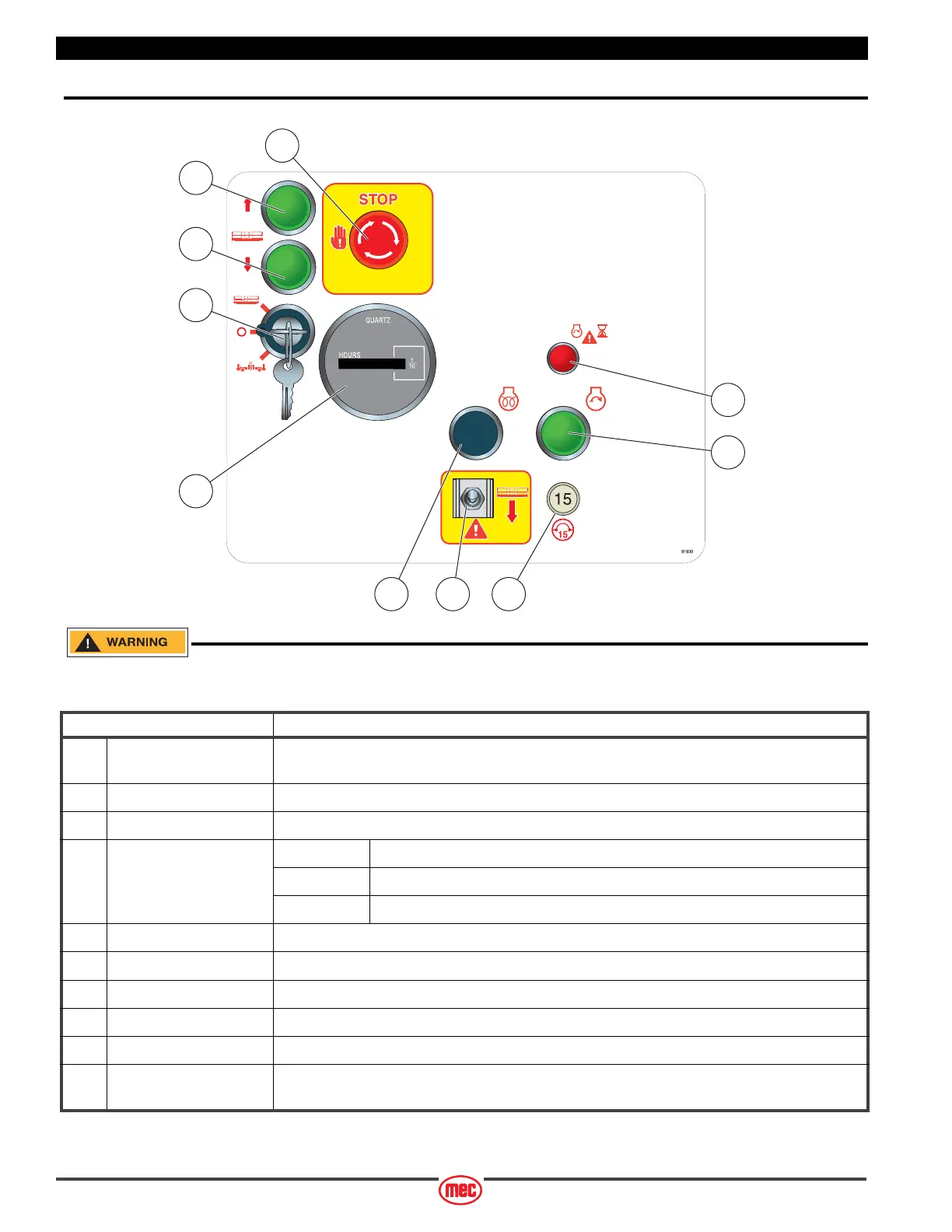
Lower Controls
ALWAYS be aware of the machine’s position and of your surroundings
before activating any control function.
CONTROL DESCRIPTION
1 Emergency Stop Switch Press the EMERGENCY STOP switch at any time to stop all machine functions.
Turn switch clockwise to reset.
2 Platform Lift Button Press this button to lift the platform.
3 Platform Lower Button Press this button to lower the platform.
4 Selector Switch PLATFORM Select to operate from the platform control panel.
BASE Select to operate from the base control panel.
OFF Select to stop operation from either control panel.
5 Hour Meter Indicates total elapsed time of machine operation.
6 Glow Operate when starting in cold start conditions.
7 Emergency Down Switch Move this switch down to lower the platform in the event of an emergency or power loss.
8 Circuit Breaker Trips when there is excessive electrical load. Push to reset.
9 Start Button Press to start engine. Release when engine starts.
10 Start Delay Light Prevents over-cranking of engine. When lit, starter is disabled. After approximately 35 seconds
the light will go out and starter will operate.
ART_4399
7 86
9
10
2
3
4
5
1



 To Next Page