Page 13 1330SE - Operator’s Manual
June 2023Section 5 - Controls & Components
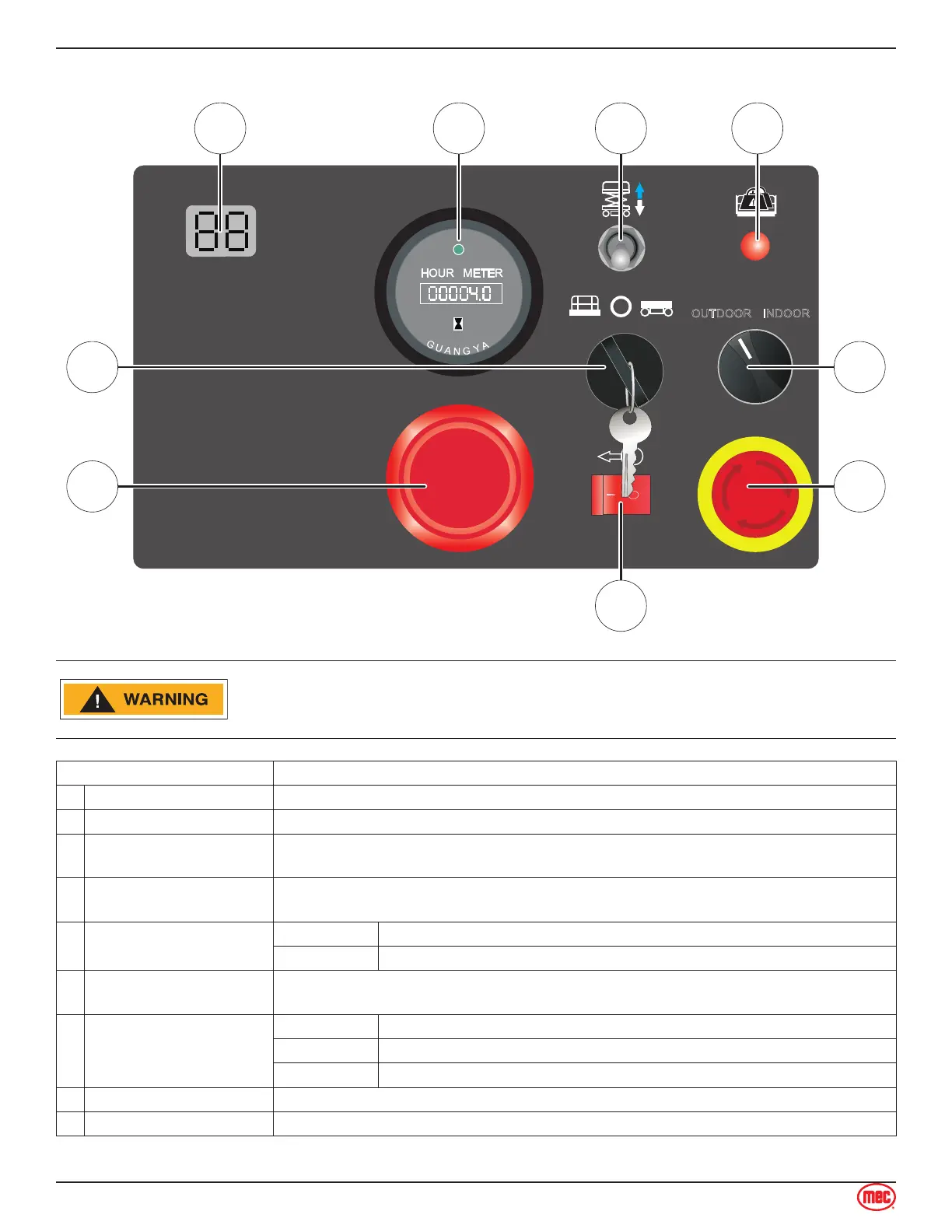
Lower Controls
OUTDOOR INDOOR
09110036.B
8
6
7
9
5
ART_5792
ALWAYS be aware of the machine’s position and of your surroundings
before activating any control function.
Control Description
1 LED Display Indicates the state of battery charge and displays diagnostic codes when necessary.
2 Hour Meter The hour meter displays the number of hours the machine has operated.
3
Platform Lift / Lower
Switch
With the Key Switch in the BASE position, move this switch up to lift the platform or
down to lower the platform.
4 Platform Overload
Indicates too much weight on the platform.
Remove weight from the platform to restore function and continue.
5 Outdoor/Indoor Switch
OUTDOOR Select to limit the maximum height when outdoors.
INDOOR Select to allow unrestricted height when indoors.
6 Emergency Stop Switch
Press the EMERGENCY STOP switch at any time to stop all machine functions.
Turn button clockwise to the on position to operate the machine.
7 Key Switch
PLATFORM Select to operate from the platform control panel.
OFF Select to stop operation from either control panel.
BASE Select to operate from the base control panel.
8 Brake Release Switch See page 37 for instructions.
9 Main Power Switch Pull to turn the power on or push to turn the power o.



 To Next Page