Page 12 65-J Diesel - Operator’s Manual
September 2022Section 5 - Controls & Components
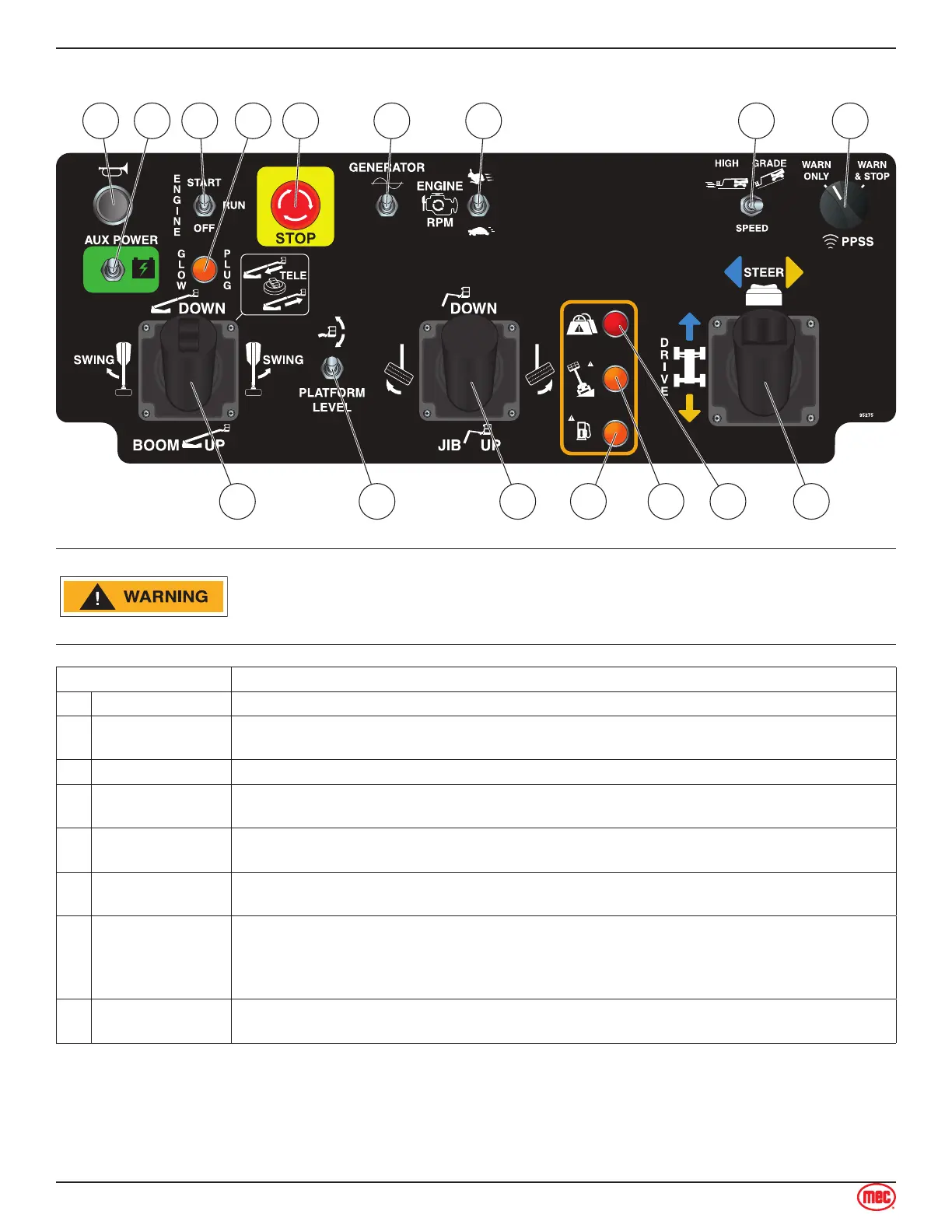
Platform Controls
ART_5659
1 5 6 7 8 93 42
10141516 13 12 11
ALWAYS check over, under and around the machine for personnel,
structures and obstructions before activating any control function and
continue to watch for hazards while operating the machine.
Control Description
1 Horn Button Press to sound warning horn.
2 Auxiliary Power
If normal power fails, press and hold while using Boom Retract and Boom Lower
functions.
3 Start/Stop Switch Move this switch up to start engine. Press this switch down to stop engine.
4 Glow Plug Light
The light will turn on when the Kubota ECU determines it necessary to activate glow plugs
before starting the engine.
5
Emergency Stop
Switch
Press the EMERGENCY STOP switch at any time to stop all machine functions.
Turn switch clockwise to reset.
6
Generator Switch
(Optional)
Turn switch ON to engage optional AC generator.
Generator switches o when any other function is enabled.
7
Engine Speed
Select Switch
Use this switch to set the engine speed when functions are enabled. Setting this switch to
low idle speed allows the operator to move the machine slowly and precisely.
Move this switch up for high idle speed and fast function speed.
Move this switch down for low idle speed and slow function speed.
8
Speed/Torque
Switch
Move this switch to the left for high speed drive. Push this switch to the right for high
torque drive.



 To Next Page