Page 36 92RT Scissor Lifts - Operator’s Manual
July 2020Section 11 - Component Locations
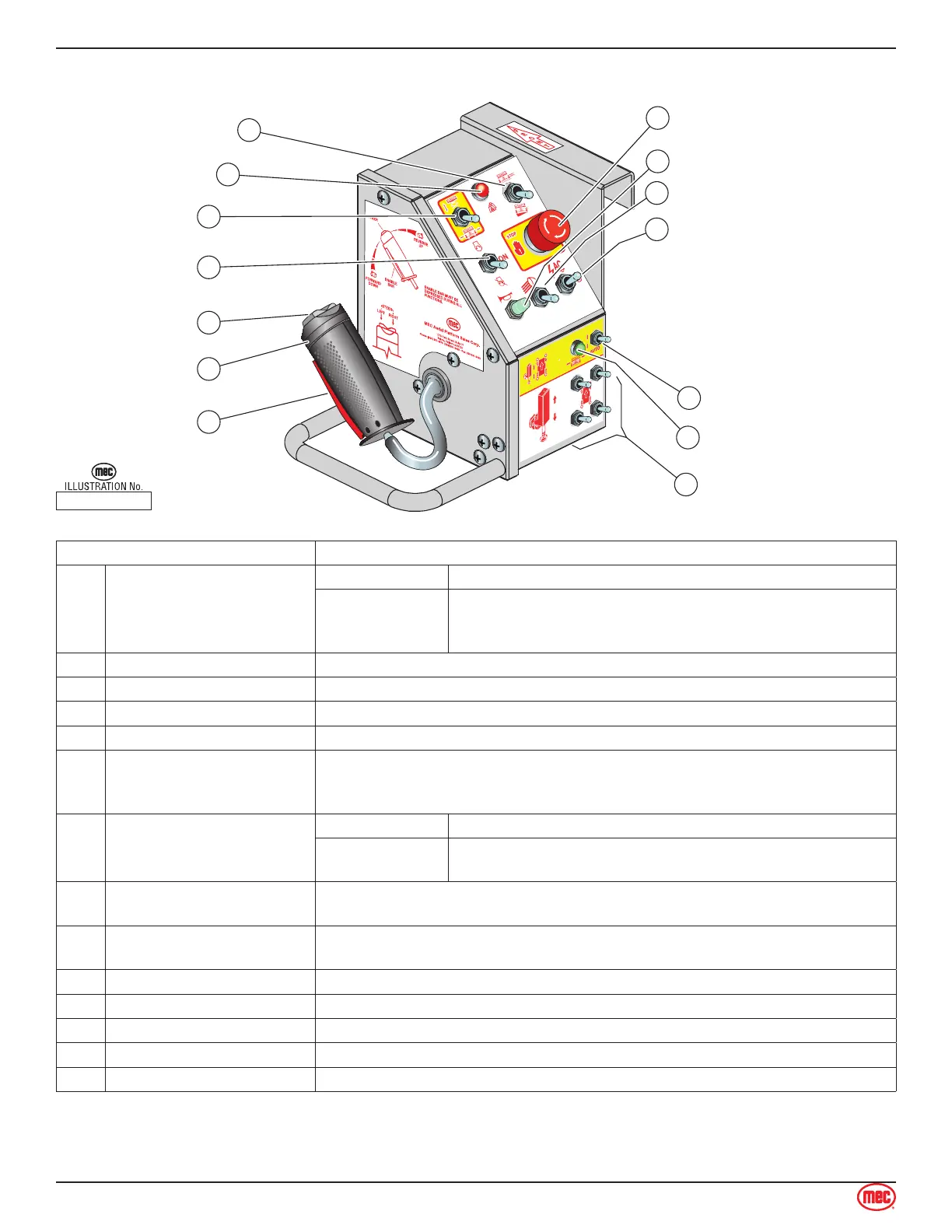
Upper Controls
ART_4698
91844
Emergency Stop
Joystick
Enable Bar
Lift / Drive
Steering
Speed / Torque
Automatic Leveling
Horn (Optional)
Manual Level Switches
8
11
Start Switch
5
12
Drive Enabled Indicator
13
1
2
3
4
Overload Indicator
6
7
14
Work Lights (Optional)
10
Up -- Preheat
9
CONTROL DESCRIPTION
1 Joystick
DRIVE Controls Forward and Reverse travel at stepped speeds.
LIFT
Move toward operator to elevate platform. Lift speed
increases proportional to the Joystick movement
Move away from operator to lower platform. Speed is fixed.
2 Enable Bar Squeeze to enable DRIVE, STEER, and LIFT from Joystick.
3 Steering Switch Using thumb, press and hold the rocker switch to steer Left or Right.
4 Mode Selector Select LIFT or DRIVE function for Joystick.
5 Start / Run Switch Turn power ON or OFF at the platform. Does not affect lower controls.
6 Overload Indicator
Platform overloaded when light is ON.
An audible alarm will sound and all machine functions will stop.
Remove weight from the platform to restore function and continue.
7 Speed / Torque Switch
HIGH TORQUE Slow speed. Provides maximum torque for rough terrain.
HIGH SPEED
Provides high speed when platform height is below 10 feet
(3 m).
8 Emergency Stop Switch
PUSH to stop all machine functions.
TURN CLOCKWISE to reset.
9 Up -- Generator
Push the switch UP to engage optional AC generator.
Drive and Lift functions are disabled while the generator is on.
10 Work Lights (Option) Move switch Up to turn on work lights.
11 Horn Press to sound warning horn.
12 Automatic Level Switch Move switch Up and hold until automatic leveling is complete.
13 Drive Enable Indicator Drive function is enabled when the light is ON.
14 Manual Level Switches Push these switches UP or DOWN to adjust individual outriggers.



 To Next Page