Page 37 92RT Scissor Lifts - Operator’s Manual
July 2020Section 11 - Component Locations
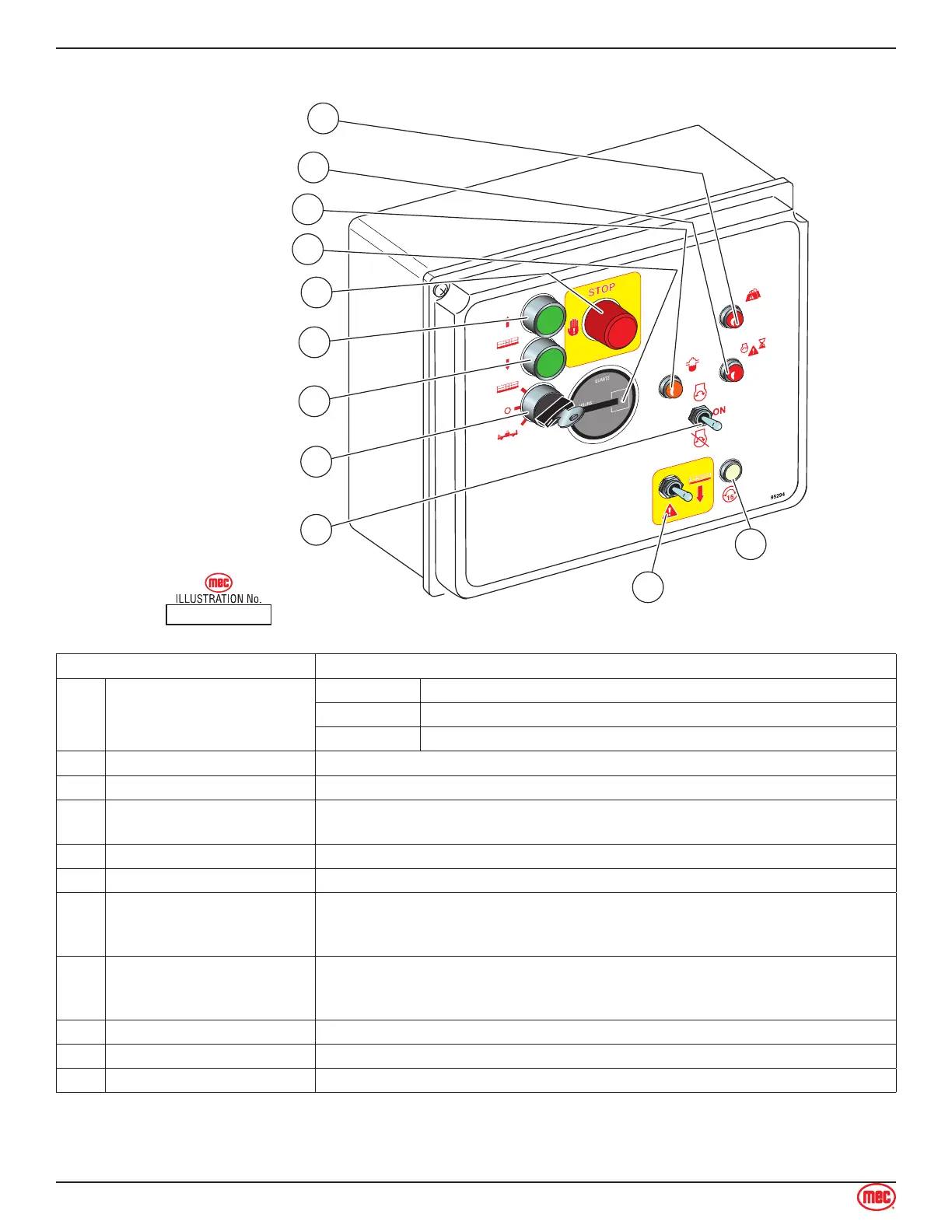
Lower Controls
ART_3021 R2
15
3
10
2
4
5
9
1
Emergency Stop
Circuit Breaker
Platform / Base
11
Start Switch
Lower (Green)
Raise (Green)
Emergency Down
Hour Meter
6
Water & Fuel Light (Amber)
7
Starter Delay (Red)
8
Overload (Red)
CONTROL DESCRIPTION
1 Selector Switch
PLATFORM Select to operate from the platform control panel.
BASE Select to operate from the base control panel.
OFF Select to stop operation from either control panel.
2 LOWER Button Press and hold to lower the platform. Release to stop lowering.
3 RAISE Button Press and hold to elevate the platform. Release to stop elevation.
4 Emergency Stop Switch
Press to stop all machine functions.
Turn clockwise to reset.
5 Hour Meter Indicates total elapsed time of machine operation.
6 Water & Fuel Light Indicates if water has contaminated fuel.
7 Start Delay Indicator Light
After 20 seconds of continuous cranking, the engine starter circuit cuts off
momentarily to prevent damage to the starter. This light illuminates when the
starter circuit is cut off. Resets after 25 seconds.
8 Overload
Platform overloaded when light is ON.
An audible alarm will sound and all machine functions will stop.
Remove weight from the platform to restore function and continue.
9 Circuit Breaker Trips when there is excessive electrical load. Push to reset.
10 Emergency Down Switch Activate this switch to run the Emergency Down auxiliary hydraulic pump.
11 Start / Run Switch Turn power ON or OFF at the platform. Does not affect upper controls.



 To Next Page