EasyManua.ls Logo

MEDCAPTAIN HP-30 - Specification Potentiometer Removal

Default Icon
82 pages
Print Icon
To Next Page IconTo Next Page
To Previous Page IconTo Previous Page
Loading...
Disassembly and Assembly
45
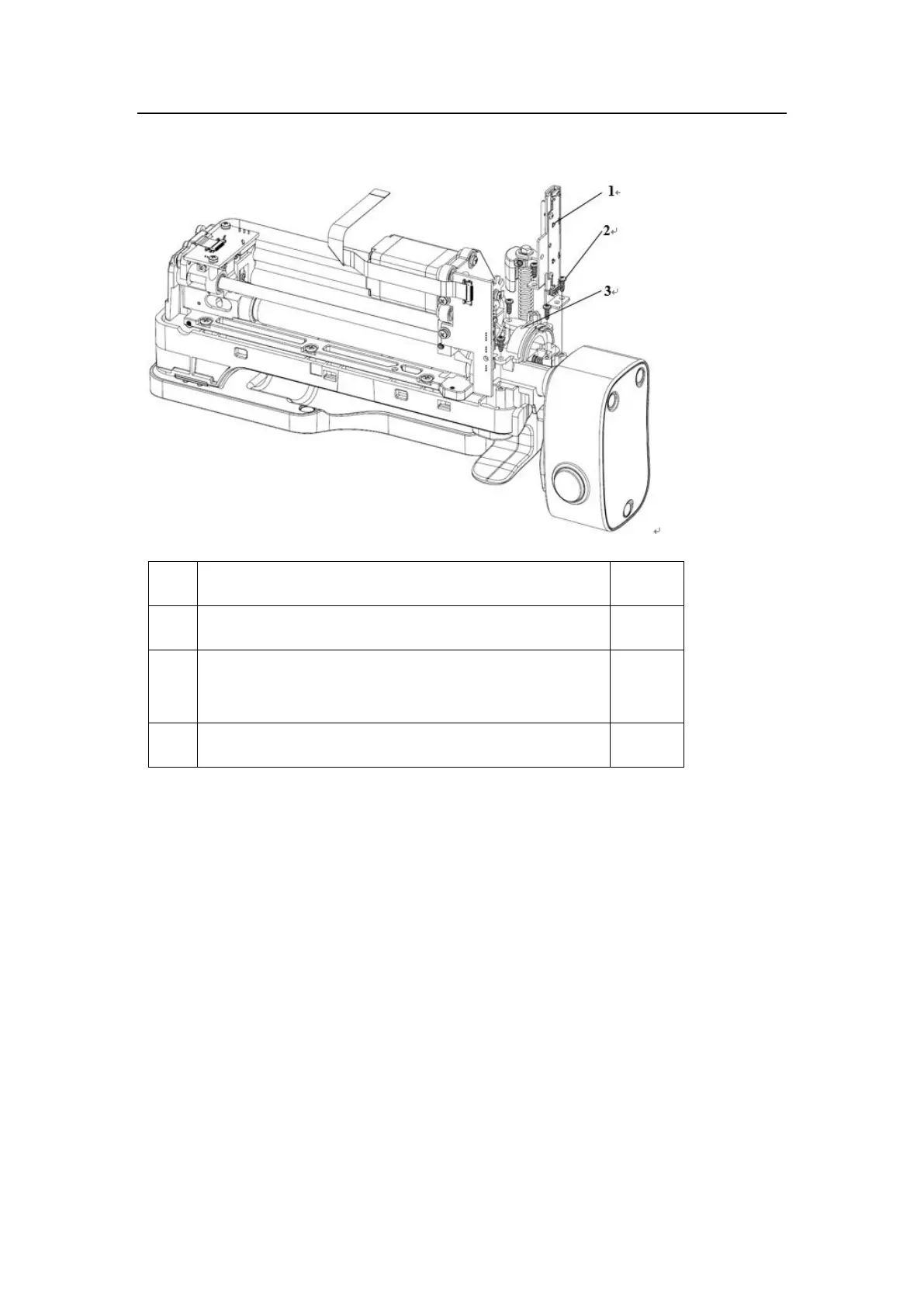
10.5 Dismantling the Specification Potentiometer
No.
Name
Quantity
1
HP-30 specification potentiometer (with cable)
1
2
PT2.3*6 cross recessed pan head drilling PT thread
pressping screw
5
3
HP-30 clamping piece pressing plate
1
1) Remove the connection cable connector of the specification potentiometer from the speed
measuring PCBA of the HP-30.
2) Remove the five pressping screws (2).
3) Take down the clamping piece pressing plate (3) of the HP-30, and take down the
specification potentiometer (1) together with cables.
Note: When dismantling the specification potentiometer, protect the slide handle of the
potentiometer.

Table of Contents

Related product manuals