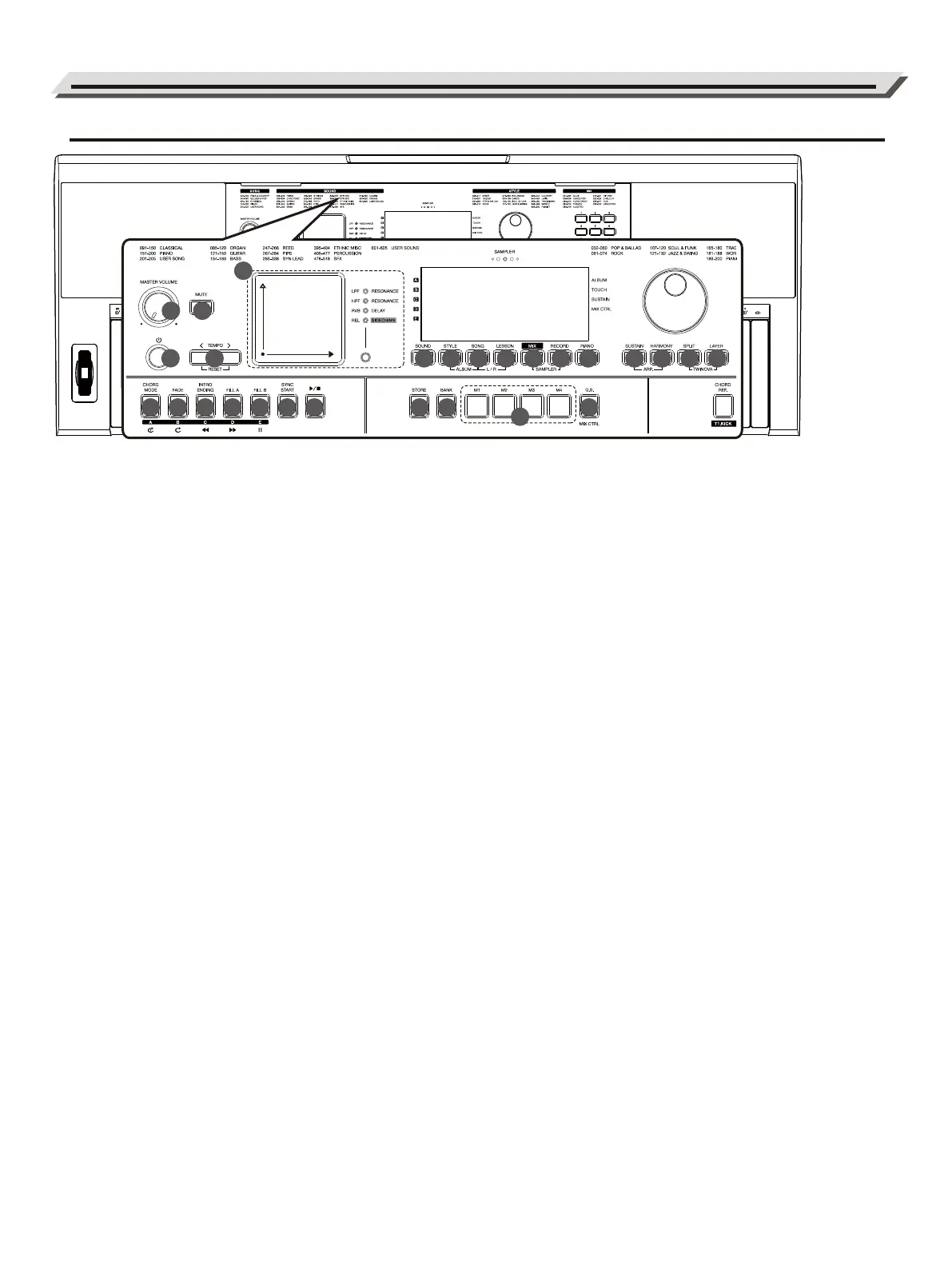
Panel & Display Description
Front Panel
1. [MASTER VOLUME] Knob:
Adjust the master volume.
2. [POWER] Button:
Switch the power on or off.
3. [MUTE] Button:
Mute or unmute the master volume.
4. [TEMPO </>] Buttons:
Adjust the current tempo.
Press [<] and [>] at the same time
to reset to the default tempo.
5. Touch Pad and [EFFECT] Button:
Press the [EFFECT] button to select
a group of parameters, and then
use the Touch pad to control the
selected parameters in real time.
6. CHORD MODE Button:
Style mode: Select Fingered mode or
Full Range mode.
Mix mode: Press this button to
select Section A. Long-press this
button to engage slicer on Section A.
Song mode: Loop playing the
currently selected song.
7. [FADE] Button:
Style mode: Turn Fade In/Fade Out
on or off.
Mix mode: Press this button to
select Section B. Long-press this
button to engage slicer on Section B.
Song mode: Loop playing all preset
songs.
8. [INTRO/ENDING] Button:
Style mode: Play an intro or ending
pattern.
Mix mode: Press this button to select
Section C. Long-press this button to
engage slicer on Section C.
Song mode: Rewind the song
playback.
9. [FILL A] Button:
Style mode: Play the fill-in pattern A.
Mix mode: Press this button to select
Section D. Long-press this button to
engage slicer on Section D.
Song mode: Fast-forward the song
playback.
10. [FILL B] Button:
Style mode: Play the fill-in pattern B.
Mix mode: Press this button to
select Section E. Long-press this
button to engage slicer on Section E.
Song mode: Pause or continue the
song playback.
11. [SYNC START] Button:
Turn the sync start function on or off.
12. [START/STOP] Button:
Start or stop playing a style, song,
or mix pattern.
13. [SOUND] Button:
Enter Sound mode.
14. [STYLE] Button:
Enter Style mode. Press [STYLE]
and [SONG] buttons at the same
time to enter Album mode.
15. [SONG] Button:
Enter Song mode. Press [SONG]
and [STYLE] buttons at the same
time to enter Album mode.
16. [LESSON] Button:
When song playback is stopped,
press this button to enter or exit
Lesson mode. Press [LESSON] and
[SONG] buttons at the same time to
select a hand-part for practice in this
circulation: L → R → L+R.
17. [MIX] Button:
Enter Mix mode. Press [MIX] and
[RECORD] buttons at the same time
to engage the sampler.
18. [RECORD] Button:
Enter Record mode.
19. [PIANO] Button:
Turn Piano Mode on or off.
20. [STORE] Button:
Hold this button then press one of
the [M1] - [M4] buttons to save the
panel settings to that button.
21. [BANK] Button:
Select a memory bank.
22. [M1] - [M4] Buttons:
In Memory mode: Press one of these
buttons to recall panel settings.
In Q.S. mode: Press one of these
buttons to recall Sound settings that
match the current style.
23. [Q.S.] Button:
Turn Q.S. function on or off. In Mix
mode, press this button to switch
between the primary and secondary
functions of the track buttons.
24. [SUSTAIN] Button:
Turn the panel sustain on or off.
Press [SUSTIAN] and [HARMONY]
buttons at the same time to turn the
arpeggiator on or off.
25. [HARMONY] Button:
Turn the harmony function on or off.
26. [SPLIT] Button:
Turn the split function on or off.
Press [SPLIT] and [LAYER] buttons
at the same time to turn Twinova
function on or off.
27. [LAYER] Button:
Turn the layer function on or off.
04
1
11
2
20
12
13
14
15 16
17
18
19
6
7
8
9
10
4
3
21
24 2726
23
25
5
22



 To Next Page