STYLE
Playing Auto Accompaniment (rhythm
track only)
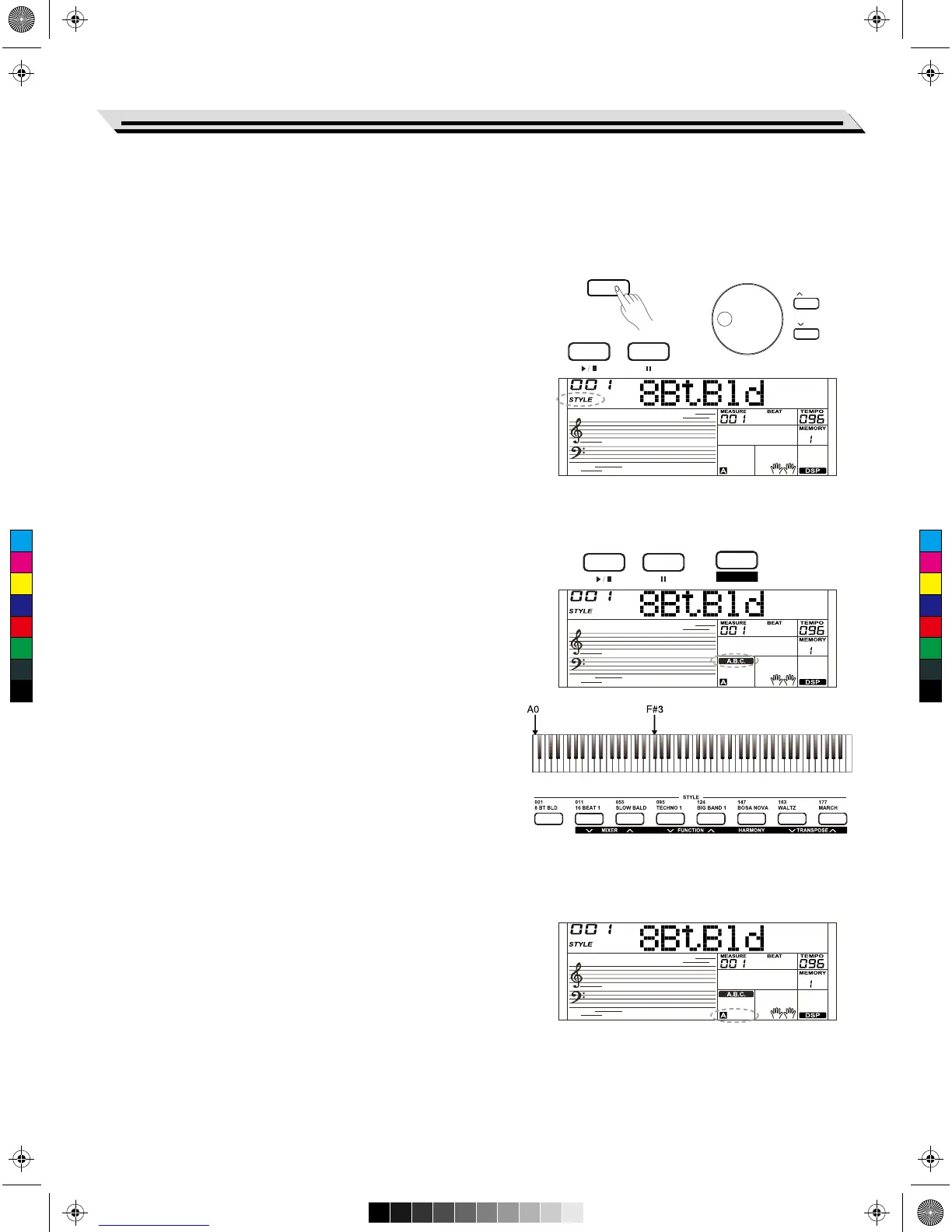
1. Press the [STYLE] button
Enter the style mode. The “STYLE” icon on the left-top of the LCD
will light up. The LCD displays the name and the number of the
current style.
2. Select a style
Use the data dial or the [+/YES]/ [-/NO] button to select a style you
want. Or use the style direct buttons.
3. Start playing a style
Press the [START/STOP] button to start the rhythm tracks of the
auto accompaniment. Also press [SYNC START] and then play any
key to start the rhythm tracks of the auto accompaniment.
4. Press the [START/STOP] again to stop style playing.
Playing Auto Accompaniment (all tracks)
1. Turn the auto accompaniment on
In style mode, press the [A.B.C] button to enter the “auto bass
chord” (A.B.C.) mode. The keyboard is divided into two sections.
Left-hand section is the chord detecting section. Meanwhile the
“A.B.C.” icon lights up. Now pressing any key in chord detect
section(Sync Start status), the fantastic accompaniment will be
heard.
2. Start the auto accompaniment
Press the [SYNC START] button and then play a chord in chord
detecting section to start the auto accompaniment of all tracks.
The accompaniment automatically changes followed by the change
of the chord. Press the [START/STOP] button to start the auto
accompaniment of the rhythm track, then play a chord in chord
detecting section. It will start the auto accompaniment of all tracks.
Note:
The instrument includes 10 user styles. You can use our PC suite to
create your own styles.
Accompaniment Sections
A various types of Auto Accompaniment sections which allow you to
vary the arrangement of the accompaniment to match the song
playing.
They are: Intro, Main (A, B), Fill (A, B), and Ending. By switching
among them during your performance, easily produce the dynamic
elements of a professional sounding arrangement .
1. INTRO Section
The intro is an opening section of the song. When the intro pattern
is finished, the system will automatically shift to the main section.
2. MAIN Section
The main is an important section of the song. And it plays an
accompaniment pattern and repeat infinitely until another section’s
button is pressed.
Auto Accompaniment
15
START / STOP SYNC START
A.B.C.
FADE
START / STOP SYNC START
/ YES
/ NO
The auto accompaniment function puts a full backing band at your fingertips. All you have to do is to play the chords with
your left hand using your selected accompaniment style, and then the accompaniment will automatically play along, instantly
following the chords you play. This keyboard features 230 styles in a variety of different musical genres. Try to select and
playing with the style you want . (Please refer to the Style List for details)
C
M
Y
CM
MY
CY
CMY
K
AW_SP4200_Manual_G05_150723.ai 15 2015/7/23 11:23:00AW_SP4200_Manual_G05_150723.ai 15 2015/7/23 11:23:00



 To Next Page