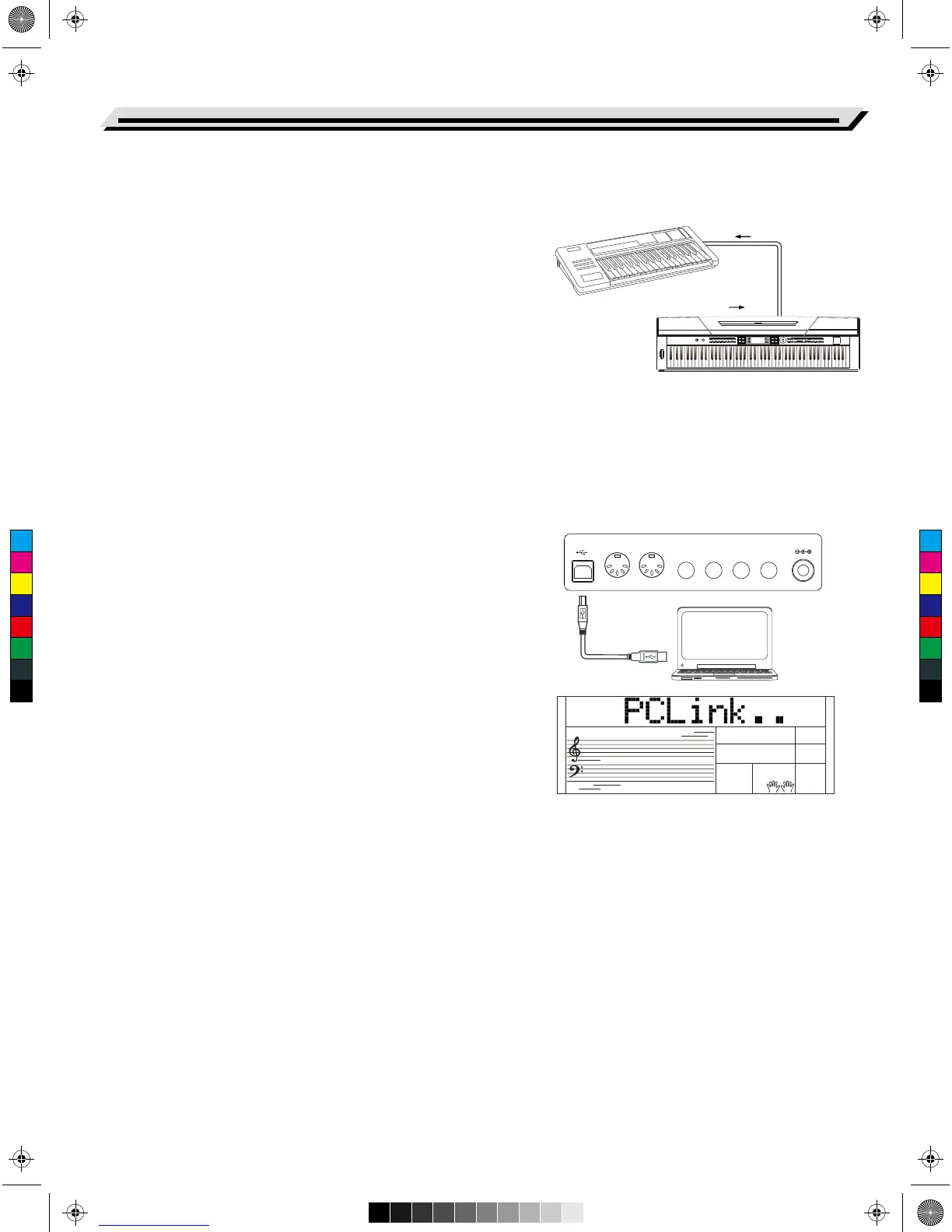
By using the MIDI functions you can expand your musical possibilities.
This section explains what MIDI is, and what it can do, as well as how
you can use MIDI on your instrument.
What's MIDI?
1. MIDI (short for Musical Instrument Digital Interface) allows a wide
variety of electronic musical instruments, computers and other
related devices to connect and communicate with one another. MIDI
carries event messages that specify notation, pitch and velocity,
control signals for parameters such as volume, vibrato, audio
panning, and program change information to change the voice
selections.
2. The instrument can output the real-time playback information via
MIDI messages and control external MIDI devices. The instrument
can also accept incoming MIDI messages and generate sound
accordingly.
Note:
The USB connector belongs to USB device which can only be
connected with PC. It is not allowed to be connected with the USB port
of other instrument unless the one belongs to HOST.
Downloading Data from the PC
1. Connect a standard USB cable between the USB jack of the
instrument and the USB terminal of your PC.
2. Power on the instrument first, and then open the PCSUITE software
in your PC, the “PCLink..” will be displayed on LCD, which indicates
the PCSUITE has been connected successfully with the instrument.
3. You can download 3 MIDI files to the instrument as user songs or
upload the user songs. You can upload user styles to the PC as a
backup or download them to the instrument.
4. You can upload user voices to the PC as a backup or download
them to the keyboard. You can upload memory files to the P as a
backup or download them to the instrument.
38
MIDI Functions
USB MIDI OUT MIDI IN SUSTAIN AUX OUT AUX IN MIC DC IN
MIDI OUTMIDI IN
MIDI OUT
MIDI IN
最小 最大
音量
001 8 拍民谣 011 16 拍 1045 慢民谣 085 电子舞曲 1137 波沙诺瓦 150 华尔兹 163 进行曲 173 中国民乐摇滚 001 原声大钢琴 048 放克电钢琴 062 颤音琴
M1记忆库 存储 M2 M3 M4 M5 M6 单触键设置 USB设备
079 手摇风琴 167 小提琴 186 弦乐合奏 211 小号 226 铜管合奏 244 高音萨克斯 276 甜蜜长笛
启动 / 停止 同步启动 前奏 / 尾奏 插入 A 插入 B 自动低音和弦 速度
调音台 双音色 下音色 力度 环境效果 延音 和弦字典 学习 左 右&
录音 伴奏音轨 旋律音轨 1 旋律音轨 2 旋律音轨 3 旋律音轨 4 旋律音轨 5
音色节奏
单触键设置
和声 移调功能
双钢琴 八度
PITCH BEND
/ 是
/ 否
渐强 / 渐弱 伴奏音量
演奏帮助 节拍器
大钢琴
音色 节奏
歌曲
切换 示范曲
C
M
Y
CM
MY
CY
CMY
K
AW_SP4200_Manual_G05_150723.ai 38 2015/7/23 11:23:07AW_SP4200_Manual_G05_150723.ai 38 2015/7/23 11:23:07



 To Next Page