17
EN
7) : Standby button: Switch the device on or into standby mode
8) Operating light: Shines red when the device is in standby mode.
Shines blue when the device is switched on.
Infrared sensor: Reception field for the infrared remote control signals.
9) LCD screen
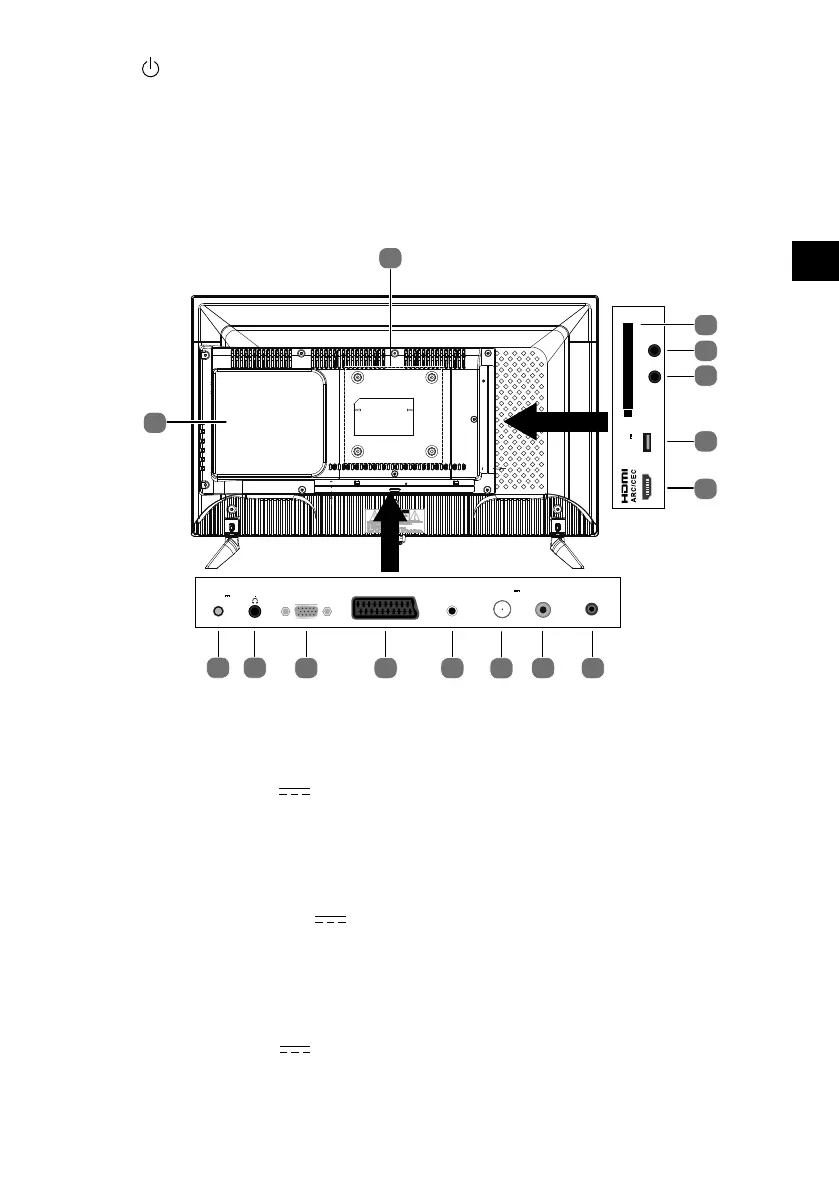
5.2. Rear
14
15
Headphone out
SPDIF
COAX OUT
Common Interface
MINI
YPbPr
USB (2.0)
DC 5V
Max. 500mA
MINI
AV
1
2
3
4
5
PC
AUDIO
PC
TRACS
RF
6791011
LNB IN
DC13V/18V
400mA Max.
8
POWER
DC12V
3A
13 12
1) COMMON INTERFACE CI+:
Card slot for connecting pay TV cards
2) MINI YPBPR: YPbPr components input (via the supplied cinch adapter)
3) MINI AV: Audio/video input (via the supplied cinch adapter)
4) USB2.0 DC 5V , Max. 500mA:
USB port for connecting an external stor-
age medium for playing back media.
5) HDMI ARC/CEC: HDMI port for devices with HDMI output (can be used for CEC/ARC)
6) SPDIF COAX OUT: Digital audio output (coaxial)
7) RF: Antenna connection (DVB-T/DVB-T2 HD/DVB-C/analogue)
8) LNB IN DC 13V/18V 400mA Max.: For connecting the antenna (satellite)
9) PC AUDIO: Audio socket for PC sound playback
10) SCART: SCART socket (input)
11) PC: Socket for connecting a PC
12) HEADPHONE OUT: For connecting headphones with 3.5 mm jack
13) POWER DC 12V / 3A: Connector for mains adapter or for car adaptor
14) DVD player (optional)



 To Next Page