32
8. Operation
8.1. Channel selection
To select a channel, either press the CH+/ buttons (on the device) or the P+/
buttons (on the remote control) or select the channel directly by pressing the
appropriate number.
For a two- or three-figure number, press the numbers one after another.
Press the
button to select the last channel played.
8.2. Sound settings
You can increase or decrease the volume by pressing the volume buttons
(on the remote control) or VOL+/ (on the device).
Press the mute button to switch the volume fully off and on again.
Use the AUDIO button to select from the available audio languages (audio
channels). If the current programme supports DUAL mode (e.g. for dual-lan-
guage programmes), you can select DUAL mode.
Use the S.MODE button to switch between the following sound modes: STAND
ARD, MUSIC, MOVIE, SPORTS, PERSONAL. The PERSONAL setting is defined
in the SOUND > SOUND MODE menu.
8.3. Screen settings
Use the P.MODE button to switch between the following picture modes: DY
NAMIC, STANDARD, MILD, PERSONAL. The PERSONAL setting is defined in
the PICTURE > PICTURE MODE menu.
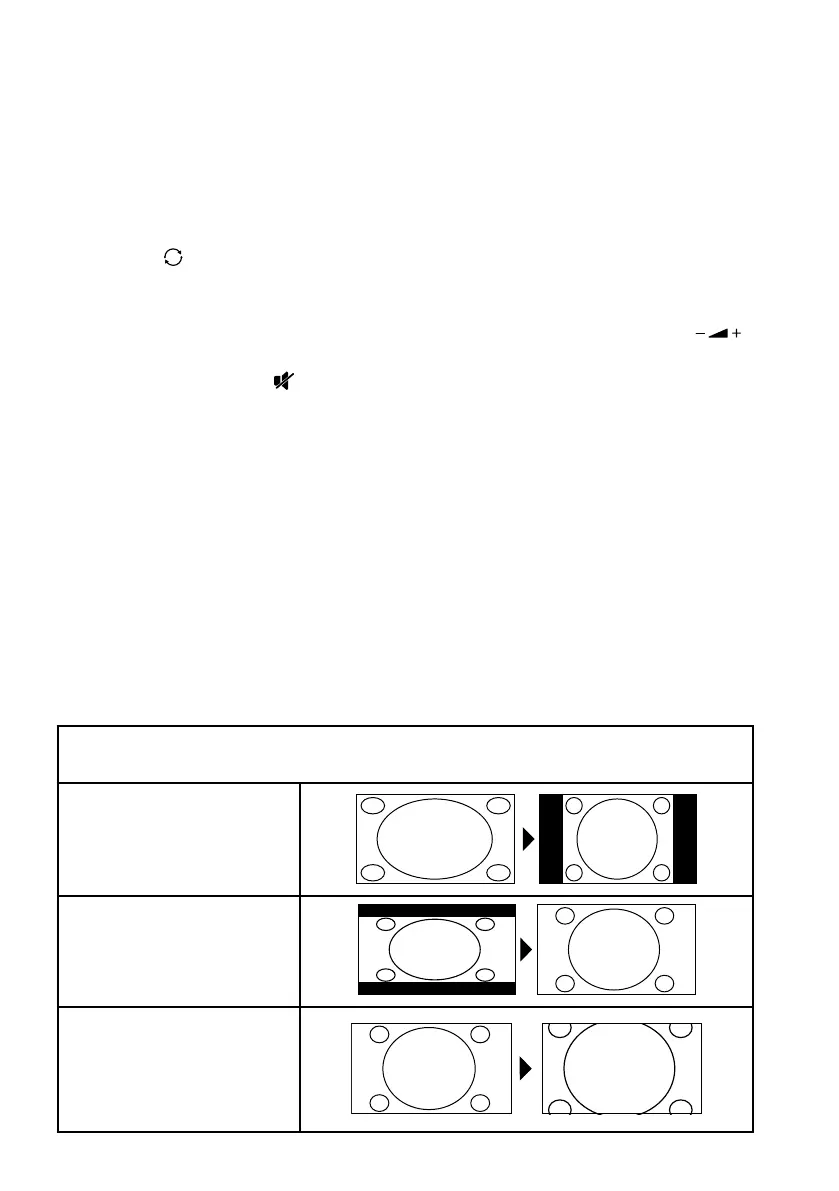
Depending on the programme, the pictures are transmitted in the formats 4:3 or
16:9. Use the SIZE button to adjust the picture format:
AUTO (not available for ATV)
The format displayed is automatically adjusted to match the input signal.
4:3
For undistorted picture dis-
play in 4:3 format.
16:9
For undistorted picture dis-
play in 16:9 format.
ZOOM 1
The picture is stretched in
all directions in level 1.



 To Next Page