56
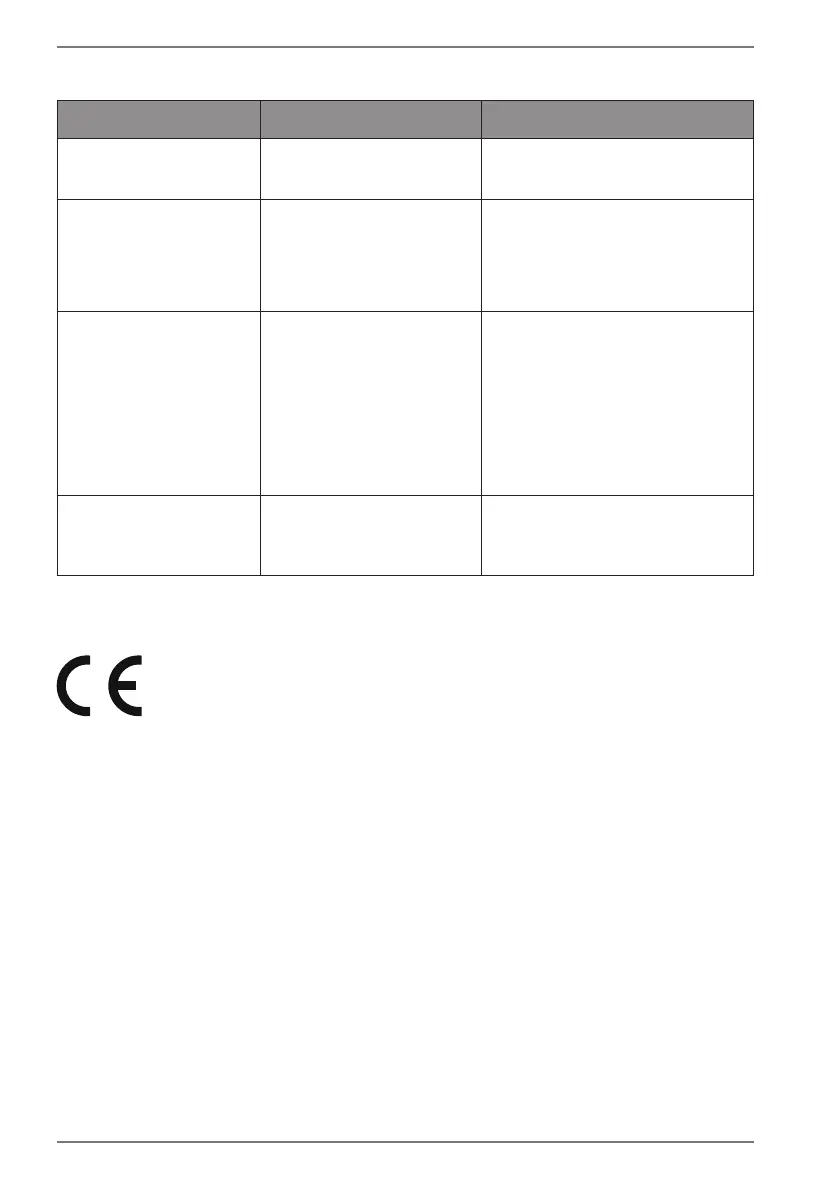
15. Troubleshooting
Problem Possible cause Solution
The fitness watch will
not start.
The battery is not
charged.
Charge the fitness watch.
No/incorrect heart
rate measurement
The sensor surfaces are
dirty.
The strap is too loose
around the wrist.
Clean the sensor surfaces.
Make sure that the strap
is not fastened too loosely
around your wrist.
Data transfer
between the
fitness watch and
smartphone/tablet is
faulty.
No Bluetooth
connection
Perform the Bluetooth
pairing again.
If necessary, uninstall the
MEDION® Fitness app
and then reinstall it with
subsequent Bluetooth
pairing.
The calculation of
calories burned is
incorrect/implausible.
Your personal data has
been stored incorrectly.
Check your entries in the
app for gender, age, weight
and height.
16. EU Declaration of Conformity
MEDION AG hereby declares that this device complies with the
fundamental requirements and the other relevant provisions of:
• Radio Equipment Directive 2014/53/EU
• RoHS Directive 2011/65/EU.
You can download the complete EU Declaration of Conformity at
www.medion.com/conformity.
16.1. Trademark information
The Bluetooth® word mark and logos are registered trademarks of
Bluetooth SIG, Inc. and are used by MEDION under licence.
The Android™ word mark and logos are registered trademarks of Google LLC and
are used by MEDION under licence.
The USB™ word mark and logos are registered trademarks of the USB Implementers
Forum, Inc. and are used by MEDION under licence.
Other trademarks are the property of their respective owners.


 To Next Page