51
IT
EN
SI
HR
If there is an existing Bluetooth connection with the smartphone/tablet
PC, tap
to use the “Find telephone” function and sound a signal
tone on the connected device to help locate it.
9. Sport mode
In sport mode on the fitness watch, you can select a sport type or define a training
goal and start an activity recording. You can view stored activity recordings in the
activity progress.
9.1. Activity recording
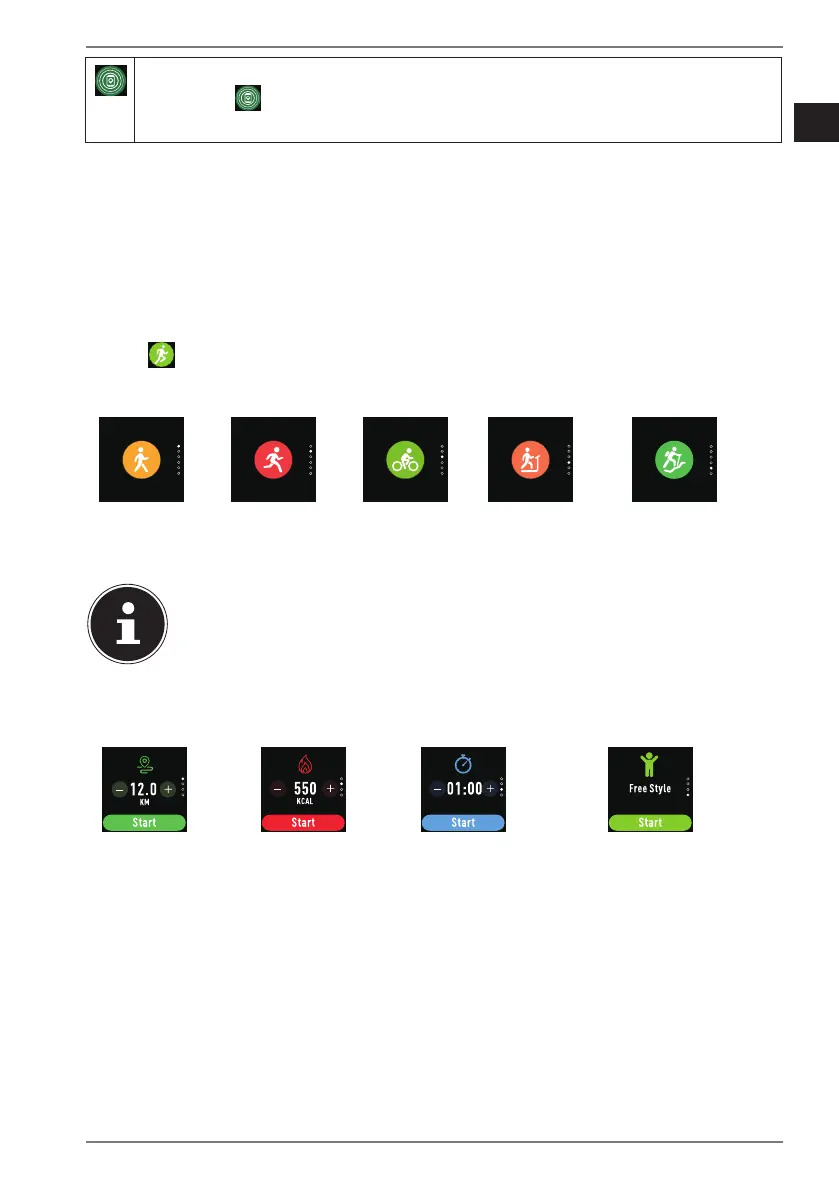
Tap to select a sport type for the activity recording.
By default, you can choose from the following:
Walking Running
(outdoors)
Cycling Running
(indoors)
Climbing
Use the MEDION® Fitness app to select an activity from an extended
range of sport modes (e.g. badminton, dancing etc.). The range varies
depending on the device model.
Once you have selected a sport type, you can also define a training goal for the
activity recording:
Distance
goal
Calorie consumption
goal
Time goal Free training without
defining a goal
Swipe upwards or downwards on the display to switch between the various
options.
Use the +/- buttons to select the desired value for your training goal.
Select the free training option to start an activity recording without a training
goal.
Tap START to begin the activity recording.
Activity recording starts once the three-second countdown has elapsed.


 To Next Page