MegaPoints servo controller Revision 24 April 2016
www.loolee.org Page: 16
programming mode. Solid means a servo is operating normally,
flashing indicates it has been reversed.
Advance to next servo
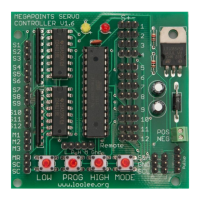
While in programming mode, subsequent presses of the PROG button
moves you onto the next servo to be programmed. As each servo is
selected, it will jump to its centre position. The yellow indicator will
flash in groups. The number of flashes indicates which servo is being
programmed, so 6 flashes means servo channel 6 is currently being
programmed. After the 12
th
servo has been selected, the next press
will end programming mode.
Cycles through channel modes and is indicated by the number of
flashes on the right LED during programming mode. The MegaPoints
Servo Controller currently supports six modes of operation. Before
pressing the MODE button, count the number of flashes on the right
LED first to determine the current programmed mode.
Channel modes:
1 flash – Points, normal direction.
2 flashes – Points, reversed direction.
3 flashes – Semaphore, normal direction.
4 flashes – Semaphore, reversed direction.
5 flashes – Relay control.
6 flashes – Relay control (pulse).
NOTE: Modes 5 & 6 are only available on boards 1.5i and later.
Moves a servo slowly to a new low end point. Release button to stop.
Moves a servo slowly to a new high end point. Release button to stop.


 To Next Page