MegaPoints servo controller Revision 24 April 2016
www.loolee.org Page: 17
Changing the slave unit network address
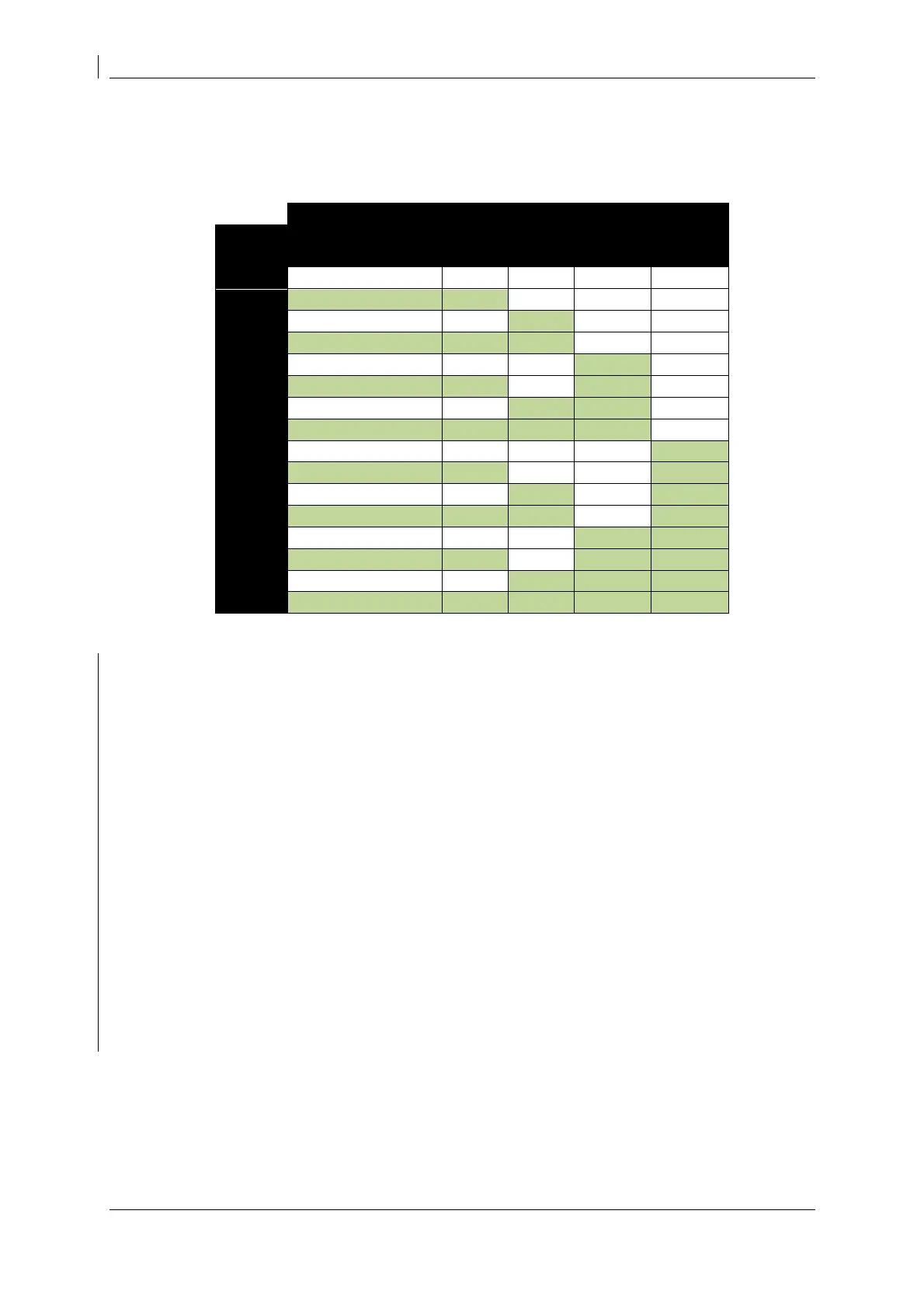
To change the address of a slave unit, throw input switches (S1 – S4) to set slave addresses 2 – 17.
Use the following table to help set the device address:
Points Switch Circuit (S1 – S4)
The address is set by holding down LOW and PROG whilst powering the board on.
Follow these steps to configure your network address. In this example we’ll set network address 3.
Power off the board.
Set toggle switch one contact OPEN (or if using the pop-on board set the top switch OFF).
Press and hold down the LOW & PROG buttons whilst applying power.
When the RED light begins to flash, release the buttons.
You can check the address is programmed with this procedure:
Power off the board.
Power ON the board.
Both LEDs will flash alternately to indicate slave mode has been set.
The yellow LED will flash a number of times to indicate the board address. In this example it
should flash three times.
The board is now ready for use and will remain in this mode until you change it.
The network address will be flashed out using the YELLOW LED as the board is powered up. Count
the number of flashes to read the network address.
If a unit is moved out and back into slave mode and none of the servo switches (S1 – S4) are set, the
last programmed slave address will be used. A factory reset will return the address to the default
value of 2.


 To Next Page