MegaPoints servo controller Revision 24 April 2016
www.loolee.org Page: 5
If you are familiar with servos this section will get you up and running quickly. It is recommended
you initially hook up the board, servos and switches on a bench to become familiar with its
operation.
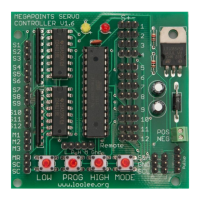
1. Connect servos to connectors on right side of board (1-12).
2. Connect switches to S1-S12 using supplied cables (left side).
3. Connect switch common to SC and memories (lower left).
4. Apply DC power to GND & +VE (lower right), yellow LED will begin to flash indicating run
mode.
5. Short press PROG button once. RED light is on to indicate programming mode. Yellow light
now flashes in groups to indicate which servo is being programmed (1-12).
6. Press and hold LOW button (bottom of board) to set servo low motion limit.
7. Press and hold HIGH to set servo high motion limit.
8. Short press PROG to advance to next servo.
9. After the 12
th
servo has been programmed the next press of the PROG button returns the
unit back to run mode.
10. Operate your switches to move the servos across the programmed movement range.
IMPORTANT: Servos operate differently from coil type points motors traditionally used in model
railway layouts. This is because servo motors are constantly powered and draw current based upon
the servo load. It is therefore important that when the servo end points are set, care is taken to
ensure the servo moves freely to each end point and does not suffer from any binding or mechanical
restriction. Ultimately the end point of the servo must be set by the electronics and not by driving a
servo under load into a mechanical limit. Over driving a servo or leaving it under constant load will
shorten the servo life and increase current drain.
Web site
Check out our web site (www.loolee.org) for instructional videos, updates, further ideas and
examples of installation.
If using the MegaPoints Servo Controller in a networked environment we suggest also reading the
Networking Guide from our web site.


 To Next Page